

What Is a Site Audit? A Guide for Restaurant Equipment Suppliers
Think of a site audit as a full diagnostic check for your restaurant equipment supply website. It’s how you make sure potential customers—from local restaurant owners to large commercial kitchen managers—can easily find your products online, browse your catalog, and make a purchase. It's a top-to-bottom inspection that looks at everything from the technical framework of your site to the experience a visitor has, flagging the critical issues that might be sending buyers to your competitors.
Understanding a Website Audit and Its Value

Your website is your company's digital showroom and its single most important marketing tool. If that showroom is hard to find online, slow to load product pages, or difficult to navigate on a phone, people will just leave. They'll click away to a competitor in seconds. A site audit is simply the process of checking every part of that digital entrance to make sure it’s welcoming, works perfectly, and is optimized for sales.
This isn’t just a quick look-over. A real audit gets under the hood and digs into the gears of your website to find those hidden problems that are quietly costing you money. For any restaurant equipment supply business, this is a non-negotiable step to find issues that hit your bottom line directly.
Connecting the Audit to Your Bottom Line
A website audit is no longer optional; it’s a standard business practice for any serious e-commerce company, including those in the restaurant equipment space. It uncovers all sorts of hidden revenue leaks, like broken quote request forms, product pages that take forever to load, or a mobile experience so bad it frustrates potential customers into leaving.
A good audit will even find the technical SEO mistakes that are keeping your business from showing up in search results when a chef is looking for a new commercial oven, making you totally invisible to buyers. It’s all about finding problems so you can fix them.
The goal here isn't to find fault—it's to find opportunities. An audit gives you a clear, actionable list of things to improve. For example, it might show you that:
- Your site is too slow. If your product category page takes more than three seconds to load, 40% of visitors are gone. They're already on a competitor's site.
- Your mobile experience is poor. Most B2B buyers now research on their phones. If your product specs are unreadable or the checkout process is clunky on a small screen, you're losing sales.
- You have broken links. A "Request a Quote" button that doesn't work is the same as having a phone line that nobody answers.
A site audit isn't just a technical report; it's a strategic blueprint for growth. It translates complex website data into a simple question: "What can we fix right now to get more customers and sales?"
By finding and fixing these issues one by one, you make the entire customer journey smoother. You won't just see your product pages rank higher in searches; you'll see a real increase in online sales and quote requests. If you want to dive deeper into the nuts and bolts, you can learn how to do a website audit that brings in actual business.
A well-oiled website is a key ingredient for any successful restaurant equipment supplier. For more specific tips, our local SEO checklist can give you even more targeted ideas to work on.
https://restaurantequipmentseo.com/blogs/restaurant-equipment-seo-blog/local-seo-checklist
The Core Components of a Website Audit
To really figure out what’s going on with your website, you can’t just glance at one thing. A proper site audit is more like a full-scale inventory check—you have to inspect the warehouse, review the sales floor, and see what your customers are saying about you. Each part looks at a different piece of your online presence, and only when you put them together do you get the full picture.
Breaking it down like this makes the whole process much less intimidating. Instead of staring at one massive, overwhelming task, we can tackle it in four distinct chunks. Each area answers a very specific question about how well your site is working for both search engines and the actual people you want to sell to.
Technical SEO Audit
Think of a technical SEO audit as checking your online store’s foundation, plumbing, and wiring. It’s all the mission-critical stuff happening behind the scenes. Your customers will never see it, but they absolutely depend on it for a good experience. This part of the audit makes sure search engines like Google can crawl, understand, and index your website without hitting dead ends or confusing errors.
We’re on the hunt for issues like:
- Slow Page Speed: If your product pages take forever to load, impatient buyers will just go somewhere else. Simple as that.
- Broken Links: A link to a specific commercial refrigerator model that doesn't work is a sale walking right out the door.
- Mobile-Friendliness: Most of your customers are looking you up on their phones. If your site is a mess on mobile, you’ve got a major problem.
Content Audit
Next up, the content audit. This is like evaluating every product description, spec sheet, and blog post on your site. Is the information accurate and helpful? Are your product descriptions persuasive? Do your blog posts about choosing the right equipment actually answer the questions your customers have?
A content audit asks the most important question of all: "Does our content actually help a potential buyer choose us?" It's about making sure every word and every picture on your site is pulling its weight to drive sales.
The main goal here is to find content that’s stale, unhelpful, or just plain not doing its job. For a restaurant equipment supplier, that means checking if product descriptions are accurate and if blog posts about commercial charbroilers answer the real questions chefs and managers are asking.
Backlink Audit
A backlink audit is all about gauging your online reputation. It’s the digital equivalent of checking your business's reviews and seeing which industry publications or partners are recommending you. Are reputable industry blogs and directories sending people your way, or is it just a bunch of low-quality, spammy sites?
This process means we analyze every single link pointing to your website from other places on the internet. A bunch of high-quality backlinks from respected sources can give your search rankings a serious boost, but a profile full of toxic links can drag you down.
Local SEO Audit
Finally, the Local SEO audit is laser-focused on making sure buyers in your service area can actually find you. Think of it as making sure your business shows up correctly on Google Maps, that your hours are right, and that your phone number is the same across all the different online directories. This is non-negotiable for any business with a physical showroom or a defined service area.
Your Step-by-Step Restaurant Equipment Website Audit Checklist
Ready to get your hands dirty? A site audit might sound intimidating, but you can make a huge difference with a simple, focused checklist. Think of it like your inventory checklist before a big shipment—it keeps you organized and ensures you don't miss the small details that impact your customers' experience.
This guide is built specifically for restaurant equipment suppliers. We’ll walk through four key areas with clear, actionable steps you can take right now. You don't need to be a tech genius to find and fix the easy stuff that might be costing you sales and leads.
This flowchart breaks down the core pieces of a site audit, starting with the technical foundation and moving up to the content and local SEO that your customers see.
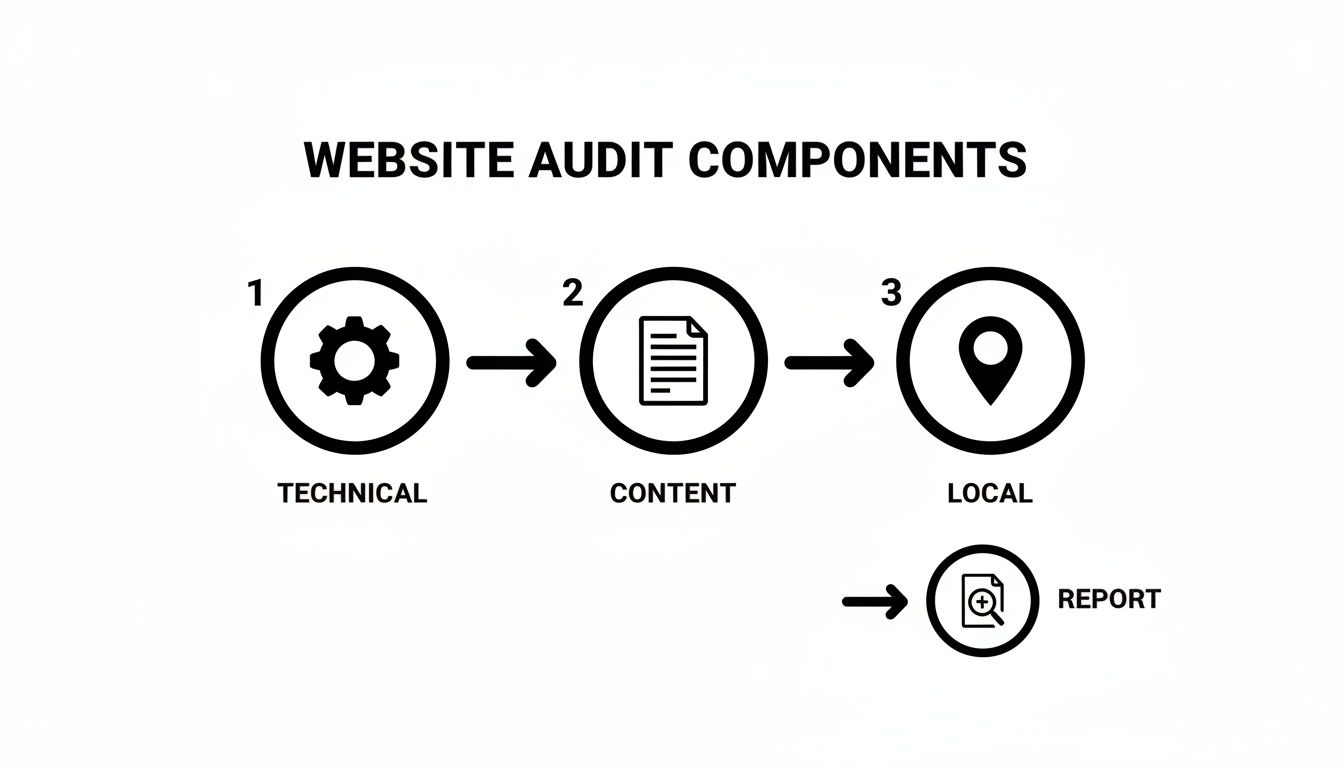
The flow here is important. A solid audit builds on itself, making sure the technical base is strong before you start judging the content and local visibility.
On-Page SEO for Your Product Pages
Let's be honest, your product pages are probably the most important pages on your entire website. They have to be perfect for both interested buyers and Google.
- Check Product Page Titles: Does the title tag for each product include the product name, brand, model number, and your company name? Something like, "Vulcan VCRH24 Commercial Charbroiler - Restaurant Supply Co." works perfectly.
- Review Product Descriptions: Are your product descriptions unique and compelling? Don't just copy and paste from the manufacturer. Use language that highlights benefits and convinces a buyer to choose that model.
-
Optimize Product Images: Great photos are non-negotiable. Make sure every image file has a descriptive name (like
vulcan-vcrh24-charbroiler.jpg) and includes alt text to help with accessibility and SEO.
Local SEO and Google Business Profile Health
For any supplier with a physical showroom or local delivery service, being found by locals is the whole game. This part of the audit makes sure your digital sign is pointing people right to your front door.
An inconsistent address or phone number online is like giving customers two different addresses for your business. It just creates confusion, kills trust, and makes it harder for search engines to recommend you.
Start with these key checks:
- Verify Your NAP Consistency: Your Name, Address, and Phone number (NAP) need to be exactly the same everywhere. That means your website, Google Business Profile, and industry directories—everywhere.
- Audit Your Google Business Profile: Is it actually complete? Double-check that your hours are correct, the website link works, and you have recent, high-quality photos of your showroom and products uploaded.
- Check for Duplicate Listings: Search for your business on Google Maps. Do multiple listings pop up? Duplicates can split your reviews and confuse customers, so you need to get them merged or removed.
Technical Performance and Mobile Speed
Think of this as the "quality control inspection" for your website. We're looking at the behind-the-scenes stuff that makes your site feel either fast and professional or slow and frustrating.
Your website’s mobile performance is critical. Most buyers are researching on their phones, and they won't wait around. In fact, 40% of users will ditch a site if it takes more than three seconds to load.
Use a free tool like Google's PageSpeed Insights to check your site's speed on mobile. Next, use an online checker to hunt for broken links. A broken "Add to Cart" button is literally a leak in your revenue stream. If you find broken links that need to be permanently rerouted, our guide on how to properly implement a 301 redirect can help you fix them without losing SEO value.
User Experience for Online Purchasing
Finally, put yourself in your customers' shoes and walk through your own website. The goal is simple: make it incredibly easy to find equipment and make a purchase or request a quote.
- Test Your Forms: Fill out your own quote request and contact forms on a computer and a smartphone. Are they a pain to use? Do you get the submission right away?
- Walk Through the Purchasing Process: Place a test order from start to finish. Is the navigation easy to follow? Can you find products and add them to the cart without any headaches? Any friction here is a guaranteed way to get abandoned carts.
Common Issues a Restaurant Equipment Website Audit Uncovers

Alright, let's move from the 'what' to the 'why.' A site audit is like turning on the lights in a warehouse you thought was organized. Suddenly, you see all the little problems that have been quietly hurting your business. For equipment suppliers, these issues can seem small, but they have a huge impact on whether a buyer picks you or the competitor.
These aren't just technical jargon; they're real roadblocks that stop a customer from requesting a quote or placing an order. Once you see what an audit usually finds, it becomes crystal clear why this process is so important for growth.
Technical Glitches That Turn Customers Away
The most common things we find are technical hiccups that directly mess up a visitor's experience. You might have amazing photos of your equipment, but if they make your product page take five seconds to load, you're losing people before they even see the specs.
Think about these all-too-common scenarios:
- Slow Page Speed: A beautiful website doesn't matter if it's slow. Did you know 40% of visitors will leave a site if it takes more than three seconds to load? Speed isn't a bonus feature anymore—it's the bare minimum.
- Poor Mobile Experience: If a customer has to pinch and zoom to read a spec sheet on their phone, they're gone. People looking for equipment on their phones want easy, and if you don't provide it, they'll find a competitor who does.
- Broken Functionality: How many potential buyers have clicked your "Add to Cart" button only to hit a 404 error page? Every broken link is a lost sale, pure and simple.
A site audit doesn't just find code errors; it finds the exact moments where your website is failing your customers. Each issue represents a real person who got frustrated and went elsewhere.
You, as the owner, might never see these problems. But for a first-time visitor, they're impossible to miss.
Local SEO Mistakes That Make You Invisible
For any business with a physical location, like a restaurant or an equipment supplier, being found locally is everything. An audit often uncovers huge mistakes in how your business shows up online, making it almost impossible for local customers to find you when they're ready to buy.
One of the worst offenders is inconsistent business information. If your Google Business Profile says you close at 5 PM, your website says 6 PM, and an industry directory has a totally different address, you're creating confusion for both customers and search engines. Google rewards businesses it can trust, and sending mixed signals is a fast way to drop in local rankings.
Another classic mistake is missing or incorrect schema markup. This is just a bit of code that helps Google understand important details like your products, hours, and location. Without it, you miss out on showing up in special search results, like product snippets, that grab a customer's attention and drive traffic. Fixing these local SEO basics is often the quickest way to see a real return from your audit.
A website audit isn’t something you do once and then forget about. Think of it like servicing the equipment you sell. If you let it slide, small issues can quickly turn into big problems that tank your search rankings and cost you real customers.
So, how often should you really be checking under the hood of your website? There's no single answer for everyone.
The right schedule really depends on your business. A small supplier with a static catalog won't have the same needs as a huge e-commerce site that’s adding new products every single month. How fierce your competition is, how often you update your content, and just how complex your site is all play a part.
Establishing a Practical Audit Cadence
Instead of locking yourself into one rigid timeline, it’s much smarter to think in tiers. This way, you can catch the most critical errors quickly without getting bogged down in constant, exhaustive analysis. It’s like having different levels of inspection for your most important business assets.
For most supplier websites, a quarterly check-up is usually enough to keep things healthy. But for bigger e-commerce operations, you need to be watching things more closely. A good rule of thumb is to do quarterly performance and SEO checks, semi-annual accessibility reviews, and a big annual review of your site's architecture and security. If you're in a really competitive space, like selling commercial kitchen equipment, this kind of constant monitoring is what stops you from leaking revenue and keeps you visible in search results. You can find out more about the best tools for website audits on vezadigital.com.
A Recommended Tiered Schedule
Having a practical schedule keeps your site in great shape without burning out your team. It’s all about balancing those deep strategic dives with regular health checks.
Here’s a simple but effective framework you can follow:
- Annual Deep-Dive Audit (Once a Year): This is your big annual inspection. It’s a comprehensive look at everything—technical SEO, content, backlinks, and local SEO. What you find here will set your strategy for the next 12 months.
- Quarterly Health Checks (Every 3 Months): Think of these as lighter reviews to monitor your key metrics. You’ll be looking for new broken links, keeping an eye on page speed, and checking in on your top-performing product pages to make sure everything is still on track.
- Continuous Monitoring (For E-commerce): If you’re selling restaurant equipment online, you can't afford for things to break. Critical errors need to be found and fixed immediately. For these sites, constantly monitoring uptime, checkout functionality, and security isn't just a good idea—it’s non-negotiable to prevent lost sales.
Turning Your Audit Findings Into a Growth Plan
An audit report by itself doesn't fix anything. Its real value comes from the action plan you build from it. A list of problems is just data; a strategic roadmap is what drives growth for your restaurant or equipment supply business.
The key is transforming those findings into a clear, prioritized plan. The goal isn't to fix everything at once. It's about tackling the most damaging issues first—the critical, revenue-leaking problems that hit your bottom line directly.
Prioritizing Your Action Items
Think of it like triaging orders in a busy warehouse. You handle the most urgent shipments first, right? For your website, this means fixing a broken online checkout system or a non-functional quote request form before you even think about minor content tweaks.
A logical order for your plan would look something like this:
- Critical Revenue Leaks: First, fix anything that stops a customer from giving you money. This means broken checkouts, incorrect phone numbers, or contact forms that just don't submit.
- High-Impact SEO Fixes: Next, address the technical issues making you invisible on Google. This could be major indexing errors or a website that’s a nightmare to use on a phone.
- Content and UX Opportunities: Finally, work on improving things like your product category pages, adding better product photography, or rewriting equipment descriptions to boost conversions.
Your site audit is not a report card of past failures. It is a blueprint for future success, turning valuable insights into measurable results like more sales leads, higher online sales, and a stronger industry reputation.
Once you have your priorities straight, the plan needs to assign responsibility and set clear deadlines. To really turn those audit findings into a growth plan, a critical step is implementing comprehensive website conversion rate optimization tactics. This makes sure the traffic you gain from all your SEO improvements actually turns into paying customers.
Ultimately, a structured action plan turns your audit from a simple document into an engine for growth. If you want to learn more about organizing these tasks, check out our guide on effective SEO project management.
Got Questions About Site Audits? We've Got Answers.
Even after you've decided a website audit is the right move, a few questions always pop up. It's totally normal. Here are the quick, straight-to-the-point answers to the questions we hear most often from equipment suppliers.
How Long Does a Website Audit Actually Take?
This really comes down to the size and complexity of your website. A quick, automated scan might spit out a report in a few hours, but a real, comprehensive audit is a whole different ballgame.
For a typical restaurant equipment supply website with a large catalog, a proper deep dive into the technical side, the content, and local SEO usually takes somewhere between one and two weeks. That's the time we need to dig in and give you a report that’s actually useful and full of actionable steps.
Should I Just Do This Myself?
You can definitely tackle a basic audit on your own. Using free tools and checklists is a great way to find the obvious stuff—think broken links or pages that take forever to load. It's perfect for knocking out that low-hanging fruit.
But when you need to get into the weeds of technical SEO, analyze your backlink profile, or figure out what your competitors are doing right, it’s time to call in a pro. An expert brings advanced tools and, more importantly, the experience to spot critical issues that a DIY audit will almost always miss.
Okay, I Have the Audit. What Do I Fix First?
Always, always start with the problems that are actively costing you customers and money. We call these "revenue leaks," and they need to be plugged immediately.
Start with the problems that have the biggest and most immediate impact on your bottom line. Fixing a broken online checkout will always be more important than tweaking a blog post.
This means things like a busted online ordering system, a quote request form that doesn't work, the wrong phone number listed on your site, or a terrible mobile experience that’s making people give up and go somewhere else.
A high-performing website is just as crucial as the equipment in your kitchen. Charbroilers.com provides top-tier commercial charbroilers to ensure your menu stands out. Explore our selection to find the perfect model for your restaurant.