

Boost Your Restaurant Equipment Supply Website with Schema Markup for Local Business
Think of schema markup as a secret translator for your website. It's a bit of code that speaks directly to search engines, turning your key business info—like your hours, address, and product categories—into a language Google understands instantly. This helps your restaurant equipment supply website pop up with all the right details right in the search results.
Why Schema Is Your Secret Ingredient for Local SEO
Imagine your website is a detailed product catalog. Without schema, Google has to guess the specifications and purpose of each item. Schema markup is like a perfectly organized spec sheet, clearly labeling your location, contact number, hours, and the types of equipment you supply. This way, Google knows exactly what your business offers.
This kind of clarity is a game-changer for any B2B supply company.
When a restaurant owner searches for "commercial refrigerators near me," Google’s job is to deliver the most accurate, helpful answer. A website with solid schema markup hands Google all those critical details on a silver platter, making it much more confident in recommending you over the competition.
Turning Code into Customers
The real magic happens when schema transforms your standard, boring search result into a rich, interactive snippet. These enhanced listings are way more engaging and give potential buyers the answers they need on the spot. For any local business, this is a core part of dominating local maps SEO.
Here’s what that actually looks like:
- Star Ratings: Your average customer rating shows up right under your name, building immediate trust.
- Business Hours: Searchers can instantly see if you're open, which removes a huge barrier.
- Direct Actions: You can add links to specific product categories or a contact page, encouraging people to take the next step.
This isn't just a cosmetic tweak; it's a powerful tool for getting more customers. Rich results powered by schema markup capture an impressive 58% of all user clicks, blowing past the 41% for standard, non-rich results. For a deeper dive into these enhanced listings, check out our guide on what are SERP features.
To help you get a quick handle on what's most important, here's a breakdown of the key properties and why they matter for your restaurant equipment supply website.
Key LocalBusiness Schema Properties and Their Impact
This table gives you a quick-glance summary of the most crucial schema properties and why each one helps attract more buyers.
| Schema Property | What It Tells Google | Why It Matters for Your Business |
|---|---|---|
name |
Your official business name. | Ensures brand consistency and helps customers find you by name. |
address |
Your physical street address or showroom. | Absolutely critical for local map pack rankings and "near me" searches. |
telephone |
Your main phone number. | Allows for click-to-call functionality, making it easy for mobile users to contact you. |
openingHours |
Your daily hours of operation. | Tells customers when you're open, preventing wasted trips and frustration. |
department |
The types of products you sell (e.g., Refrigeration, Cooking Equipment). | Helps you show up for specific searches like "best commercial ovens in Austin." |
url |
A direct link to your website. | Gives potential buyers the info they need to decide, leading to more inquiries. |
aggregateRating |
Your average customer rating and total reviews. | Displays star ratings in search, building instant social proof and trust. |
Getting these properties right is the foundation of a strong local SEO strategy. They directly feed Google the information it needs to feature your business prominently.
The Undeniable Impact on Clicks
The data doesn't lie. Websites that use schema correctly see a real boost in their click-through rates (CTR). This happens because those rich snippets make your listing stand out on a crowded search results page.
You’re essentially answering a searcher’s questions before they even click on your site. This direct impact on user behavior is why getting a handle on schema is no longer just a nice-to-have for restaurant equipment suppliers—it's essential for winning your local market.
How to Build Your Local Schema in JSON-LD
Alright, it’s time to roll up our sleeves and actually build your schema. Don't let the code intimidate you; we're using JSON-LD, which is surprisingly straightforward. Think of it less like coding and more like filling out a super-detailed form about your business that only search engines can read.
Our goal here is to put together a complete script that tells Google everything it needs to know. This is what turns a standard search result into a rich, informative listing that pulls customers in. We’ll start with the absolute essentials and then layer on the details that really make a B2B supplier stand out.
Start With the Foundation: Your Core Business Details
Every local business schema begins with the basics. These are the non-negotiable details that form the bedrock of your online identity. Getting these right is non-negotiable—they're the first thing Google looks for to confirm who you are, what you do, and where you are.
These core properties must match your Google Business Profile and other online listings perfectly. Any little inconsistency can confuse search engines and seriously weaken your local SEO. This consistency is the whole point of effective local citation building—creating a single, unified presence across the web. To get a better handle on this, you can dig into the specifics of how local citation building works.
Let's walk through this using a fictional example, a company we'll call "ProKitchen Supply Co."
Here's what the initial JSON-LD script looks like with just the bare-bones essentials:
Let's quickly break that down:
-
@type: We’ve specified "Store" right away. This is more specific than the generic "LocalBusiness" and is perfect for a supplier. -
name: This is your business's official name. It needs to be an exact match to what’s on your Google Business Profile. -
address: This is a "nested" property containing your full physical address. Accuracy is everything here, especially for getting into the map pack. -
telephone: Your main business phone number, complete with the country code.
Don't Forget Your Hours of Operation
Next up, we need to tell people when you're actually open. The openingHours property is a game-changer because it directly powers the "Open" or "Closed" tag that shows up in search results. For a busy restaurant manager, that little tag can be the final deciding factor.
The format might look a bit technical at first glance, but it's pretty logical. You just list out each day of the week with its opening and closing times in a 24-hour format (so 5:00 PM becomes "17:00").
Let's add the hours for ProKitchen Supply Co., which is open from Monday to Friday.
"openingHours": [ "Mo-Fr 09:00-17:00" ]
This clean, simple format is exactly what search engines need to parse your hours correctly. No more guesswork for your customers.
Flesh Out the Business Details
With the basics locked in, we can now add the specifics—the details that are unique to equipment suppliers. These are the properties that help you show up for more specific searches, like "commercial ice machines with warranty." This is where schema really starts to do the heavy lifting for your business.
We're going to add a few key properties:
-
department: What kind of products do you sell? Be specific—"Commercial Refrigeration," "Cooking Equipment," "Food Prep Supplies." -
priceRange: This gives people a quick idea of your price point. It's usually shown with dollar signs, from$(inexpensive) to$$$$(high-end). -
url: A direct link to your website's homepage. -
image: A link to your company logo.
Getting these details right is what separates a good listing from a great one. The core properties are the foundation, but supplier-specific details like
departmentare what help you cut through the noise and stand out from your competitors.
Let's plug these new details into our growing script for ProKitchen Supply Co.
"department": [ { "@type": "DepartmentStore", "name": "Commercial Refrigeration" }, { "@type": "DepartmentStore", "name": "Cooking Equipment" } ], "priceRange": "$$$", "url": "https://www.prokitchensupply.com", "image": "https://www.prokitchensupply.com/logo.jpg"

Just by adding these lines, you've answered some of the most common questions potential customers have before they even click. That makes your search listing incredibly helpful and much more compelling.
The Complete Schema Markup Template
Okay, let's put it all together. Here is the finished, ready-to-use JSON-LD script for "ProKitchen Supply Co." You can copy this and use it as a template for your own restaurant equipment supply website. Just swap out the example info with your own.
With this complete script, you've successfully translated your essential business information into a language that Google loves. You’ve taken a simple listing and turned it into a rich snapshot of your business, ready to attract new B2B customers right from the search results page.
Implementing and Validating Your Schema Markup
Alright, you’ve built your JSON-LD script. Now for the final lap: getting it onto your website and making sure it actually works. This part might sound a little technical, but most modern website platforms make it surprisingly straightforward.
Putting the code in the right place and running a quick test is crucial. It's how you ensure Google can read all your hard work and use it to give your business a leg up in search results. Think of it as handing a perfectly written spec sheet to an engineer—your schema is the spec sheet, and Google is the engineer. You just need to place it where they'll see it.
This diagram breaks down how LocalBusiness schema is structured, starting with the business basics and layering on the specific details that get customers in the door.
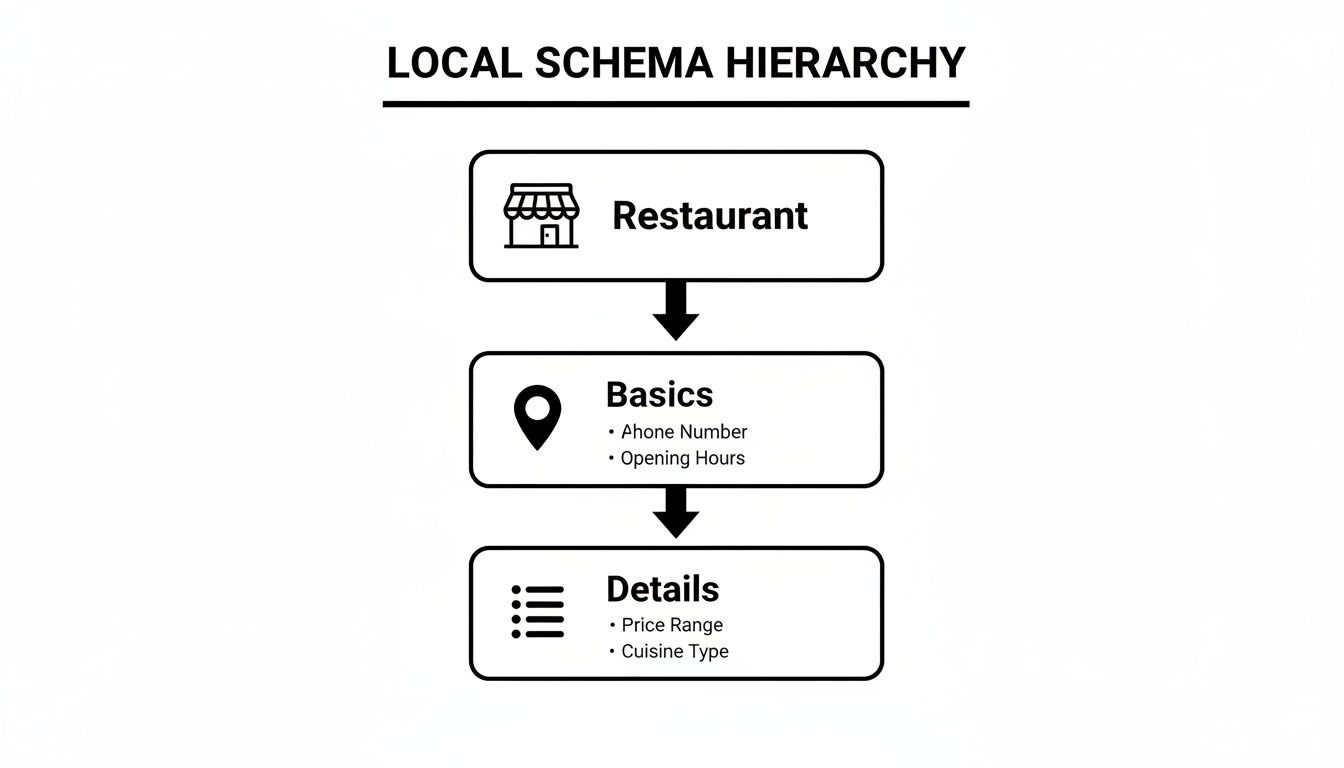
As you can see, the core LocalBusiness properties are the foundation. Then, supplier-specific details like department add the context that really matters to buyers.
Placing Your Schema Code on Your Website
Your goal is to get the entire <script type="application/ld+json">...</script> block into the <head> section of your site’s HTML. This is the standard, cleanest way to do it. The good news? You almost certainly don't need to be a developer to pull this off.
Here are the most common ways to get it done:
- Using an SEO Plugin (WordPress): If your site is on WordPress, plugins like Yoast SEO or Rank Math are your best friends. They usually have a spot for custom code or header/footer scripts where you can just paste your JSON-LD. This is easily the simplest and safest route for most people.
- Theme Options: Many modern themes, no matter the platform, have a built-in feature to add custom code to the header. Poke around your theme's settings for labels like "Code Injection," "Custom Scripts," or something similar.
- Google Tag Manager (GTM): For those more comfortable with marketing tools, GTM is a fantastic way to deploy schema. You can create a new "Custom HTML" tag, drop in your script, and set it to fire on the specific pages where it applies, like your homepage.
My Two Cents: While you can add schema to every page, a good starting point is to place your main
StoreorLocalBusinessschema on your homepage. If you have multiple locations, each one needs its own dedicated page with its own uniqueLocalBusinessschema. Consistency is everything here.
Testing and Validating Your Markup
Once the code is live, you have to test it. I mean it. Never assume it's working. A single misplaced comma or a forgotten bracket can make the entire script invisible to Google.
Luckily, Google gives us free and powerful tools for this exact job.
Your go-to resources are:
- The Rich Results Test: This is your main tool. It tells you straight up if your page is eligible for Google's rich results (like star ratings in the search results). It will show you exactly what schema it found and if it's valid.
- The Schema Markup Validator: This is a bit more technical. It validates all schema.org markup on a page, not just the types that create rich results. It's excellent for debugging and making sure your syntax is 100% correct.
When you run the test, this is what you want to see—Google's Rich Results Test giving you the green light on your schema. A successful test confirms Google can find and understand the data you've added.
Diagnosing and Fixing Common Errors
So, what happens if the test comes back with errors or warnings? Don't panic. The tools are designed to help you fix things, not just point out flaws. They will highlight the exact line of code with the problem and give you a hint about what’s wrong.
From my experience, the culprits are usually pretty simple:
- A missing comma after a property (but remember, not after the very last one!).
- An extra comma hanging at the end of a list.
- Forgetting to close a bracket
{}or a quote"". - Using a URL that isn't a complete, valid link (it needs the
https://).
The validator will flag these syntax errors right away. To get a second opinion and ensure your code is perfectly formatted, you can also run it through other JSON reader online tools. After you fix the error in your code, just update it on your site and run the test again.
Once you get that sweet, sweet "Page is eligible for rich results" message, you’re golden. You’ve officially implemented and validated your schema markup. Just make sure this information perfectly matches your other online profiles, which is a huge part of how to get a Google Business listing that dominates local search.
Advanced Schema Tactics to Outrank Your Competitors
Once you have your basic LocalBusiness schema locked in, it's time to add layers that will really make you stand out. The foundational schema gets you in the game, but the advanced stuff is what helps you win. We're moving beyond just listing your address and hours. This is about building a rich, interconnected data profile that Google can use to create search results that B2B buyers can't ignore.
By nesting different schema types and using more specialized markups, you give search engines a much deeper, more nuanced understanding of what you offer. This helps you claim more digital real estate in the search results and gives potential customers compelling reasons to choose your company over the one down the street.
Nesting Schema for a Richer Profile
One of the most powerful strategies you can use is nesting, which is just a fancy way of saying you're embedding one schema type inside another. Instead of having a bunch of separate markups, you can place relevant schema types directly inside your main LocalBusiness schema. This creates a single, comprehensive block of data that’s far more valuable to search engines.
For an equipment supplier, this is a golden opportunity. You can embed customer Review data or even Product schema for your top-selling items right into your main markup.
Think about it from a customer's perspective. When they search for suppliers, Google doesn't just see your name and address. With nested schema, it sees your 4.8-star rating from 150 reviews and specific product details like model numbers and pricing, all understood in perfect context. That’s a much more robust and appealing search snippet.
Using Specialized Schema for Engagement
Beyond nesting, you can get even more tactical by using standalone, specialized schema types on different pages of your website. This is where you can get creative and directly market your unique offerings to a very specific audience. These tactics help you show up for more specific, long-tail search queries that high-intent customers are using.
Some of the most effective types for a supplier include:
-
ProductSchema: This is essential for your product pages. Mark up individual items with details likebrand,model,price, andavailability. This can make your products eligible for rich results, including images and pricing directly in search. -
FAQPageSchema: Your "Contact" or product pages probably answer common questions already. By marking them up withFAQPageschema, you can get those Q&As to appear in a dropdown format in the search results. This is fantastic for addressing questions about shipping, warranties, or installation before a customer even clicks through to your site. -
OfferSchema: Got a seasonal sale, a bundle deal, or a clearance event? TheOfferschema is designed to highlight these promotions. You can specify the price, the valid dates, and a description of the deal, making it highly visible to buyers looking for a great value.
By combining your core
LocalBusinessschema with these specialized markups, you build a comprehensive web of structured data. This not only improves your eligibility for rich results but also establishes your business as a well-defined, authoritative entity in Google's eyes.
A Practical Example of Advanced Markup
Let's look at how this all comes together. You could have your main LocalBusiness schema on your homepage, setting the foundation. Then, on your product category pages, you'd add Product schema for your featured equipment. On your blog or resources page, you could use Article schema for your expert guides.
This multi-faceted approach ensures that no matter what a potential customer is looking for—your location, your product catalog, or expert advice—you've provided the structured data needed for Google to deliver the most helpful result possible. This is how you transform schema markup for a local business from a simple technical task into a powerful marketing strategy.
Avoiding Common Schema Mistakes That Hurt Rankings
Putting schema on your site is a huge win, but one tiny error can render the whole script useless. Worse, it can send confusing signals to search engines. The whole point of using schema markup for a local business is to provide crystal-clear information, so dodging the common pitfalls is just as important as writing the code in the first place.
These mistakes are surprisingly easy to make, but thankfully, they're also straightforward to fix once you know what to look for.
Think of your schema as an official declaration to Google. If that declaration contradicts what your website or Google Business Profile says, it creates distrust. This is your troubleshooting guide to make sure all your hard work pays off.
The Cardinal Sin of Mismatched Information
The absolute most critical error is having inconsistencies between your schema markup and your Google Business Profile (GBP). Your Name, Address, and Phone number (NAP) must be an exact match. I mean exact.
Even a seemingly minor difference, like "St." versus "Street" or including a suite number in one place but not the other, can create problems.
Google uses this data to verify your business’s identity. When the information doesn't line up, it chips away at Google's confidence in your listing, which can directly tank your local search rankings.
Run through this quick checklist:
- Business Name: Is it identical to your GBP listing, down to the "LLC" or "Inc."?
- Address: Does every line of the address match perfectly, including abbreviations and formatting?
- Phone Number: Is the format—including the country code and area code—exactly the same?
- Operating Hours: Do the hours in your schema reflect the exact hours listed on your GBP profile?
Mismatched information is a major red flag for search engines. It creates ambiguity and forces them to guess which source is correct. Always treat your Google Business Profile as the single source of truth and ensure your schema markup mirrors it perfectly.
Formatting Fumbles and Property Misuse
Beyond NAP consistency, a few technical slip-ups can easily break your schema. These are often simple syntax errors that the validation tools we've talked about will catch, but it helps to know what they look like ahead of time.
A frequent problem area is the openingHours property. The format has to be precise, using the two-letter day abbreviation (like Mo, Tu, We) and the 24-hour clock format (HH:mm). A common mistake is using "5 PM" instead of "17:00," which will cause the schema to fail validation.
Another classic issue is stuffing the wrong information into a property. For instance, putting a blog post URL in the product property instead of a direct link to a product page. It might seem small, but using the most specific property available gives search engines the clearest context.
Let's break down some of the most common errors I see and how to fix them.
Troubleshooting Common Schema Errors
Here's a quick reference table for some of the mistakes that pop up all the time when I'm auditing B2B websites.
| Common Error | Why It's a Problem | How to Fix It (Code Example) |
|---|---|---|
| Incorrect Hour Format | Search engines can't parse AM/PM times in the openingHours property, making the data useless. |
"openingHours": ["Mo-Fr 09:00-17:00"] |
| GBP Name Mismatch | A name like "ProKitchen Supply" in schema vs. "ProKitchen Supply Co." on GBP creates a direct conflict. | "name": "ProKitchen Supply Co." |
| Wrong Property Usage | Placing a general URL in a specific field like productID dilutes the value and context of the markup. |
"sku": "123-ABC-789" |
| Missing Commas | A forgotten comma between properties breaks the JSON-LD syntax, invalidating the entire script. | Ensure every property (except the last one in a block) ends with a comma. |
These types of errors are incredibly common, so don't feel bad if you make them.
Just be sure to carefully proofread your script and run it through Google's Rich Results Test before it goes live. That one extra step can help you catch these issues and ensure your schema is clean, accurate, and ready to give your rankings a real boost.
Common Questions About Local Business Schema
Once you start digging into schema markup, a few questions almost always pop up. It's totally normal. Getting these details right is what separates a decent implementation from one that really moves the needle for your business.
Let's clear up some of the most common points of confusion we see.
What's the Difference Between LocalBusiness and More Specific Schema Types?
Think of LocalBusiness as the big, general bucket for any company with a physical address. But more specific types like Store, ProfessionalService, or even AutomotiveBusiness are much more powerful tools designed for specific industries.
Sure, you could just use the generic LocalBusiness type, but you'd be leaving a ton of value on the table. Choosing a more specific subtype lets you define details that your target customers are actively searching for. For a restaurant equipment supplier, Store is a great choice because it allows for properties like:
-
department: What categories of products do you sell? "Refrigeration," "Ovens." -
paymentAccepted: List the payment methods you take. -
priceRange: Give a general idea of your pricing.
Using a more specific schema type gives search engines a crystal-clear picture of what you offer. This precision helps you appear in more relevant searches and can earn you those rich, detailed results that grab a buyer's attention.
How Long Does It Take for Rich Results to Show Up?
This is the million-dollar question, and the honest answer is: it varies. After you’ve added the schema to your site, Google has to find it by re-crawling and re-indexing your pages. That process alone can take anywhere from a few days to a few weeks.
It's critical to remember that schema makes you eligible for rich results—it doesn't guarantee them. Google’s algorithms have the final say, and they consider things like your content quality, relevance to the search, and a host of other ranking signals.
Can I Add Schema Markup if I'm Not a Coder?
Absolutely. You don't need to be a developer to get this done. While schema is technically code, plenty of tools have made it super accessible for non-technical folks.
Many of the SEO plugins you might already be using for WordPress, like Yoast SEO or Rank Math, can handle a lot of this for you automatically. You can also use free online schema generators to build the JSON-LD code yourself. From there, it's usually just a simple copy-and-paste job into your website's header, which most modern themes make pretty straightforward.
Does My Schema Have to Match My Google Business Profile Exactly?
Yes, 100%. This one is non-negotiable. The name, address, and phone number (NAP) in your schema markup must be an exact, character-for-character match with what’s on your Google Business Profile. The same goes for your hours of operation.
Even a tiny difference—like "St." in one spot and "Street" in another—sends a mixed signal to search engines. That kind of inconsistency can erode Google's trust in your information and ultimately hurt your local search rankings. Think of it as your digital ID card; if the details don't match up everywhere, it looks suspicious. Consistency is the bedrock of trust with Google.
At Restaurant Equipment SEO, we know that standing out online is just as important as the quality of the equipment you sell. Our specialized services—from local citation building and SEO to expert blog posting, copyrighting, and article writing—are designed for restaurant equipment supply websites like yours. We help you connect with restaurant owners and chefs actively searching for the products you offer. Visit our blog to learn more about how to dominate your niche online.