
How to Optimize Your Google Business Profile for Restaurant Equipment Supply Websites
Optimizing your Google Business Profile really boils down to a simple formula: fill out every single section with accurate details, add high-quality, professional photos of your equipment, and consistently engage with your customers. That means jumping on reviews and answering questions.
Do this, and you'll transform your free listing from a static directory page into a powerful machine that actively pulls in local restaurants and contractors looking for their next purchase.
Why Your GBP Is Your Business's Digital Showroom
Picture this: a restaurant owner pulls out their phone and searches for 'commercial oven supplier near me.' What they see in the first three seconds will determine if they choose your business or the one down the street.
Your Google Business Profile (GBP) isn't just another box to check on your marketing list. It's the most critical piece of your online real estate—your digital welcome mat. Think of it as the modern version of your physical storefront, and it’s often the very first impression a potential client will have of you.
This guide isn't about just running through a generic checklist. We want to show you how a fully optimized profile drives real-world results, turning online searches into actual leads and ringing your register. The ROI for the time you put in here is massive, especially for a restaurant equipment supply website.
A strong, well-maintained profile leads directly to:
- Higher Local Rankings: When someone searches for a type of equipment you sell in the area, a properly optimized profile is your ticket to appearing in that coveted "Map Pack" right at the top of the search results.
- More Direct Leads and Sales: By making it dead simple for customers to find your product catalog, call for a quote, or get directions to your showroom, you create a smooth, frictionless path from discovery to a sale.
- More Foot Traffic: At the end of the day, every photo you upload, every review you respond to, and every update to your hours is another little nudge convincing a potential customer that your supply company is the right choice for them.
The Core Pillars of a Winning Profile
To truly get a handle on your GBP, you need to focus on three core pillars that all work together.
First up is accuracy. This is non-negotiable. Your name, address, phone number (we call this NAP), and your hours have to be perfect, everywhere, every time.
The second pillar is visual appeal. This is especially true for equipment suppliers. People want to see the quality of the products you offer, so high-quality photos and videos aren't just a "nice to have"—they're a must.
Finally, the third pillar is customer engagement. Responding to reviews (both good and bad!), answering questions in the Q&A section, and using Google Posts all send powerful signals to both customers and Google that you're an active, attentive business that cares.
This guide will give you actionable steps for each of these areas, helping you build a profile that works as one of your most profitable digital assets. For a broader view of how this fits into your overall marketing, you can check out our complete local SEO checklist for restaurants. Our expertise in local citation services and blogger outreach can further amplify these efforts.
Before you can dream about snapping professional photos of your latest inventory, you’ve got to lay the groundwork. This initial setup is the absolute bedrock of your local SEO. Get this part right, and every other effort you make will actually pay off. It all begins with claiming, verifying, and filling out your profile with obsessive accuracy.
First things first: you need to have full control over your listing. If you’ve been around for a while, a profile probably already exists out there. Your job is to claim it and go through the verification process, which is how you prove to Google you're the real owner. If you're starting from scratch, our guide on how to get a Google Business listing will walk you through creating one.
Nailing this isn't just a "nice-to-have"—it's how you get seen. A complete and verified Google Business Profile gives you a massive boost in local search. The numbers don't lie: fully fleshed-out profiles show up in search results about 80% more often. They also pull in roughly 4× as many website clicks, 12% more calls, and 10% more direction requests compared to half-finished ones.
This whole process is about shortening the distance between a searching buyer and a paying customer.
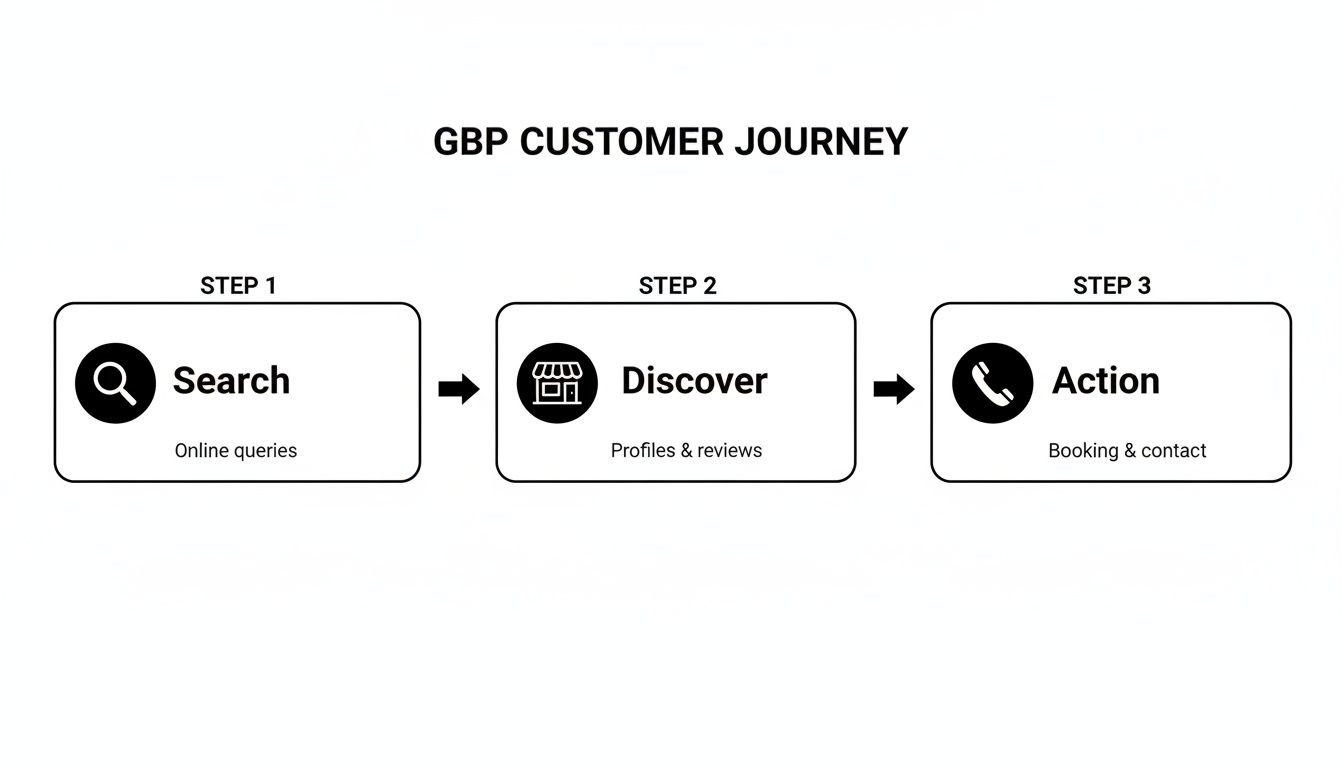
As you can see, a solid foundation makes it incredibly simple for someone to find you and take action, all without ever leaving Google.
Get Your Core Information Dialed In
Your basic business info is the first thing both Google and your potential customers see. Inaccuracies here don't just look sloppy; they actively hurt your ranking. The goal is to be crystal clear and perfectly consistent.
This checklist covers the non-negotiable fields you need to complete right away. Think of it as your GBP launchpad.
| Profile Section | What to Do | Pro Tip |
|---|---|---|
| Business Name | Enter your official, registered business name exactly as it appears on your signage. | No keyword stuffing! Don't add your city or "best restaurant supply" to your name. Google will penalize you for it. |
| Address | Use your precise, physical location. If you're a delivery-only or online business, follow Google's specific guidelines. | Make sure the address format (St. vs. Street, Suite vs. Ste.) is identical everywhere online. Consistency is key for local SEO. |
| Phone Number | Provide your primary, local business phone number. | Use a number with a local area code. It’s a small but powerful local ranking signal. |
| Website | Link directly to your website's homepage. | Use a UTM-tagged URL to track how many clicks your GBP is sending to your site. |
| Business Hours | Be meticulous. Update for holidays, special events, or any changes in your schedule. | Google rewards accuracy. Regularly confirm your hours in the GBP dashboard to show you're on top of things. |
Completing this table is just the start, but it builds the trust and consistency Google's algorithm loves to see.
Why NAP Consistency Is a Deal-Breaker
One of the most powerful signals you can send to Google is consistency. Your NAP (Name, Address, Phone Number) must be a perfect match across your entire online presence—your website, social media, Yelp, industry directories, everywhere. This is a core part of our local citation services.
Even tiny differences, like using "St." on your GBP but "Street" on your Facebook page, can confuse Google's algorithm. This confusion chips away at the trust factor and can drag down your local ranking. You're trying to build a consistent digital identity that both search engines and customers can rely on.
Pro Tip: Do a quick Google search for your business's name and scan the top results. Does every listing show the exact same NAP? If you spot any discrepancies, make it your mission to hunt them down and update them to match your GBP.
Your Primary Category Is Everything
Choosing your business category is easily one of the most critical decisions for your profile. This is no time for broad strokes. Simply picking "Store" is a huge missed opportunity.
You have to get specific. Are you a "Restaurant Supply Store," a "Commercial Kitchen Equipment Supplier," or an "Appliance Store"? This one choice tells Google exactly what you are and which searches you deserve to rank for. A restaurateur searching for "commercial refrigerators near me" is way more likely to find a "Restaurant Supply Store" than a generic "Store."
Once your primary category is locked in, you can add secondary ones. For example, that supply store with a robust repair department could add "Appliance Repair Service" as a secondary category. This helps you show up for more searches without watering down the impact of your main choice.
Go Beyond the Basics with Service Areas and Attributes
If you offer delivery or on-site installation, you need to define your service areas. Don't just rely on your physical address. Spell out the specific cities, zip codes, or counties you serve. This is how you show up in "near me" searches for customers who are in your delivery zone but not right next door.
Finally, take a deep dive into Attributes. This feature is your golden ticket to answering customer questions before they even think to ask them. It's a simple checklist in your GBP dashboard where you can tag all the little things that make your business special.
- Offerings: Do you offer online estimates, repair services, or on-site services?
- Amenities: Is your showroom wheelchair accessible? Is there free Wi-Fi for customers waiting for service?
- Crowd: Is your business LGBTQ+ friendly or a trans-inclusive safe space?
Every attribute you check acts like a filter, connecting you with the right buyers. That contractor looking for a supplier with on-site services or the new restaurant owner needing an online estimate can find you specifically because you took two minutes to check the right boxes. And once they find you, you'll want to make a great first impression, which is why a business needs professional photos to seal the deal.
Crafting a Visually Irresistible Equipment Supplier Profile
For restaurant equipment suppliers, the old saying "customers eat with their eyes first" has a different meaning: they buy with their eyes. A potential buyer's journey to your showroom almost always starts online, and your Google Business Profile is your main showcase. This is where you move beyond just listing your hours and start creating a desire to purchase—crafting a first impression that's impossible to ignore.
It's time to transform that static listing into a vibrant, visual catalog. This isn't just about snapping a few pictures; it's about telling your brand's story through carefully chosen images and videos that make a restaurant owner feel confident in your products.
Building Your Essential Photo Library
Your photo gallery is the heart of your profile's visual appeal. A sparse, outdated, or low-quality collection can actively turn customers away. To truly figure out how to optimize google business profile visuals, you need a plan. Think of it like creating a shot list before a professional photoshoot.
Your goal is to give people a comprehensive peek at what makes your business special. A complete photo library should cover these key areas:
- High-Quality Product Photos: These are your headliners. Seriously, invest in professional, well-lit photos of your key equipment lines. Capture the gleaming stainless steel and the robust construction of your top sellers.
- Inviting Showroom Shots: Show off your space. Get wide shots of your showroom when it’s clean and perfectly lit, but also grab close-ups of specific product displays or your customer service desk.
- Appealing Exterior Photos: Help people find you. A clear shot of your storefront, especially one showing your logo and any available parking, is absolutely essential.
- Behind-the-Scenes Action: Humanize your brand. Candid shots of your team helping a customer, technicians making a repair, or your delivery trucks heading out build a real connection.
- Customer-Centric Content: Encourage happy clients to share their own photos of your equipment in their kitchens! User-generated content is authentic social proof that resonates powerfully with potential buyers.
The impact of a rich visual library is backed by hard data. Profiles with extensive photo galleries and numerous reviews significantly outperform sparse listings. Industry analyses show that businesses with over 250 images rank markedly higher in local search, with each GBP driving an average of about 200 clicks per month. To see a real uplift, aim for concrete targets like uploading over 100 relevant images to materially increase clicks, calls, and direction requests from your profile. You can discover more insights about these GBP statistics from Birdeye.
The Power of Video on Your Profile
While photos are the foundation, video can take your profile to the next level. Short, engaging videos grab attention in a way that static images just can't. They offer a dynamic, immersive glimpse into the quality and function of your products.
Think about creating short clips that showcase different parts of your business. A quick 30-second video tour of your showroom gives a much better sense of your inventory than photos alone. A product demonstration featuring a popular oven or mixer adds personality and authority. You could even create a simple, high-quality video showing equipment being installed in a client's kitchen to build anticipation and trust.
Google Posts: Your Digital Sales Flyer
Think of Google Posts as your business's weekly sales flyer, broadcast directly on the search results page. This feature is one of the most underused yet powerful tools for keeping your profile fresh, active, and engaging. It’s a direct line to your audience, perfect for time-sensitive announcements and promotions.
Regularly creating posts signals to Google that your business is active, which can positively impact your local rankings. It also gives searchers a compelling reason to click on your profile. A well-crafted post can be the final nudge a customer needs to choose you over a competitor down the street. Our blog posting services specialize in creating exactly this kind of engaging content.
Creating Compelling Google Posts
To make your Google Posts work, they need to be timely, visually appealing, and have a clear call to action. Don't just post for the sake of posting—have a purpose behind each one.
Here are some proven ideas for equipment supplier posts:
- Spotlight a New Product: "Our new line of energy-efficient convection ovens is here! Built for high-volume kitchens. Come see a demo in our showroom. Get directions now!"
- Promote a Special Offer: "This month only! Get 10% off all commercial refrigeration units. This offer is only good through the end of the month, so don't miss out. Browse inventory online!"
- Announce a Special Event: "Join us for our Annual Demo Day on October 15th! See the latest tech from top brands and enjoy exclusive event-only pricing. Learn more on our website."
- Share a Positive Review: "We love hearing from our amazing customers! Thanks, Chef Marco, for the wonderful review. We're so glad the new mixer is working out. See what others are saying!"
A consistent posting schedule keeps your audience engaged. Aim to publish a new post at least once a week. This rhythm ensures your profile always has fresh content and shows both Google and your customers that you're on top of your game.
Your Google Business Profile isn't just a static listing; it's a dynamic, two-way street for communication. Mastering its interactive features is how you build immense trust and social proof, turning passive searchers into loyal customers.
This is where your profile evolves from a simple information hub into an active engagement platform. The good news? Google rewards businesses that use it well.
Let's dive into the tools that connect you directly with your buyers—reviews, questions, and messages. Consistent responsiveness here isn't just good service; it's a powerful signal to search engines that your business is active, authoritative, and deserving of a top spot in local results.
Master the Art of Review Management
Reviews are the lifeblood of your local reputation. Think about it—they’re a huge ranking factor and often the final piece of information a potential buyer checks before deciding where to purchase from. Managing them effectively means both encouraging new reviews and responding thoughtfully to every single one you get.
A steady flow of recent, positive reviews tells Google your business is relevant and popular. But it's your responses that truly show your character and commitment to customer service.
Responding to Glowing Praise
When a customer leaves a fantastic 5-star review, your response needs to be more than a generic "Thank you!" This is your chance to reinforce that positive experience and add a personal touch. A great response makes that happy customer feel heard and shows potential customers what you're all about.
Example Positive Review Response:
"Thank you so much for the wonderful feedback, Sarah! We're thrilled to hear you're happy with the new walk-in cooler—our installation team takes great pride in their work. We look forward to serving your restaurant's needs again soon!"
This response nails it. Here’s why:
- It uses the customer's name, making it personal.
- It mentions the specific product/service they enjoyed, showing you actually read their review.
- It expresses genuine gratitude and invites them to return.
Navigating Critical Feedback with Professionalism
Negative reviews happen. Even the best businesses get them. The key is to see them not as an attack, but as an opportunity. A professional, empathetic response can defuse a tense situation and show everyone else reading that you take accountability.
The absolute worst thing you can do is ignore it or get defensive. Instead, follow a simple formula: acknowledge their point, apologize, and offer to make it right offline.
Example Negative Review Response:
"Hi Mark, thank you for bringing this to our attention. We're very sorry to hear that your experience with our delivery service didn't meet our standards. This is not the level of service we aim to provide, and we'd appreciate the chance to learn more and make things right. Please reach out to our manager, David, directly at [email or phone]."
This approach shows you take feedback seriously without starting a public argument. It protects your reputation while offering a genuine path to fixing the problem.
Key Takeaway: Responding to 100% of reviews is non-negotiable. It encourages other customers to leave feedback and signals to Google that you are an engaged, active business owner, which can positively influence your local search ranking.
Ethically Encouraging More Reviews
You have to actively ask for reviews to keep your profile fresh. The best time to ask is right after a customer has had a great experience—the memory is fresh, and their enthusiasm is high.
Just be sure never to offer incentives for reviews, as this violates Google's policies. Instead, make the process as simple as possible. Train your sales team to mention it after a successful purchase or installation. You could also add a small, friendly note at the bottom of your invoices.
To really simplify things for customers, you can use a Google Review QR Code tool that buyers can scan right at the checkout counter.
Turn Your Q&A into a Proactive FAQ Hub
The Questions & Answers section is one of the most underutilized features on a Google Business Profile. Too many business owners just see it as reactive, only paying attention when a customer asks something. The secret here is to be proactive.
Here's the thing: anyone can ask a question, but more importantly, anyone can answer it. If you don't control the narrative, you risk having incorrect information posted by well-meaning (or not-so-well-meaning) users. The best strategy is to seed the Q&A yourself.
Think about the top 5-10 questions your sales team answers every single day. Post those questions on your profile, then answer them yourself immediately.
-
Question: "Do you offer financing options for large equipment purchases?"
Answer: "Yes, we do! We partner with several lenders to offer flexible financing options for qualified buyers. Please speak with one of our sales associates to learn more." -
Question: "Is there parking available for trucks and trailers?"
Answer: "Absolutely. We have a large lot with designated parking for commercial vehicles located on the east side of our building." -
Question: "Do you deliver and install equipment?"
Answer: "We offer full delivery and professional installation services for all the equipment we sell. Our team will ensure everything is set up and running perfectly in your kitchen."
By pre-populating your Q&A, you remove friction for potential customers and ensure the information they find is accurate and helpful, straight from the source. Our copywriting and article writing services can help craft these Q&As perfectly.
Leverage Messaging for Real-Time Conversations
The Messaging feature lets customers send you a text directly from your profile. In an age of instant gratification, this gives people a convenient way to get quick answers about inventory, pricing, or service availability.
Enabling this feature is a strong signal to Google that you're open for business and ready to engage. But you have to be responsive. A slow reply is almost worse than no reply at all. Aim to answer all messages within a few hours, max. If you can't commit to monitoring it, it's better to leave it turned off.
If you do turn it on, set up an automated welcome message to manage expectations. Something simple like, "Thanks for contacting us! We'll get back to you as soon as possible. For immediate assistance, please call our sales desk at [phone number]," provides instant value while giving your team time to craft a personal response.
Once you’ve built a solid, eye-catching foundation for your profile, it’s time to pivot. The goal shifts from simply attracting attention to actively driving business. This is where the more advanced features of your Google Business Profile come into play, creating a direct line to more revenue.
Think of these tools as the final step in turning casual browsers into confirmed leads and paying customers. It's all about creating a seamless path from the moment they discover you to the moment they decide to buy. This next phase is about making your GBP listing work for you, transforming it into a functional extension of your business that funnels leads your way.
Activate Direct Booking and Ordering Integrations
The single most powerful way to boost conversions is to eliminate friction. It's that simple. When a potential buyer is looking at your profile and decides they need a quote, you need to make it incredibly easy for them to act on that impulse.
Google gets this, which is why they allow you to plug your profile directly into popular third-party scheduling and quoting systems. Instead of making someone leave Google, hunt for your website, and then find your contact page, you can put a "Request a Quote" or "Book an Appointment" button right there on your listing. This one change can have a massive impact on your conversion rates by capturing customers at their peak moment of interest.
- For Appointments: Connect your profile to a scheduling platform to allow clients to book showroom visits or service calls.
- For Orders: Integrate with e-commerce platforms or your website's online store to facilitate direct purchases of smaller items or supplies.
These buttons are a powerful call to action. They turn your GBP from a passive information panel into an active sales channel.
Spotlight Offerings with the Products and Services Tabs
So many equipment suppliers skip right over the "Products" and "Services" tabs, assuming they’re just for retail stores. That's a huge missed opportunity. These sections are actually perfect for showcasing what makes your business special, going far beyond your standard inventory list.
Use the Products tab to feature your most popular or highest-margin items. Treat it like a curated highlight reel of your catalog. You could create product listings for things like:
- "High-Efficiency Commercial Fryer"
- "Stainless Steel Prep Table (Various Sizes)"
- "Walk-In Cooler Installation Package"
Each item gets its own photo, a compelling description, and a price or price range. You're essentially creating a mini-catalog of your absolute best equipment right on your profile.
The Services tab is just as valuable, allowing you to promote offerings beyond your product sales. This is the ideal spot to advertise things like:
- "Commercial Kitchen Design Consultation"
- "Equipment Repair & Maintenance"
- "Custom Stainless Steel Fabrication"
By clearly defining these offerings, you start attracting a completely different type of customer and open up brand new revenue streams—all directly from your Google profile.
Embrace Consistent and Strategic Management
An optimized Google Business Profile isn't a "set it and forget it" task. It's a living, breathing part of your digital storefront that needs ongoing attention to perform at its best. You have to adopt a mindset of continuous improvement and active management.
This consistent activity sends strong signals to Google. We've seen it time and time again: a business's activity level and its adoption of Google’s latest features drive measurable improvements in customer actions. Monthly edits, regular posts, and active Q&A management correlate directly with rapid gains in profile interactions. In fact, businesses that post regularly often see 2–5× increases in profile views within the first 30 days of a focused campaign.
And remember, with about 71% of all GBP interactions happening on mobile devices, a mobile-first approach to your updates and photos will produce outsized results. You can learn more about the impact of recent Google Business Profile updates to stay ahead of the curve.
This maintenance also ties directly into your local citation building efforts. You need to ensure your business name, address, and phone number are perfectly consistent everywhere online. This consistency builds trust with Google and reinforces your profile’s authority.
To keep things manageable, it helps to follow a simple schedule.
Ongoing GBP Maintenance Schedule
A little bit of consistent effort goes a long way. Here's a sample routine you can adapt to keep your profile in top shape without feeling overwhelmed.
| Frequency | Task | Why It's Important |
|---|---|---|
| Weekly | Post an update with a new product photo or offer using Google Posts. | Keeps your profile looking fresh and active, which Google rewards. |
| Respond to all new reviews (positive and negative). | Shows customers you value their feedback and encourages more reviews. | |
| Check and answer any new questions in the Q&A section. | Ensures accurate information is available and prevents misinformation. | |
| Monthly | Add new, high-quality photos of new inventory, staff, or your showroom. | Visuals are key; fresh photos keep potential buyers engaged. |
| Review your Business Information (hours, phone, address) for accuracy. | Guarantees customers have the correct core details about your business. | |
| Analyze GBP Insights to see what's working and what's not. | Helps you make data-driven decisions for future updates. | |
| Quarterly | Audit your primary and secondary business categories. | Ensures you're still accurately categorized as Google updates its options. |
| Review and update your product or services list. | Keeps your offerings current and reflects any seasonal changes. | |
| Check for and adopt any new GBP features Google has released. | Staying current with new tools often gives you an edge over competitors. |
Sticking to a schedule like this turns a big job into small, easy-to-manage tasks and ensures your profile is always working as hard as you are.
Key Takeaway: Treat your GBP like you treat your weekly sales flyer—keep it fresh, accurate, and relevant. Small, consistent updates like confirming holiday hours or responding to a new review send powerful signals to both Google and your customers that you are an active, engaged business worthy of their attention.
Got Questions? We’ve Got Answers.
Even with the best game plan, you’re bound to have questions once you start digging into your restaurant equipment website's Google Business Profile. It’s totally normal. Over the years, we've heard a lot of the same worries from owners trying to get a handle on their online presence.
Here are the straight-up answers to the questions that pop up most often.
How Long Does This Actually Take? When Will I See Results?
This is the big one, isn't it? While some changes, like updating your hours for a holiday, show up almost instantly, seeing a real jump in local rankings takes a little patience. Think of it less like flipping a switch and more like stoking a fire.
Consistency is everything. When you’re regularly adding professional photos of your equipment, responding to every single review (good and bad), and tossing up a quick Google Post each week, you're sending powerful signals to Google. Most businesses that truly commit to this see a real, measurable lift in calls, website traffic, and people asking for directions within 30 to 60 days.
If I Can Only Focus on One Thing, What’s the Most Important Part of My Profile?
That's a tough question because so many pieces work together. But if we're talking about what directly sways a potential buyer, it comes down to a few key things:
- Your primary category: Being a "Restaurant Supply Store" instead of just a generic "Store" makes a world of difference.
- Your product photos: They have to be high-quality and clearly show your inventory. Grainy photos are a deal-breaker.
- A flow of recent reviews: Social proof is king. Buyers trust other buyers.
But none of that matters if the foundation is cracked. The single most foundational piece is having a rock-solid, perfectly consistent NAP (Name, Address, Phone) across the internet. It’s the bedrock that all your other efforts are built on, and a key focus of local SEO and citation services.
The Bottom Line: Great photos and glowing reviews are what grab a customer's attention. But it's the boring-but-critical data accuracy—like your NAP and categories—that gets Google to show your profile to the right people in the first place.
Can I Actually Manage All This from My Phone?
Yes, you absolutely can. And honestly, it’s one of the best things about the platform for a busy owner who’s never at a desk. You can run almost your entire profile right from the Google Maps app.
This makes it ridiculously easy to fire off a quick reply to a review the moment a customer leaves, answer a question during a lull in service, or snap a picture of a new piece of inventory and upload it on the spot. Just search for your business's name in the app while you're logged in, and all the editing tools will pop right up.
What Do I Do About a Fake or Just Plain Mean Negative Review?
It’s incredibly frustrating, and it happens to everyone. The first thing you need to do is take a breath and respond publicly with a calm, professional tone. Whatever you do, don't get into a fight.
Simply state that you don't have a record of their visit and invite them to contact you directly so you can learn more. This shows everyone else reading the reviews that you’re professional and care about customer service. After you respond, flag it. Click the three little dots next to the review and hit "Report review." Pick the best reason, like "Conflict of interest," and submit it. Just be prepared to wait—Google's process can be slow, and unfortunately, removal is never a guarantee.
At Charbroilers.com, we know that a winning restaurant equipment supplier excels both in the showroom and online. While you focus on providing top-tier equipment like a commercial charbroiler, our team of SEO and content experts can help you build the digital presence you deserve. Explore our SEO, local citation, and article writing services to see how we can take your online visibility to the next level.