

How to Do a Website Audit for Restaurant Equipment Sites
A proper website audit is more than just a quick scan for errors. It’s a deep, methodical look at your site's performance to find real opportunities for improvement. The whole point is to walk away with a clear, prioritized action plan that actually boosts your search rankings, improves the user experience, and drives more business.
Your Blueprint for Auditing a Restaurant Supply Website
Before you start tinkering with code or tweaking page titles, you need a solid game plan. Think of a website audit as a comprehensive health check for your online storefront. For a B2B supplier selling something specific like charbroilers, this isn't just a "nice-to-have"—it's critical.
This isn't just about finding what's broken. It's about uncovering the hidden friction points that are stopping chefs and restaurant managers from finding your products online.
This process breaks down a seemingly massive task into five core pillars. Understanding this structure is the key. It’s what ensures that when a potential buyer searches for a new countertop charbroiler, your site not only shows up but actually guides them smoothly toward a quote or a sale. This is your roadmap to a much stronger online presence.
The Five Core Pillars of an Effective Audit
A truly effective audit looks at your website from every important angle, giving you a complete picture of its health and performance. Each pillar represents a critical area that influences how both search engines and potential customers see your brand. If you ignore one, you'll undermine your efforts in another, so a balanced approach is everything.
These five pillars are what hold up the entire audit framework:
-
Technical Health: This is the foundation of your entire site. We're talking about things like broken links, slow page speeds, and crawl errors that can literally stop search engines from indexing your content. For a restaurant equipment supplier, this means making sure every single product page is accessible and loads fast for busy professionals who don't have time to wait.
-
Content & On-Page SEO: Next, you have to analyze if your content is actually meeting the needs of your audience. This means optimizing everything—product descriptions, blog posts, and landing pages—with the exact keywords and phrases that chefs or GMs use when they're looking for new equipment. Our expertise in SEO, copywriting, and article writing is crucial here.
-
User Experience (UX) & Performance: This pillar is all about how easy and enjoyable your site is to use. A confusing navigation menu, a clunky mobile view, or a frustrating checkout process will send potential customers straight to your competitors. A good user experience keeps visitors engaged and makes it easy for them to buy from you.
-
Backlink Authority: A huge part of your site's authority comes from the quality and quantity of other websites linking to it. This part of the audit involves digging into your backlink profile to see who's linking to you, find high-value opportunities, and clean up any spammy links that could be hurting your reputation. We leverage blogger outreach to build these valuable connections.
-
Conversion Pathways: The final piece of the puzzle is figuring out how well your website actually turns visitors into customers. This involves a close look at your calls-to-action (CTAs), lead forms, and the entire sales funnel to find and fix any roadblocks.
This simple flowchart gives you a great visual of how these five pillars—Technical, Content, UX, Performance, and Security—all connect to form a complete, cyclical audit process.
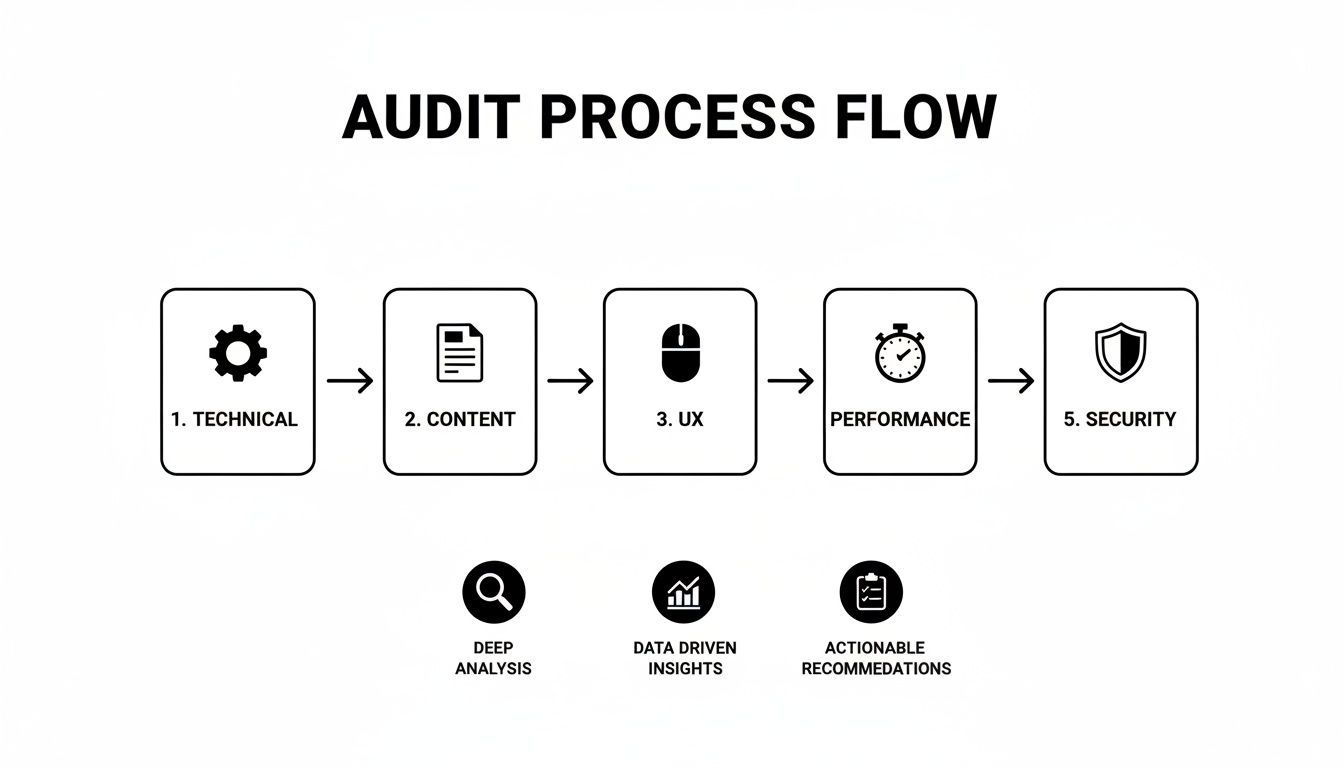
As you can see, a successful audit isn't just a random checklist. It's a logical process that starts with the technical foundation and builds up toward creating real, actionable business insights that you can use to grow.
To make this crystal clear, here’s a quick breakdown of how these pillars apply specifically to a restaurant equipment website.
The Five Pillars of a Restaurant Website Audit
| Audit Pillar | Primary Goal | Example for an Equipment Website |
|---|---|---|
| Technical Health | Ensure the site is crawlable, indexable, and fast for search engines and users. | Fixing 404 errors on discontinued product pages and ensuring mobile pages load in under 3 seconds. |
| Content & On-Page SEO | Align content with what your target audience (chefs, managers) is searching for. | Optimizing a category page for "commercial convection ovens" with detailed specs and buying guides. |
| User Experience (UX) | Make it incredibly easy for visitors to find products and complete a purchase or request a quote. | Simplifying the navigation so a user can find "commercial refrigerators" in no more than 2 clicks. |
| Backlink Authority | Build trust and authority with search engines through high-quality inbound links. | Getting a link from a popular foodservice industry blog in an article reviewing your top-selling fryer. |
| Conversion Pathways | Remove friction from the sales funnel to increase leads and online orders. | A/B testing the "Request a Quote" button color and placement on product pages to increase submissions. |
By systematically working through each of these five pillars, you're not just fixing problems—you're building a more resilient, visible, and profitable online presence for your business.
Auditing Your Technical SEO Foundation
Alright, let's get into the guts of the website. We're moving from the big-picture plan to the actual build. Your site's technical foundation is the hidden framework that decides whether search engines can even find, crawl, and make sense of your content. This is non-negotiable for a restaurant equipment site with hundreds or thousands of products.
Think of it like the plumbing and electrical systems in a commercial kitchen. If they aren't right, the best chef in the world can't cook a decent meal. It’s the same with your website—without a solid technical base, the best content and products will never reach their audience.

Checking Your Core Instructions for Search Engines
First things first: you have to check the direct instructions you’re giving search engine crawlers. Two simple files control this whole dance: your robots.txt file and your XML sitemap. These tell search engines where they can look and give them a map to find everything.
A shockingly common (and costly) mistake is accidentally blocking Google from crawling entire product categories. I’ve seen robots.txt files with a "Disallow" rule for /products/ that was just leftover code from a site redesign. That one line can make your whole inventory invisible to search.
You also need a clean, current XML sitemap. This file is the roadmap, listing every important page on your site, from the homepage to that specific product page for a countertop charbroiler. Without it, you’re just hoping search engines can guess which pages matter.
Finding and Fixing Crawl Errors and Broken Links
Once you know the search engines have the right instructions, it’s time to see what problems they’re running into on their own. This is a huge part of learning how to do a website audit. We're talking about things like crawl errors and broken links, also known as 404 errors.
A crawl error happens when a search engine tries to visit a page but can't, maybe because of a server issue. A 404 error is what a user sees when they land on a page that doesn't exist anymore—like a page for a discontinued charbroiler model.
A bunch of 404 errors sends a bad signal to both users and search engines that the site is poorly maintained. A busy restaurant manager looking for a replacement part will get frustrated fast and just leave if they keep hitting dead ends.
I always start in Google Search Console to get a full report of these errors. Here’s a quick workflow to knock them out:
- Prioritize by Traffic: Start with broken links that still get clicks from search or other sites.
- Implement 301 Redirects: For pages that have moved or been replaced (like an old product model that now has a new version), use a 301 redirect. This sends users and search engine authority to the new, correct page.
- Fix Internal Links: Go back and update any links on your own site that point to the now-deleted page.
If you want to go deeper on this, our guide on how to perform a technical SEO audit has a ton more detail: https://restaurantequipmentseo.com/blogs/restaurant-equipment-seo-blog/technical-seo-audit
Assessing Page Speed and Mobile Experience
In the restaurant industry, nobody has time to wait around for a slow-loading page. Site speed is a massive ranking factor and a huge part of the user experience. Giant, unoptimized images of commercial ovens or clunky code can bring your site to a halt, especially on a phone.
This is a really common problem. Data shows that only 54.6% of websites actually meet Google's Core Web Vitals standards, which measure loading speed and stability. On top of that, 23% of sites don't link their XML sitemap correctly in the robots.txt file, and about 15% don't even have a sitemap at all. These technical basics are overlooked all the time.
Use Google's PageSpeed Insights to test your most important pages—homepage, category pages, and a couple of your top-selling products. The tool spits out a score and gives you specific fixes, like compressing images or improving server response time. Before you even begin your audit, it helps to have a solid grasp of what goes into a technical checkup. It’s worth reading up on understanding the specifics of an ecommerce technical site audit. Getting this right is what makes every piece of equipment you sell easy for customers to find.
Analyzing Your On-Page Content and Keywords
Once you’ve got the technical green lights and search engines can crawl your site without hitting any roadblocks, it's time to look at what you’re actually saying. This is where the real connection with restaurant professionals happens. The on-page audit makes sure every word—from your homepage headline to a product description for a modular charbroiler—is pulling its weight.
Good on-page SEO isn't just about cramming keywords into your text. It's about getting inside the heads of your customers, understanding the exact language they use, and creating content that solves their immediate problems. This is how you prove you know your stuff and build trust with chefs, food service managers, and catering business owners.

Uncovering Opportunities with a Content Gap Analysis
First things first: you need to find out what you're missing. A content gap analysis is just a systematic way to see what valuable topics and keywords your competitors are ranking for that you aren't. This isn't about copying their work. It's about identifying the conversations your audience is having that you’re completely absent from.
For example, a competitor might have a killer buying guide on "how to choose the right commercial deep fryer" that’s pulling in a ton of traffic. If your site just has product listings, you're missing out on capturing buyers who are still in the research phase. Tools like Ahrefs or Semrush are brilliant for spotting these keyword gaps in minutes.
The idea is to walk away with a hit list of high-priority content ideas. You'll likely find opportunities for:
- Buying guides for complex equipment like combi ovens.
- Comparison articles that pit different charbroiler models against each other.
- Maintenance tips for commercial refrigerators and freezers.
This process gives you a clear roadmap for creating new content that plugs the holes in your marketing funnel and establishes your business as the go-to resource. Our blog posting and article writing services specialize in creating exactly this type of expert content.
Auditing Your Existing Pages for Keyword Optimization
Now, let's turn the microscope on the content you already have. Every single page on your site needs a clear job to do, and that means being optimized for a primary keyword that matches what users are searching for. A classic mistake I see on restaurant supply websites is having dozens of generic product pages that all sound identical.
Start by mapping your most important pages to their target keywords. A category page for walk-in coolers, for instance, should be laser-focused on terms like "commercial walk-in coolers" or "restaurant walk-in refrigerators." Once you have that map, run each page through a simple checklist.
- Meta Title: Does the title feature the main keyword and tell people exactly what the page is about? It has to be compelling enough to earn that click.
- Meta Description: Is this a unique, punchy summary of the page? It doesn't directly affect rankings, but a good one can dramatically improve your click-through rates.
- Heading Structure: Do you have one—and only one—H1 tag with your main keyword? Are you using H2s and H3s to organize the content and make it easy to scan?
- Keyword Usage: Is the primary keyword used naturally in the body, especially within the first 100 words? Are you including related terms and synonyms (LSI keywords) to add context?
This kind of methodical review helps you spot and fix the underperformers, ensuring every page is actively contributing to your SEO.
A key takeaway from any on-page audit is this: unique, high-quality content is non-negotiable. Using generic manufacturer descriptions for your products is a surefire way to get lost in a sea of competitors and can even lead to duplicate content issues.
The Importance of Unique Product and Category Content
For an e-commerce site selling complex gear, your product and category pages are your money pages. This is your chance to offer real value that goes way beyond a price tag and an "add to cart" button.
Put yourself in a chef's shoes. What would they need to know about a new convection oven? They're thinking about capacity, energy efficiency, cooking consistency, and how painful it is to clean. Your product descriptions should answer those questions before they're even asked.
Don't just list the specs. Create rich, helpful descriptions that let the customer imagine that equipment in their kitchen. Explain how a specific charbroiler creates perfect sear marks or how a high-efficiency fryer can slash their monthly oil costs. This approach doesn't just help your SEO—it gives customers the confidence they need to make a purchase, which will do wonders for your conversion rates. Your content is the bridge between a search and a sale.
Evaluating User Experience and Site Performance
A technically sound website is a fantastic foundation, but it's only half the story. If a busy catering business owner lands on your site and can't figure out how to find the exact countertop charbroiler they need, all that technical work goes right out the window. This part of the audit is all about putting yourself in your customer's shoes and seeing the site through their eyes.
Even the tiniest bit of friction can cost you a sale. Seriously. Studies show that a staggering 88% of users are less likely to return to a website after a bad first experience. For restaurant pros who need equipment yesterday, you can bet that number is even higher.

Assessing Navigation and Design Clarity
First things first: how easy is it to get around? Your site's navigation has to be so intuitive that a first-time visitor finds what they need without a second thought. For a restaurant supply website, this means logical categories and a crystal-clear path from the homepage to a specific product.
Imagine a chef needs a new modular charbroiler. Can they find it in two or three clicks? Or do they have to play a guessing game, wondering which obscure category you've buried it under? A confusing layout is a one-way ticket to a competitor's site.
Here are a few things I always check:
- Menu Structure: Is the main menu a cluttered mess or is it clean and simple? You want broad categories like "Cooking Equipment" and "Refrigeration," with specific sub-menus that make sense.
- Search Functionality: Does the search bar actually work? Test it yourself. Punch in specific product names and even some general terms to make sure it spits out relevant results. A bad search is worse than no search at all.
- Page Layout: Are your product pages easy to scan? Key info—specs, price, availability—should be right there, "above the fold," without any scrolling.
The Critical Role of Site Speed and Core Web Vitals
In the restaurant equipment world, speed is everything. A restaurant manager grabbing a few minutes on their phone between shifts isn't going to wait around for slow-loading pages. In fact, research shows 40% of visitors will bounce if a site takes more than three seconds to load.
Google is on the same page. Their Core Web Vitals are a set of metrics that measure real-world user experience, specifically focusing on loading speed, interactivity, and visual stability. A poor score here can directly tank your search rankings.
The number one culprit for slow speeds on equipment sites? Huge, unoptimized product images. High-res photos of commercial ovens are great, but they absolutely must be compressed for the web. Use a tool like Google's PageSpeed Insights to test your key pages. It'll tell you exactly what's slowing things down.
Don't just test your homepage. Run speed tests on your most popular category pages and a few of your top-selling product pages. These are often the heaviest and most critical pages in the buying journey.
Turning Visitors into Leads with Clear Calls-to-Action
A great user experience isn't just about being easy to use; it's about guiding visitors toward a goal. Every single page should have a clear purpose and a strong call-to-action (CTA) that tells the user exactly what to do next. For a restaurant supply business, this is usually "Request a Quote," "Download Spec Sheet," or "Contact Sales."
Your CTAs should be impossible to miss. I'm talking about contrasting button colors, strategic placement on the page, and action-oriented language. The path from browsing a combi oven to making an inquiry needs to be seamless and dead simple.
To help you out, I've put together a quick checklist of the most common UX problems I see on equipment supply websites. These are the kinds of issues that quietly cost businesses a lot of money.
Common UX Issues on Equipment Supply Websites and How to Spot Them
| Common Issue | How to Identify It | Impact on Business |
|---|---|---|
| Confusing Navigation | Ask a colleague to find a specific product (e.g., "a 36-inch gas charbroiler") and time them. If it takes more than 3 clicks, your menu is too complex. | Lost sales from frustrated users; lower search rankings due to poor engagement signals. |
| Slow Page Load Times | Use Google PageSpeed Insights on product pages. Look for scores below 70 and specific recommendations like "properly size images." | High bounce rates, especially on mobile; users will abandon the site before your products even load. |
| Hidden Contact Info | Check if your phone number and a "Contact Us" link are clearly visible in the header and footer of every page. | Fewer inbound leads and quote requests; customers who need quick help will go elsewhere. |
| Weak CTAs | Look at a product page. Is the "Request a Quote" button small, gray, or buried at the bottom? Does the text say "Submit" instead of something clear? | Low conversion rates; visitors are interested but don't know how to take the next step. |
By really digging into these performance and user experience elements during your audit, you can uncover the hidden roadblocks that drive customers away. Fixing them helps build a site that not only attracts traffic but actually turns that traffic into qualified leads.
Reviewing Your Backlink Profile and Authority
Your website's authority isn't just about the great content you publish; a huge piece of the puzzle is who links back to you. Think of backlinks as votes of confidence in the SEO world. When another reputable site links to your page, it's a powerful signal to Google that you're a trustworthy resource, which is a massive boost to your online reputation.
In this stage of the audit, we're stepping off your own site to look at how it's perceived across the web. This is a non-negotiable step. A toxic backlink profile can actively sabotage your rankings, no matter how perfect your on-page content or technical setup is.
Identifying High-Quality Links
The real goal here isn't just collecting any link you can get; it's about earning the right kind of links. For a restaurant equipment supplier, a high-quality link is one that comes from a relevant, authoritative source. We're talking about a mention in a well-known food industry publication, a link from a popular restaurant association's blog, or even a listing in a respected B2B supplier directory. Our blogger outreach services help forge these vital industry connections.
These are the links that actually move the needle. They don't just send you referral traffic from potential buyers; they pass significant "link equity"—sometimes called "link juice"—that tells Google your site is an authority on commercial charbroilers or walk-in coolers.
Your first move is to pull a complete list of every site linking to you using a tool like Ahrefs, Semrush, or Moz. Once you have that list, it's time to sift through and assess the quality. I find it helpful to categorize them:
- High-Tier Links: These are your gold standard—links from major foodservice blogs, industry news outlets, or even culinary schools.
- Mid-Tier Links: These are solid links from decent, relevant sources like local business directories, the websites of partners you work with, or niche food bloggers.
- Low-Tier Links: These are links from less relevant or lower-authority sites. They don't provide a ton of value, but they aren't necessarily hurting you either.
Doing this gives you a quick visual of your strengths and weaknesses, showing you exactly where you need to focus your future link-building efforts.
Spotting and Disavowing Toxic Backlinks
Just as good links help, bad ones can seriously harm your rankings. Toxic backlinks are the spammy, low-quality, or totally irrelevant links that can trigger a Google penalty or just tank your site's authority. These often come from sketchy private blog networks (PBNs), foreign-language spam sites, or directories built for the sole purpose of manipulating search rankings.
Finding these is a critical part of any real audit. As you go through your backlink profile, keep an eye out for these red flags:
- Irrelevant anchor text (like "cheap payday loans" linking to your commercial oven page).
- Links coming from sites in a completely unrelated niche or language.
- A flood of links from sites with a very low Domain Authority (DA) or Domain Rating (DR).
- Links from obvious link farms or thin directories with no real content.
When you find a clear pattern of these toxic links, you have to take action. This is where Google's Disavow Tool comes in. It lets you tell Google to completely ignore these specific links when evaluating your site. It’s like saying, "Hey, I never asked for this link, and I don't want to be associated with that shady website." Use this tool carefully, but don't be afraid to clean up a messy profile when you need to.
Benchmarking Against Competitors
Finally, a backlink audit isn't truly complete until you've peeked over your shoulder at the competition. Pull the backlink profiles for your top three to five competitors. Where are they getting their best links? Are they consistently getting featured on certain industry blogs or directories that you're completely missing out on?
This competitive analysis is a goldmine for new link opportunities. If a top foodservice publication is regularly linking to your competitor's buying guides, that’s your cue to start creating similar, high-value content and building relationships with those same editors. You can learn more about this in our guide on how to find backlinks in Google. Understanding what's working for them gives you a practical roadmap for building your own authority and earning the kind of backlinks that drive real, lasting SEO results.
An audit is just a pile of data until you turn it into real, tangible changes. You've dug through your site's technical guts, content, and authority—now it's time to build a practical roadmap for getting things fixed. Honestly, this is the most important step if you want an audit that actually drives results.
It's easy to get overwhelmed by a massive list of problems. The secret is to be absolutely ruthless with your priorities. You need to focus on what will give you the biggest bang for your buck, separating the quick wins from the long-term strategic projects.
Prioritizing Your Audit Findings
The best way I've found to do this is to categorize every single issue into a simple matrix. This framework is a lifesaver for deciding where to put your energy first, making sure you don't ignore the fires while you're busy polishing the doorknobs.
Here’s how to break it down:
- High Impact / Low Effort (Quick Wins): These are your immediate to-dos. Think fixing broken internal links, rewriting a few meta titles on your most important pages, or compressing some massive images that are killing your load times.
- High Impact / High Effort (Major Projects): These are the big-ticket items that will really move the needle but need proper planning. We're talking about a full content overhaul for a key category or a targeted link-building campaign to boost authority.
- Low Impact / Low Effort (Fill-in Tasks): These are the small tweaks you can knock out when you have a spare hour. This might be updating alt text on old blog images or cleaning up some minor formatting issues you spotted.
- Low Impact / High Effort (Re-evaluate Later): Put these on the back burner. They just aren't worth the investment right now. A full-scale website redesign might fall into this bucket if your current site is generally working okay.
This approach transforms that messy, intimidating list into a clear, actionable strategy. It keeps your team from getting bogged down in minor details while the critical stuff gets ignored.
Building Your Roadmap for Success
Once you have your priorities straight, it's time to build the action plan. A simple spreadsheet is perfect for this. Just map out the problem, the solution you've decided on, who's responsible for the fix, and a realistic deadline. If you need a more detailed template, check out our guide on the ideal SEO audit report format. This document becomes your blueprint for accountability and, more importantly, progress.
Your action plan isn't a one-and-done report. Treat it as a living document. It's the only way to ensure your audit findings translate into measurable improvements in traffic and user engagement.
It’s also critical to start thinking about the future of search. Recent data shows AI search traffic shot up by 527% in just one year, and Google's AI Overviews are now hitting 2 billion users a month. On top of that, nearly 70% of businesses are seeing a better ROI from using AI in their SEO. By structuring your content with clear headings, FAQs, and direct answers, you're setting up your expert information to be featured in these new search formats. You can discover more insights about AI in SEO on semrush.com to get ahead of the curve.
Frequently Asked Questions
Even with a detailed roadmap, some questions always pop up, especially when you're auditing a site in a niche B2B industry like restaurant equipment. Let's tackle some of the most common ones I hear.
How Often Should I Audit My Restaurant Supply Website?
A full, deep-dive audit is something you should block out time for once a year. But the online world moves fast. That's why I always recommend quarterly "mini-audits" to keep a pulse on your site's technical health and on-page SEO.
This lets you spot things like broken links or indexing errors before they turn into real headaches. And it goes without saying, a full audit is absolutely essential right after any major site redesign or content migration.
What Are the Best Tools for a DIY Website Audit?
If you're rolling up your sleeves and doing this yourself, you can get surprisingly far with a few free, essential tools. Start with Google Search Console and Google Analytics—they give you the foundational data straight from the source.
From there, add these to your toolkit:
- Screaming Frog SEO Spider: The free version is a workhorse, crawling up to 500 URLs. It's perfect for checking the technical guts of smaller sites.
- Google's PageSpeed Insights: This one's non-negotiable. You need it to test your site speed and check in on your Core Web Vitals.
- Ahrefs or Semrush: Their free backlink checkers give you a solid starting point for understanding your site's authority profile.
What Is the Most Common Issue Found on B2B E-commerce Sites?
Hands down, for sites selling complex restaurant equipment, the most damaging and frequent issue is thin or duplicate content on product pages. It happens all the time—suppliers just copy and paste the generic manufacturer descriptions. This adds zero unique value for the customer and can seriously hamstring your SEO efforts.
An audit brings these underperforming pages to light immediately. It gives you a clear path to prioritize writing unique, helpful descriptions that answer a chef’s real questions, which can significantly improve your rankings.
For a more holistic view of the entire website auditing process from start to finish, check out this comprehensive guide on how to audit a website for peak performance.
At Charbroilers.com, we know a high-performing website is just as critical as the equipment you sell. We provide expert SEO, local citation services, blog posting, blogger outreach, copywriting, and article writing specifically for restaurant equipment supply websites. If you're looking for a partner to sharpen your digital presence, take a look at our services at https://charbroilers.com.