

Unlocking H Tags SEO for Restaurant Equipment Websites
When you use H tags correctly for SEO, you're essentially creating a roadmap for both search engines and your customers. It's the practice of structuring your content with H1–H6 headings to make your page easy to understand at a glance. Think of it as a clean, logical outline that points Google straight to your most important information, which is a huge factor in ranking higher. For businesses in the restaurant equipment supply industry, mastering H tags is a key part of a successful digital strategy, alongside services like local citation building, blog posting, and article writing.
Why H Tags SEO Is Your Secret Ingredient
Picture your website as a professional kitchen and your H tags as the organizational system that keeps everything running smoothly. Your H1 tag is the big menu board out front. It tells everyone—from your customers (users) to the health inspector (Google)—exactly what that page is all about. This single, clear signal is the foundation of solid H tags SEO.
From there, the hierarchy continues. Your H2s are like the signs for major stations: 'Grill Station,' 'Fry Station.' Then, H3s get even more specific, labeling the individual pieces of equipment, like 'Commercial Charbroiler' or 'Deep Fryer.' This flow isn't just a technical box to check; it’s about creating a better, more intuitive experience for your visitors, and that’s something Google loves to reward.
The Cost of Poor Structure
For a restaurant equipment supplier, this kind of organizational clarity is absolutely critical. A page with a good structure helps search engines instantly understand what the content is about, making it much easier to rank a 'Commercial Charbroilers' page for the right searches. This is a core part of strong on-site optimization for restaurant equipment websites because it directly affects how users and search crawlers navigate your site.
The H1 tag, in particular, has become more and more important as search engines prioritize well-structured content. It's shocking, but around 25% of small-business websites are missing an H1 tag completely. That’s a huge missed opportunity that hurts their search visibility. For a business selling specialized gear like charbroilers, an oversight like that can be incredibly costly. You can find more details on the impact of SEO structure from 2026 statistics.
Treat your H tags like you'd organize a five-star kitchen. When you do, you signal authority and clarity to search engines, which helps customers find your products in a very crowded market. Remember, this structure isn't just for Google—it builds confidence and makes your site a whole lot easier for people to use.
A Practical Guide to Using Each Heading Tag
When it comes to using heading tags for SEO, there's one golden rule you have to follow: maintain a strict hierarchy. Think of your page like an outline for a research paper. Every section and subsection needs to be clearly labeled in a logical order. This structure isn't just for show—it's critical for both your website visitors and the search engine crawlers trying to understand your content. This is a foundational element of effective article writing and copyrighting for the web.
Your H1 tag is the big, bold title of the page. You get one H1—that’s it. It has to perfectly capture what the entire page is about. For a site selling restaurant equipment, this would be the main product or category, like 'Commercial Griddles' or 'Professional Deep Fryers.' It's hands-down the most important heading on the page.
From there, you'll use H2s and H3s to flesh out the details.
Building Your Content Hierarchy
Think of your H2 tags as the main chapters of your page. They break down the core topic from your H1 into logical, easy-to-scan sections. For that 'Commercial Griddles' page, your H2s might look something like 'Types of Commercial Griddles,' 'Key Features to Consider,' and 'Cleaning and Maintenance Tips.' Each H2 introduces a distinct subtopic that supports the main idea.
Then come the H3 tags, which act like sub-chapters, diving even deeper into your H2 sections. Under that 'Types of Commercial Griddles' H2, you could use H3s like 'Countertop vs. Floor Models' or 'Gas vs. Electric Griddles.' This creates a granular, easy-to-follow flow that adds real depth to your content. A key rule here is to never skip heading levels. Don't just jump from an H2 straight down to an H4.
This infographic below does a great job of showing this simple, top-down structure. You can see how the main idea (H1) branches into major sections (H2) and then into specific details (H3).
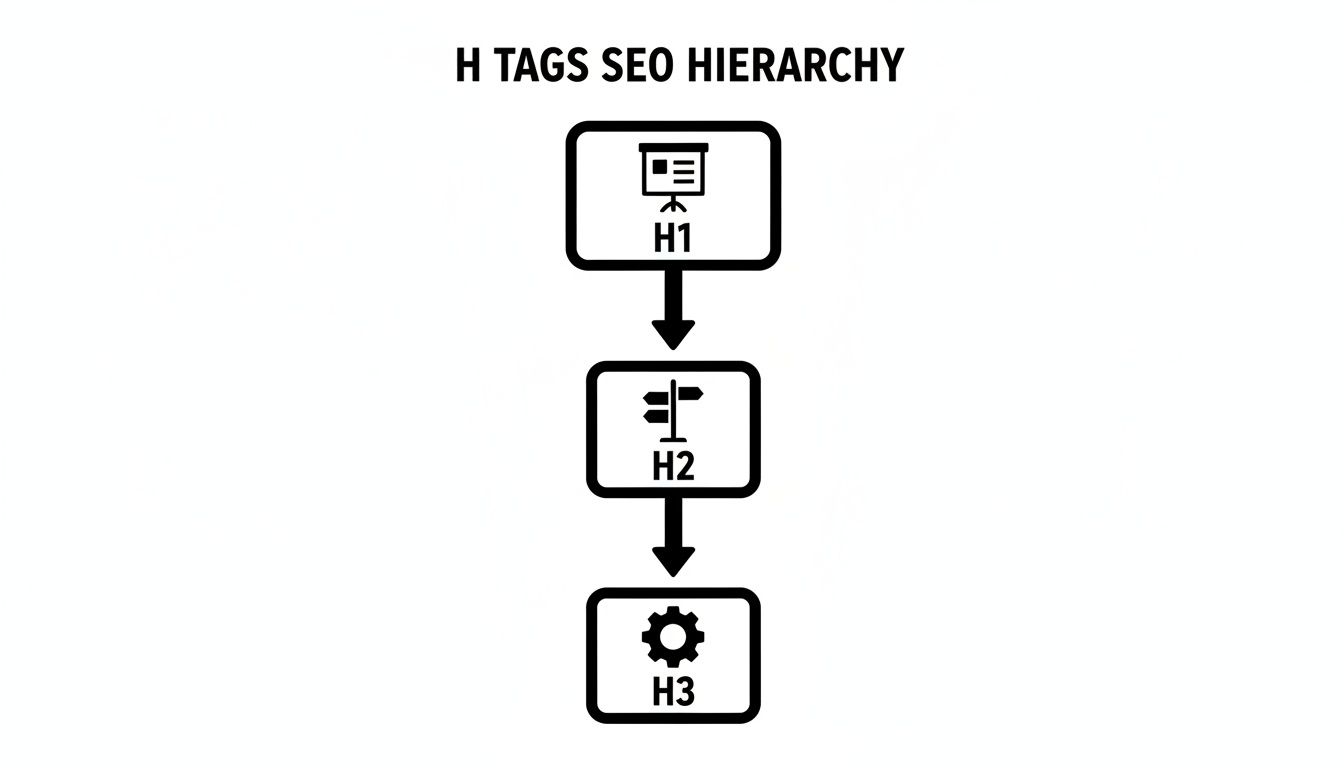
This visual really drives home the top-down logic that makes your content scannable for users and a piece of cake for search engines to index. Getting this simple structure right is fundamental to learning how to write SEO-friendly blog posts, as it ensures every part of the article has a clear purpose.
Extending to H4, H5, and H6
So, what about the other guys—H4, H5, and H6? These tags are for getting even more specific within an H3 section. Honestly, you won't see them used much in standard blog posts or product pages. But for super technical guides or long-form articles with really complex subsections, they can be incredibly useful for keeping things organized.
A well-organized heading structure is a direct signal of a high-quality user experience. It shows both search engines and potential buyers that your content is thoughtfully organized, authoritative, and easy to navigate.
To really nail down your content organization, it's worth learning how to structure a blog post for optimal readability and SEO, where this hierarchy is absolutely essential. By sticking to this model, your content team can make sure every tag has a purpose, boosting both your search visibility and the time people spend on your page.
Here’s a quick-reference table to pull all these best practices together.
H Tag SEO Best Practices at a Glance
| Heading Tag | Primary Function | SEO Best Practice |
|---|---|---|
| H1 | Main title of the page | Use only one per page; must contain the primary keyword. |
| H2 | Major sections or chapters | Break down the H1 topic; should contain secondary keywords. |
| H3 | Subsections or sub-chapters | Elaborate on H2 topics; provide more specific detail. |
| H4 | Deeper sub-points | Further detail within an H3; useful for lists or steps. |
| H5 | Granular details | Very specific points within an H4 section. |
| H6 | Fine-tuned organization | Lowest level of detail; rarely used but available. |
Using this table as a guide will help ensure every piece of content you create is structured for maximum impact with both readers and search engines.
Optimizing H Tags for Search and AI Overviews
Think of your H tags as more than just a way to organize your content—they’re prime real estate for your keywords. Getting the hierarchy right is the first step, but the real art comes from optimizing these headings to send powerful signals to search engines. This is a core part of effective on-page SEO because it tells Google exactly what your page is all about, loud and clear.
The trick is to weave your most important keywords into your headings in a way that feels completely natural, not stuffed or robotic. If you're selling restaurant equipment, this means thinking like your customers and using the terms they search for. A quality copyrighting approach ensures this integration is seamless.
For instance, a category page with an H1 of 'Commercial Charbroilers' is a great start. You can then support it with H2s like 'Choosing the Right Gas Charbroiler' or 'Benefits of Infrared Charbroilers.' This tactic doesn't just target the big, broad keywords; it also helps you capture those valuable long-tail searches from chefs and kitchen managers who know precisely what they need.
Preparing Your Content for AI Search
This kind of logical, clean structure is more critical than ever, especially with new formats like Google's AI Overviews shaking things up. Well-crafted H tags act like signposts for AI systems, helping them quickly scan your page, grasp its meaning, and confidently cite you as an authority on commercial kitchen equipment.
This is your shot at becoming the go-to source for complex questions about your products.
Solid HTML structure is now table stakes for getting your content understood and featured by AI. The data backs this up, too. Sites that get cited as sources in AI Overviews see a nice little bump in traffic. Getting featured can nearly double your click-through rate, jumping from an average of 0.6% to 1.08%.
When you optimize H tags for both people and AI, you’re doing more than just organizing content. You're building a direct pipeline for Google to see and reward your expertise, boosting your visibility and making you a trusted source.
A well-structured page also gives you a better chance of grabbing other valuable spots on the search results page. When your headings directly answer specific questions, you're much more likely to show up in rich results. To dig deeper into this, check out our guide on how to optimize for featured snippets.
At the end of the day, optimizing your H tags for SEO is all about clarity. You want every heading to pull double duty: guiding your human reader through the page while signaling your authority to the search algorithms—including the AI systems that are increasingly shaping how we find information online.
H Tag Blueprints for Your Equipment Website

Knowing the theory behind H tags SEO is great, but putting it into action is where you actually see results. To make things simple, I've put together some actionable blueprints for the three most common pages you'll find on any restaurant equipment site.
Think of these as templates to take the guesswork out of building a winning structure. Feel free to grab these and adapt them for your own category pages, product pages, and blog content. A logical flow doesn't just help search engines; it guides your customers and makes their experience a whole lot smoother.
Blueprint for a Category Page
Category pages are the heavy hitters for e-commerce SEO. They're often targeting those broad, high-volume keywords, so getting the structure right is critical for helping users and search engines navigate all your products.
Let's imagine we're building a "Commercial Refrigerators" page.
- H1: Commercial Refrigerators for Sale
-
H2: Shop Reach-In Commercial Coolers
- H3: Single-Door Reach-In Refrigerators
- H3: Two-Door Reach-In Refrigerators
-
H2: Explore Our Walk-In Freezers and Coolers
- H3: Indoor Walk-In Cooler Units
- H3: Outdoor Walk-In Freezer Systems
- H2: Commercial Undercounter and Worktop Refrigeration
- H2: Choosing the Right Commercial Refrigerator for Your Kitchen
See how this structure logically groups related products? It makes it dead simple for a busy restaurant owner to find exactly what they need, all while signaling clear topical relevance to Google.
Blueprint for a Product Page
Product pages have to be incredibly specific. You need to answer every possible question a buyer might have, and your H tags should walk them through the features, specs, and other details they need before pulling out their credit card.
Here’s a simple but effective template for a "True T-49 Refrigerator" product page.
A well-structured product page uses H tags to create a scannable, informative experience. This approach builds buyer confidence and directly addresses user intent, which is a powerful signal for search rankings.
Here’s what that looks like in practice:
- H1: True T-49 Stainless Steel Two-Door Reach-In Refrigerator
- H2: Key Product Features and Benefits
-
H2: Detailed Technical Specifications
- H3: Dimensions and Capacity
- H3: Electrical and Temperature Information
- H2: Warranty and Service Details
- H2: Frequently Asked Questions About the T-49
Each H2 tag tackles a different stage of the buying journey. It starts with the exciting features and moves all the way to the practical details like warranties and support.
Blueprint for a Blog Post
Your blog is where you capture all those informational searches and really establish yourself as an industry authority. The H tags in a blog post should break down a complex topic into easy-to-digest sections or steps. This is a core part of blog posting and blogger outreach strategies.
Let's outline a post on "How to Maintain Your Commercial Ice Machine."
- H1: A Complete Guide to Commercial Ice Machine Maintenance
- H2: Why Regular Maintenance is Crucial for Your Ice Machine
-
H2: Daily Cleaning Procedures You Can't Skip
- H3: Wiping Down Exterior Surfaces
- H3: Checking the Water Filter and Bin
-
H2: Monthly Deep-Cleaning and Maintenance Checks
- H3: How to Descale Your Ice Machine
- H3: Inspecting Condenser Coils and Air Filters
- H2: Signs Your Ice Machine Needs Professional Service
This outline creates a natural flow, guiding the reader from the "why" to the "how." It answers their core questions in a structured way that’s genuinely helpful, which is exactly what Google wants to see.
Common H Tag Mistakes That Hurt Your Rankings
Even small mistakes in your heading tags can quietly kill your SEO performance. Getting the blueprint right is a huge step, but it’s just as important to spot and fix the common errors that hold pages back.
Think of it like a final quality check before a dish leaves the kitchen. Nailing these details ensures the final product is perfect. Let’s walk through the five most common pitfalls we see on restaurant equipment websites and how to fix them for good.

Mistake 1: Using Multiple H1 Tags
This is the big one. Your H1 tag is the single, non-negotiable title for the page. Using more than one is like putting two different signs on a restaurant’s front door—it just confuses visitors and search engines about what the page is really about.
-
Before:
<h1>Commercial Charbroilers</h1><h1>Best Deals on Grills</h1>
-
After:
<h1>Commercial Charbroilers</h1>
Mistake 2: Skipping Heading Levels
Jumping from an H2 straight down to an H4 breaks the logical flow of your content. This kind of hierarchical skip messes up the outline, making it tough for screen readers and search crawlers to figure out how your content sections relate to each other.
Always keep it sequential. H2, then H3, then H4. No skipping allowed.
-
Before:
<h2>Types of Charbroilers</h2><h4>Infrared Models</h4>
-
After:
<h2>Types of Charbroilers</h2><h3>Infrared Charbroiler Models</h3>
Mistake 3: Using Headings for Visual Styling
Headings are for structure, not for looks. Please don't use an H4 just because you like its font size or color. That completely undermines its purpose.
This bad habit confuses search engines, which rely on these tags to understand your content's architecture, not its interior design.
Your headings build the architectural blueprint of your page. Using them for decoration is like using a load-bearing wall as a spot to hang a picture—it misses the entire point of its structural function.
Mistake 4: Keyword Stuffing Your Headings
Yes, you should include keywords where they make sense. But jamming them into every single heading makes for a terrible reading experience and can even get you flagged for spam.
Your headings need to be clear and helpful for a human first.
-
Before:
<h2>Best Commercial Charbroilers for Sale</h2><h3>Buy Commercial Charbroilers Online</h3>
-
After:
<h2>Choosing the Right Commercial Charbroiler</h2><h3>Key Features to Compare</h3>
Mistake 5: Writing Vague and Unhelpful Headings
Headings like "Details," "Specs," or "Conclusion" are massive missed opportunities. They give zero context to someone scanning the page and offer absolutely no SEO value.
Make every single heading descriptive and specific. It makes a world of difference.
-
Before:
<h3>Specs</h3> -
After:
<h3>T-49 Refrigerator Electrical and Dimension Specs</h3>
By steering clear of these common errors in your h tags seo strategy, you’ll ensure your pages are not just perfectly structured but also incredibly effective at showing their value to both customers and search engines.
Your Questions on H Tags SEO Answered
As we wrap things up, it’s totally normal to have a few questions floating around about putting this all into practice. This last section is all about tackling the most common things we get asked by restaurant equipment suppliers and website managers like you.
Think of it as your quick-reference guide to iron out the details so you can build out your heading strategy with confidence.
Let’s get into it.
How Many H1 Tags Should Be on a Page?
Easy one: just one H1 tag per page. That's the golden rule.
The H1 is your page's main title, the big headline that tells search engines exactly what the page is about. Think of it like the title of a chapter in a book—there’s only ever one.
Using more than one H1 can muddy the waters and confuse search engines about the page's true focus, which might water down its ability to rank. Sure, Google is smart enough to figure out most pages with multiple H1s these days, but the tried-and-true best practice is to stick to a single, powerful H1. It keeps your message crystal clear.
Does the Order of H2 and H3 Tags Matter?
Yes, it absolutely matters. You need to follow a logical, cascading order to create a structure that makes sense. An H2 tag should introduce a major section, followed by its content or by more specific sub-topics marked up with H3s.
You should never skip heading levels—for instance, jumping from an H2 straight to an H4 without an H3 in between. This hierarchy (H1 > H2 > H3 > H4) creates a clean outline for both people and search engine crawlers. It makes the content easier to scan and helps algorithms understand how all the pieces of your content relate to each other.
Keeping this flow is a big deal for accessibility and for telling a clear story on the page.
Can I Use Keywords in All My Heading Tags?
While it’s smart to get your main keyword into the H1 and related keywords into some H2s, you should not cram keywords into every single heading. Your headings have to be useful for a human reader first.
Overdoing it by stuffing keywords into every H2, H3, and H4 makes your content sound robotic and can even get you flagged for keyword stuffing. The goal is to create natural, descriptive headings that tell people what the next section is about.
-
Good Example:
<h2>Choosing the Right Gas Charbroiler</h2>(This is natural and helps the user.) -
Bad Example:
<h2>Best Gas Charbroilers for Sale Online</h2>(This sounds a little forced and spammy.)
If a keyword fits in naturally, great. If not, always pick clarity and user experience over another keyword mention.
What Is the Difference Between a Page Title and an H1 Tag?
This is a great question, as they are two separate but closely related pieces of your h tags seo puzzle. They each have a different job to do.
The page title (or title tag) is what you see in the browser tab. More importantly, it’s the big blue link that shows up on a Google search results page. It’s what convinces someone to click and visit your site in the first place.
The H1 tag, on the other hand, is the main heading that’s actually on the webpage. It’s what a visitor sees right after they land on the page, confirming they’re in the right place. They should be similar, but they don't have to be identical. This gives you a chance to optimize the title tag for clicks and the H1 for the on-page experience.
At Charbroilers.com, we know that getting the small details right is what makes a great kitchen. The same idea applies to your website. If you're looking to fit out your restaurant with top-tier cooking equipment that gets you consistent, delicious results, we've got you covered.
Find the perfect charbroiler to take your menu to the next level at https://charbroilers.com.