

Uncovering Google Analytics Not Provided Keywords
You've probably noticed it in your Google Analytics account: that frustrating line item called "(not provided)" sitting where your valuable keyword data used to be. This isn't a bug; it's the result of Google encrypting search queries to protect user privacy, a change that has fundamentally reshaped how we approach SEO.
Since 2011, Google has been systematically hiding the exact search terms people use to find your website, creating a huge blind spot for anyone trying to understand their audience and refine their content strategy.
Why Your Keywords Disappeared from Google Analytics

If you've spent any time staring at your analytics reports, you know the feeling. That data was gold. But the shift to "(not provided)" wasn't some temporary glitch. It was a deliberate, permanent change from Google that forced everyone in the SEO world to adapt.
It all started back in 2011, when Google began encrypting searches for users who were logged into their Google accounts. The stated reason was to bolster user privacy, which meant the specific keywords someone typed into the search bar were no longer passed along to the website they visited. This wasn't just a minor update—it was the beginning of a data blackout for marketers.
The Impact on Marketers
For businesses, this had an immediate and painful impact. Imagine you run a restaurant equipment supply company. Before, you could see exactly what drove your traffic. Did a chef find you by searching for "commercial ice makers," or was it "undercounter freezers"? Knowing the answer was absolutely critical for fine-tuning your content, optimizing product pages, and guiding your entire marketing strategy, including services like blog posting, article writing, and copyrighting.
Losing that direct line of sight into user intent was a huge blow. The trend only accelerated; by 2013, roughly 50% of organic keyword data was already gone. Today, that number is staggering—some reports suggest that over 97% of organic search keywords are now hidden behind the "(not provided)" label. You can dive deeper into the history of this shift over on neilpatel.com.
This shift forces a new mindset. The goal is no longer to 'fix' the problem of not provided keywords but to adapt your strategy to a new reality. It's about learning to infer user intent through other data signals.
Understanding why this happened is the first step. It helps frame the problem correctly. We're not trying to find a lost report; we're building a smarter, more resilient SEO workflow that doesn't depend on that single piece of data. We now have to get creative and piece together clues from different tools to uncover the insights that were once served up on a platter.
The good news is, you can still get the answers you need. The rest of this guide will show you exactly how to do it.
Connect GA4 and Search Console for Keyword Insights
Staring at "(not provided)" in your Google Analytics reports can feel like hitting a brick wall. But what if I told you the best solution is hiding in plain sight, and it’s completely free? The answer is linking Google Analytics 4 (GA4) with Google Search Console (GSC).
Think of this integration as building a bridge. It pulls all that rich, valuable query data directly from Search Console right into your GA4 reports. Suddenly, you get a much clearer picture of the actual search terms people are using to find you.
For anyone serious about SEO, this isn't just a "nice-to-have" anymore; it's a foundational step. If you're a restaurant equipment supplier, this is how you find out customers are searching for “commercial charbroiler reviews” or “buy countertop griddle.” These are insights you simply cannot get from GA4 on its own.
The Power of the GSC Integration
Once you’ve linked the two platforms, GA4 unlocks a brand-new set of reports. You’ll find them by heading to the Acquisition section in your GA4 dashboard and looking for the Search Console card. Click on that, and you'll see the Google organic search queries report. This is where the magic happens.
This report reveals the actual search terms people typed into Google before landing on your site. You also get a lineup of crucial performance metrics for each query:
- Organic Search Impressions: How many times your site showed up in search results for a term.
- Organic Search Clicks: The number of times people actually clicked through to your site.
- CTR (Click-Through Rate): The percentage of impressions that turned into a click. This is a huge indicator of how well your page titles and descriptions are working.
- Average Position: Your site’s average ranking for that specific query.
When Google officially rolled out GA4 in 2023, it was a massive shift from Universal Analytics. GA4 shows zero organic keyword data by default, making the GSC integration non-negotiable. While GSC is a lifesaver, keep in mind its data is only retained for 16 months. You can learn more about how the industry has adapted to these changes at Optimize Smart.
Linking Your Accounts
Thankfully, the linking process itself is dead simple.
Just go to your GA4 Admin panel, find the "Product Links" section, and click on "Search Console Links."
From there, it's a simple matter of choosing your GA4 property and the matching Search Console property you want to connect.
After you confirm the association, data will start flowing into GA4, usually within 48 hours. This one-time setup creates a continuous stream of keyword data, which will become the bedrock of your new workflow for getting around google analytics not provided keywords.
If you're still getting the hang of GA4, making sure you know your analytics tracking ID is another one of those essential first steps to get everything configured correctly. With this data pipeline in place, you can finally move from guessing what users want to making smart decisions based on what they’re actually searching for.
Use Landing Pages to Understand User Intent
Since you can't see the exact keywords bringing people to your site anymore, your landing pages have become your best source of intel. Think of it like being a detective. By looking at which pages pull in the most organic traffic, you can work backward and figure out what your audience was actually looking for.
The shift to (not provided) keywords completely changed the SEO game. We used to be able to see a direct line from a search term to a specific page and, hopefully, a conversion. Now, with over 90% of organic keywords hidden, that direct connection is gone. This makes analyzing your landing pages the single best workaround we have for guessing user intent.
Decoding Intent from Your Top Pages
Inside Google Analytics 4, the Landing page report is where the magic happens. You’ll find it under Reports > Engagement > Landing page. This report is your direct line to seeing which pages are the first handshake between your site and a visitor coming from organic search.
Let’s say you run a website selling restaurant equipment. You open up your Landing page report and see a blog post, "How to Choose the Right Commercial Oven," is getting thousands of organic visits every single month.
That’s a huge clue right there. You can be pretty confident that a big chunk of your audience is in the research phase, using informational, top-of-funnel queries about commercial ovens. They aren’t ready to buy just yet; they're trying to figure out their options.
This kind of insight is pure gold. It tells you your educational content, often developed through professional blog posting and article writing services, is hitting the mark. It also gives you a clear signal to create similar deep-dive articles for your other big product categories, like commercial refrigerators or charbroilers.
Connecting Landing Pages to Keyword Clusters
Once you've got a list of your top-performing pages, the next move is to map them to potential keyword clusters. This isn't about pinpointing one single keyword anymore. It's about understanding the entire topic that a page successfully covers.
For that "Commercial Oven" post, the keyword cluster could include all sorts of related searches:
- Commercial oven types
- Convection vs. deck oven
- Best restaurant ovens for small kitchens
- What to look for in a commercial oven
Thinking in terms of these clusters helps you optimize the page you already have and gives you a roadmap for future content. Truly getting a handle on user intent, especially for an ecommerce site, means moving beyond a simple keyword checklist. For those in ecommerce, this approach is critical, and there are great resources available for mastering ecommerce product page SEO beyond keywords.
By digging into metrics like Engaged sessions and Average engagement time, you can see more than just which pages get clicks. You see which ones actually grab and hold a user's attention—a dead giveaway that you've matched their search intent perfectly.
Find Keyword Clues in Paid and Internal Search
While Google keeps its organic search data under lock and key, there are a couple of powerful sources that are still wide open. They offer a direct line into your customers' minds. Your paid search campaigns and your website's own internal search are absolute goldmines for understanding the exact language your audience uses, helping you fill in the blanks left by "(not provided)".
Think of it this way: trying to get organic keyword data is like listening to a conversation through a wall. You can hear the muffled voices and get the general idea, but you're missing all the juicy specifics. Paid search and internal site search? That's like being handed a perfect transcript of the whole conversation.
Uncover High-Intent Keywords with Google Ads
If you're running any Google Ads campaigns, you have access to one of the most valuable keyword resources out there: the Search terms report. This report shows you the exact queries people typed into Google just before they saw and clicked your ad. Unlike the organic data, this information is completely unfiltered.
For a restaurant equipment supplier, this is huge. You might be bidding on a broad keyword like "commercial charbroiler," but the Search terms report could reveal that your highest-converting traffic is actually coming from incredibly specific, long-tail searches like:
- "Emergency walk-in cooler repair near me"
- "Best countertop griddle for a small diner"
- "Used restaurant equipment financing options"
These aren't just keywords; they're clear expressions of urgent needs and very specific problems. A phrase like "emergency walk-in cooler repair" isn't just a search—it's a desperate cry for help from a restaurant owner who is losing money by the minute.
Spotting these high-performing paid terms gives you a crystal-clear directive for your SEO and content strategy. You can immediately turn around and create blog posts, service pages, and local SEO campaigns targeting these exact phrases, often leveraging local citation services to boost visibility for "near me" searches.
Listen to Your Visitors with Internal Site Search
Once a visitor lands on your website, what do they do next? The internal site search data in Google Analytics 4 is a direct line to your audience's thoughts, revealing what they're looking for in their own words. Setting up site search tracking in GA4 is surprisingly simple and unlocks a report showing every single query typed into your search bar.
Think of your internal search log as a perpetually running focus group. It tells you exactly what content your users expect to find but can't, highlighting gaps in your navigation, product offerings, or informational articles.
Imagine your analytics show dozens of searches for "charbroiler cleaning instructions" or "Hoshizaki ice machine troubleshooting." If you don't have content that addresses these topics, you're missing a massive opportunity to serve your audience and build your authority. These searches are explicit requests for help.
By creating content that directly answers these internal queries, you not only improve the user experience but you also create new assets that can rank for these specific, long-tail organic keywords. Monitoring your internal search terms is a crucial part of any modern SEO workflow, providing a continuous stream of inspiration for new articles and resources.
If you're looking to refine your entire keyword monitoring process, exploring a guide on how to track keyword rankings can provide a more complete picture of your performance.
Keyword Data Sources at a Glance
Navigating the post-"not provided" world means piecing together clues from multiple places. Each data source has its own strengths and weaknesses. Here’s a quick breakdown to help you decide where to focus your attention.
| Data Source | Type of Data | Primary Use Case | Limitation |
|---|---|---|---|
| Google Search Console | Aggregated organic queries, impressions, clicks, CTR, position | Understanding what you rank for and identifying optimization opportunities for existing content. | Data is sampled, anonymized, and doesn't tie specific keywords to individual user sessions. |
| Google Ads Search Terms Report | Exact queries that triggered paid ads, conversion data | Finding high-intent, commercial keywords that convert and uncovering new long-tail opportunities. | Only shows data for paid campaigns; you have to spend money to get the insights. |
| Internal Site Search (GA4) | Queries typed into your website's search bar | Identifying content gaps, understanding user intent once they are on your site, and improving UX. | Limited to on-site behavior; doesn't reveal how users found your site initially. |
| Rank Tracking Tools (e.g., Ahrefs, Semrush) | Your site's ranking for a specific list of target keywords | Monitoring SEO performance over time, tracking competitors, and reporting on keyword visibility. | Doesn't show what users actually searched for, only your rank for the keywords you decide to track. |
Ultimately, no single tool gives you the full picture anymore. The best approach is to blend insights from all these sources. Use GSC for a broad overview, Google Ads for conversion-focused keywords, and your internal site search to understand what your most engaged visitors are truly looking for.
Creating a Modern SEO Strategy Without Direct Keyword Data
Alright, let's put the pieces of the puzzle together. Thriving in a world of google analytics not provided keywords isn't about finding one magic tool to solve everything. It's about building a smart, repeatable workflow. You need to create a feedback loop where insights from one source inform your actions in another, keeping your strategy dialed in on what users actually want.
Imagine you're an SEO manager at an agency handling blog posting for a restaurant equipment supply company. This kind of workflow becomes a monthly ritual. The goal is to stop chasing individual keywords and start mastering topical authority and user satisfaction.
A Practical Monthly SEO Workflow
First up, you need to do a deep dive into Google Search Console. I always start by looking for those "striking distance" keywords—the ones already ranking on page two or three. A commercial charbroiler supplier might discover they’re sitting at rank #12 for "best gas charbroiler for steaks." That’s your green light. It’s a clear signal to go update that landing page with fresher content, add some better internal links, and maybe use blogger outreach to build authority.
Next, you’ll want to pivot over to your Google Analytics 4 landing page reports. Find the pages getting the most organic traffic that aren't your homepage. If a blog post on "charbroiler maintenance tips" is one of your top performers, you've struck gold. This tells you that practical, informational content is hitting the mark with your audience, which opens the door to building out a whole content cluster around equipment care and repair.
Your workflow should be a cycle of discovery and action. Use GSC to find ranking opportunities, GA4 to validate content performance, and paid/internal search to uncover the exact language your customers use. This holistic view is your best defense against missing keyword data.
The final piece of this puzzle is to cross-reference these findings with your paid and internal search data. Did a Google Ads campaign for "restaurant griddle financing" convert really well? That's a huge hint that you need a dedicated organic landing page for that exact topic. In the same way, if your internal site search logs show repeated queries for a specific charbroiler model, it might be time for a featured product review or a video demo.
To really get ahead of the 'not provided' challenge, a solid grasp of keyword research best practices is absolutely essential for finding new opportunities.
Visualizing Your Keyword Data Flow
This flowchart gives a simple, clear picture of how you can use paid and internal search data to feed your SEO efforts.
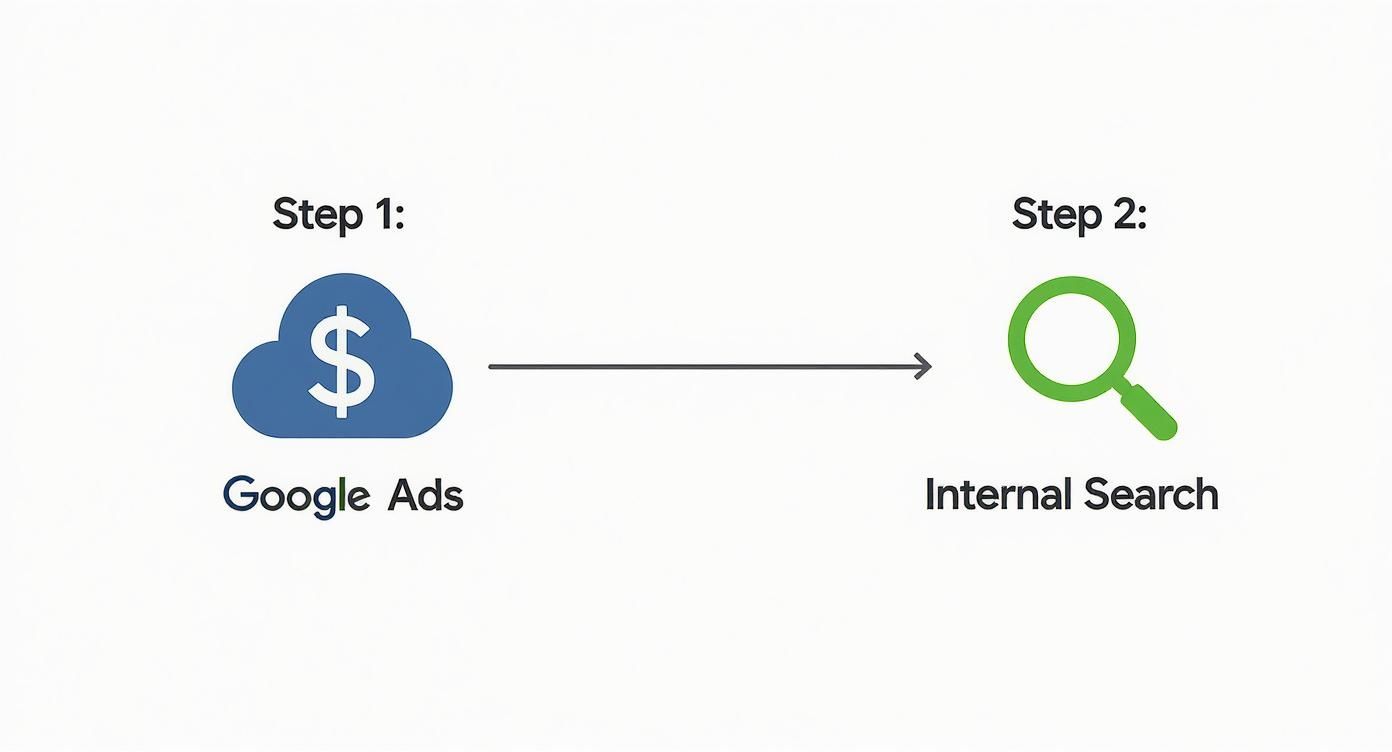
This process shows how insights from Google Ads and your own site search can create a powerful feedback loop for your organic strategy.
By weaving these different data sources together, you’re creating a powerful, multi-faceted strategy. You're no longer flying blind or relying on a single metric. Instead, you're using a whole collection of clues to build a comprehensive picture of what your audience is looking for. This allows you to create content and optimize your pages with confidence, even when the exact keyword is hidden. Of course, an important part of this is knowing how to determine search volume for keywords so you can prioritize your efforts on topics that will actually drive meaningful traffic.
Of course, even when you get the hang of working around missing keyword data, a few questions always seem to pop up. Let's dig into some of the most common ones we hear when dealing with the pesky world of Google Analytics' 'not provided' keywords.
Can Any Tool Truly Unlock Not Provided Data?
The short answer? Nope.
Ever since Google started encrypting search queries to protect user privacy, the original keyword data is locked down at the source. That means no third-party tool can just waltz in and decrypt the exact keyword a specific person used in a specific session on your site. It's just not possible.
So what about those tools that claim they can "unlock" this data? What they're actually doing is making some very smart, educated guesses. They pull together data from multiple places—like clickstream data, their own rank tracking software, and Google Search Console APIs—to build a model of what keywords probably sent traffic to a certain page. It's an estimate, not a direct reveal of the hidden data.
Why Do I Still Need Keyword Research?
With the direct keyword-to-session connection gone, it's fair to ask if keyword research is even worth the effort anymore. The answer is a huge yes—it's more important than ever.
Your entire SEO strategy still has to start with understanding the words and phrases your customers are using. Keyword research is the foundation for all of it. It helps you:
- Discover Topics: You get to find out what problems your audience is actually trying to solve. For a charbroiler supplier, that’s the difference between knowing customers are searching for "smoky flavor tips" versus "easy-to-clean grills."
- Understand Intent: It lets you see the difference between someone just browsing for information ("how to season a charbroiler") and someone ready to buy ("buy 36-inch gas charbroiler").
- Build Content Hubs: You can group related keywords into logical clusters. This allows you to create comprehensive, in-depth content that shows Google you're an expert on the topic.
If you skip this foundational research, you’re basically just throwing content at the wall and hoping something sticks.
The goal of modern keyword research isn't just about finding terms to sprinkle into a page. It's about getting so deep into your customer's head that you can create the absolute best, most helpful resource on the web for their problem.
How Does GSC Data Differ from Old Analytics Reports?
This is a big one. The old keyword reports we had back in Universal Analytics were session-based. You could literally see that a single user searched for "commercial countertop griddle," landed on your product page, and then completed a purchase. It was a straight line.
Google Search Console data is a completely different beast. It's aggregated and anonymized.
GSC will tell you that your website got 50 clicks from the keyword "commercial countertop griddle" over the last month. What it won't tell you is how those 50 clicks are connected to individual user sessions, bounce rates, or conversions in GA4.
Think of it this way: GSC gives you the "what" (the search query), but it doesn't give you the "who" or the "what happened next" (the user's behavior on your site). Understanding this distinction is critical for setting the right expectations for what you can and can't learn from the data.
At Charbroilers.com, we know that getting the right equipment is just as crucial as getting the right online traffic. We offer a premier selection of countertop, modular, and floor model charbroilers built to deliver that perfect smoky flavor and char-grilled texture your customers crave. Find the perfect model for your restaurant's needs at https://charbroilers.com.