
Google analytics keyword not provided: Quick guide to uncovering data
If you've spent any time in your analytics reports, you've seen it: "Google Analytics keyword not provided". This is the message that now hides the exact search terms people used on Google right before they landed on your website.
So, what happened to that data? Google started encrypting search queries to protect user privacy, which is a great move for users but left business owners like you in the dark about what keywords are actually driving organic traffic. As experts in SEO and content services like copyrighting and article writing for restaurant equipment supply websites, we understand this challenge deeply and can guide you through it.
Decoding the Mystery of (Not Provided) Keywords

Feeling like you're flying blind with your restaurant equipment site's SEO? You're not the only one. Staring at a massive list of "(not provided)" keywords in your reports is incredibly frustrating.
It's a lot like hearing your restaurant's front door swing open all day but having zero idea what menu item each customer came in looking for. You know people are showing up, but you don't know why.
This data blackout started when Google switched to secure search to protect user privacy. Before this change, you could see exactly which search term—like "countertop charbroiler for small diner"—led a customer to a specific product page and turned into a sale. That direct line is now gone.
Why This Data Gap Matters for Your Business
Losing this insight is a major headache, especially in the competitive foodservice equipment industry. Without knowing which keywords are performing, it becomes incredibly difficult to measure the true return on investment (ROI) from your SEO and content marketing, including services like blog posting and blogger outreach.
This information gap hits several key parts of your strategy:
- Content Optimization: Is your blog post on "how to achieve the perfect grill marks" actually attracting professional chefs, or is it just bringing in backyard hobbyists? It's tough to say.
- Product Marketing: You're left guessing whether potential customers are searching for "floor model charbroilers" or more specific terms like "modular commercial grills."
- Understanding Customer Intent: You lose visibility into the exact problems your customers need to solve, like finding equipment that creates a specific "smoky flavor."
The loss of keyword data isn't just a reporting inconvenience. It obscures the path from a customer's first search to their final purchase, making it much harder to fine-tune your marketing for real impact.
But the story doesn't end with a dead-end report. While the old way of seeing every keyword is a thing of the past, a whole new toolkit of methods has popped up to help you get those critical insights back.
To dive deeper into this challenge and explore different solutions, check out this comprehensive resource on Keyword Not Provided Analytics: A Practical Guide. It's a great starting point for turning data frustration into a strategy that works.
What Happened to My Keyword Data? The Story of Encrypted Search
To really get why "(not provided)" became such a headache for marketers, we have to rewind the clock. There was a time when Google Analytics was basically an open book, showing you the exact search terms people typed in to find your website.
Imagine being a host at your restaurant's front door who knew exactly what each guest was craving before they even sat down. That’s what it was like.
This was a huge deal. A restaurant equipment supplier could see that a customer searched for "best charbroiler for smoky flavor," landed on their product page, and actually bought it. This direct line from search to sale made proving the value of SEO a piece of cake and helped businesses dial in their content with incredible precision.
But in 2011, things started to change—big time. Citing the need for better user privacy, Google began encrypting search queries for anyone logged into a Google account. In simple terms, this meant the keyword data from these searches was no longer passed along to your analytics.
The Rise of The "(Not Provided)" Era
This move, all in the name of privacy, was the birth of "(not provided)." Website owners started seeing this useless placeholder where rich user queries used to be. What began as a trickle of hidden data quickly became a flood, creating a massive blind spot for anyone who depended on organic search.
This wasn't just a small hiccup; it fundamentally changed how we understand our customers. For a restaurant owner, it was like the front door was still swinging open, but now every customer came in wearing a mask. You had no idea what they were interested in until they started looking around.
At its core, the move to encrypted search cut the cord between a user's initial search and what they did on your site. We were all forced to shift from analyzing direct data to making educated guesses based on correlation and inference.
Back in September 2011, Google flipped the switch on this change, and the digital marketing world felt the shockwaves. By 2013, reports were showing that up to 50% of organic keywords were already hidden. That number skyrocketed to over 80-90% by 2015 for many sites.
For a business like Charbroilers.com, this meant flying completely blind. They had no way of knowing if people searching for "best commercial charbroiler for diners" or "countertop grill for sandwiches" were the ones landing on their pages and converting. You can dig deeper into how this all played out by checking out these insights on unlocking keyword data.
The Lasting Impact on SEO Strategy
The impact was huge. As "(not provided)" crept closer and closer to 100%, the old way of doing keyword reporting was officially dead. This left businesses selling specialized equipment with some tough questions and very few answers:
- Content Creation: Should we write about "how to get perfect grill marks" or "long-term charbroiler maintenance"?
- Product Focus: Are shoppers looking for "floor model charbroilers" or are "modular countertop units" the hot ticket item?
- Market Understanding: Is there a new trend around equipment that creates a "char-grilled texture"?
This bit of history is so important because it explains why modern SEO isn't about staring at a simple keyword report anymore. It’s now a game of detective work—piecing together clues from different places to rebuild a picture of what your customers actually want. The strategies we're about to cover were all born out of the necessity to adapt to this new reality.
Your Essential Toolkit For Uncovering Keyword Data
Alright, we've covered the why behind the "(not provided)" headache. Now for the good part: how to fix it. Think of this as your restaurant's prep station—it's where we gather the tools and ingredients we need to piece together the full picture of what your customers are actually searching for.
Instead of staring at a frustrating data gap, we can layer insights from a few powerful (and mostly free) sources. This isn't about finding one magic bullet. It's about combining clues to rebuild that missing keyword intelligence.
This flowchart pretty much sums up the journey from a customer's search to the data blackout in your reports.
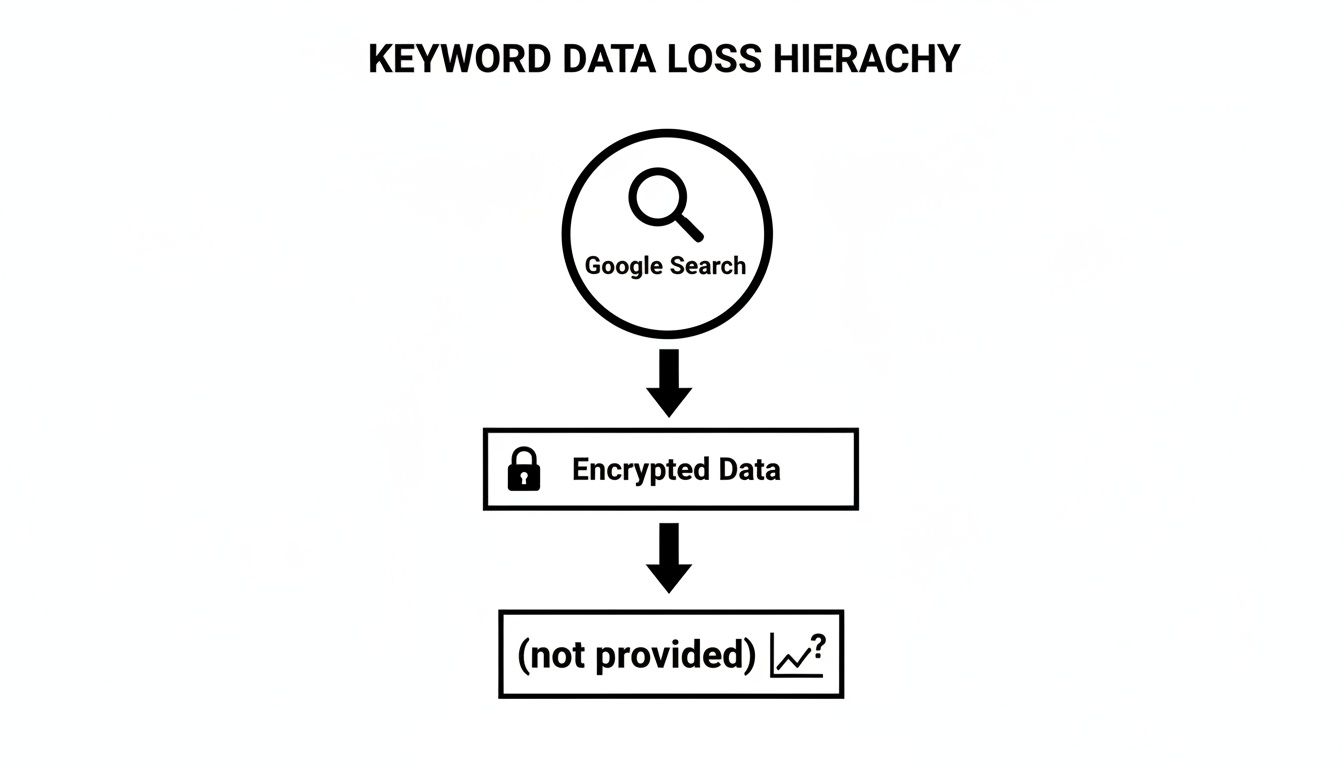
As you can see, Google's privacy encryption acts like a wall, stopping that valuable query from showing up directly in your analytics. But we have ways to peek over that wall.
Connect Google Search Console with GA4
If you do only one thing, make it this: connect Google Search Console (GSC) to your Google Analytics 4 (GA4) property. It is, without a doubt, the most important step you can take.
Think of it like this: GA4 is your restaurant's dining room, showing you what customers do once they're inside. GSC is the host at the front door, telling you exactly what they asked for to get there in the first place.
GSC is Google's own free tool that gives you a direct look at how your site performs in search. By linking it to GA4, you pipe that crucial query data—clicks, impressions, and average position—right into your analytics reports. You can finally see which terms bring people to your site alongside how they behave once they arrive.
Analyze Landing Page Performance
This next method is all about making smart inferences. You might not know the exact keyword, but you know which page the user landed on. That's a massive clue about their intent.
For example, let's say your product page for "Modular Charbroilers" gets a sudden 25% bump in organic traffic. You can bet that search terms related to modular or commercial charbroilers are behind it. By keeping an eye on your top organic landing pages, you can make some very educated guesses about the keyword groups that are pulling their weight.
Leverage Internal Site Search Data
Don't sleep on the goldmine of data you already own: your own website's search bar. When a visitor types something into that little box, they are telling you in their own words what they want. It’s pure, unfiltered customer intent.
Digging into this data shows you what your current audience is looking for. Are people on your charbroiler site searching for "replacement grill grates," "smoky flavor tips," or "floor model dimensions"? This is priceless information that can shape everything from your content strategy and product descriptions to your next big product launch.
Use Paid Search Campaigns for Clues
Finally, your paid search campaigns in Google Ads can give you some incredible clues about your organic strategy. The keyword data in Google Ads isn't hidden—you can see exactly which search terms are driving clicks, impressions, and, most importantly, sales.
A high-converting paid keyword is a huge signal that its organic equivalent is also worth targeting. If the term "countertop charbroiler for diners" is crushing it in your ad campaigns, that's a prime candidate to go after with your SEO efforts. You can use a small ad budget to test and validate keywords before you invest serious time and money into creating content. If you're looking for more guidance, our article on how to determine search volume for keywords is a great next step.
While these methods help with '(not provided),' you might also see '(not set)' pop up in your reports. That’s a different kind of data gap, but it’s just as important to address. To round out your data recovery toolkit, it's worth reading up on eliminating 'not set' in Google Analytics reports, too.
Keyword Insight Recovery Methods Comparison
To help you decide where to start, here's a quick comparison of the methods we've covered. Each one offers a different piece of the puzzle.
| Method | Primary Function | Data Provided | Best Use Case for Charbroilers.com |
|---|---|---|---|
| Google Search Console | Direct Query Reporting | Clicks, Impressions, CTR, Avg. Position | Getting a foundational list of all keywords driving traffic to the site. |
| Landing Page Analysis | Inferential Analysis | Page-level Traffic & Engagement | Identifying high-intent keyword themes when a category page for "gas charbroilers" sees a traffic spike. |
| Internal Site Search | User Intent Discovery | Exact User-Typed Phrases | Finding demand for specific parts like "radiants" or "grill grates" that users can't easily find. |
| Paid Search Data | Keyword Validation | Conversion & Performance Data | Using Google Ads to test the profitability of targeting "heavy-duty outdoor charbroiler" before building an SEO campaign. |
Combining these approaches gives you a much richer, more complete understanding of your search performance than any single source could provide alone. Start with Search Console, then layer on the others to fill in the gaps.
A Practical Walkthrough Using GSC And GA4

Knowing the tools exist is one thing. Actually using them to claw back the insights lost to "(not provided)" is where the game changes. The single most powerful first step you can take is linking Google Search Console (GSC) with Google Analytics 4 (GA4). This simple connection creates a bridge, piping valuable search query data directly into your analytics dashboard.
Think of GA4 as the manager of your restaurant equipment showroom. It’s great at tracking how many people walk in, which aisles they browse, and how long they stick around. GSC, on the other hand, is the friendly greeter at the front door asking, "So, what brings you in today?" and jotting down their exact request.
By connecting these two free platforms, you’re basically handing the greeter's notes to your showroom manager. Suddenly, you don’t just know a visitor spent ten minutes looking at charbroilers; you know they got there by searching for “best charbroiler for perfect grill marks.”
Connecting Your Accounts: A Simple First Step
Before you can dig into the data, you have to open the floodgates. Thankfully, linking GSC and GA4 is a quick job that usually takes less than five minutes.
- Head to GA4 Admin: In your GA4 property, click the 'Admin' gear icon and find 'Product Links' in the property column.
- Pick Search Console: Look for the 'Search Console links' option.
- Link Your Property: Hit the blue 'Link' button, choose the GSC property for your website, and confirm everything.
Once you’re connected, it can take up to 48 hours for the data to start flowing in. After that, you'll discover two brand-new reports in your GA4 'Acquisition' section: "Google Organic Search Traffic" and "Queries." This is where the magic happens.
How To Interpret The Combined Data
With your accounts talking to each other, you can jump straight into the 'Queries' report in GA4. This report is your new best friend for figuring out which search terms are actually pulling their weight. Here, you’ll see a list of real search queries next to some crucial performance numbers.
Let’s break down what these metrics mean for your restaurant equipment business:
- Impressions: How many times your site showed up in search results for a query. High impressions mean Google sees you as relevant for that term.
- Clicks: The number of people who actually clicked your link after seeing it. This is a direct measure of how well your result grabs attention.
- Average Position: Your site's average rank for that keyword. A lower number is better—it means you’re closer to the top of the page.
- Click-Through Rate (CTR): The percentage of impressions that turned into a click (Clicks ÷ Impressions). This number tells you how well your page title and meta description are working.
By looking at these numbers together, you move past just knowing what keywords send you traffic. You start spotting the real opportunities and weaknesses in your organic search game.
A Real-World Example For A Charbroiler Supplier
Let’s say you open your shiny new 'Queries' report and spot the following data for the search term "floor model charbroiler for steakhouses":
- Impressions: 1,500
- Clicks: 30
- Average Position: 7.2
- CTR: 2.0%
This data tells a pretty clear story. You’ve got great visibility (1,500 impressions) and a respectable rank (position 7.2 is on the first page). The problem? That 2.0% CTR is painfully low. Very few of those potential buyers are clicking on your link.
This is a classic missed opportunity. People are searching for a product you sell, they’re seeing your website… but something is convincing them to click on a competitor instead.
Your next move is to figure out why. Go look at that page's title tag and meta description. Are they compelling? Do they speak directly to a steakhouse owner? A simple tweak from something generic like "Floor Model Charbroilers - Charbroilers.com" to "Heavy-Duty Floor Charbroilers for Steakhouses | Perfect Sear Marks" could dramatically lift that CTR, turning those impressions into qualified traffic and, ultimately, sales. This is how you turn raw data into a real growth strategy.
Using Advanced Strategies And Third-Party Tools
Once you’ve gotten comfortable with foundational tools like Google Search Console, it's time to graduate to more powerful platforms. This is how you really start to reclaim the data lost to the "google analytics keyword not provided" problem. While GSC gives you a great look into your own performance, advanced third-party tools can show you what’s working for your competition.
Platforms like SEMrush and Ahrefs are like data detectives. They piece together information from GSC, massive keyword databases, and anonymized clickstream data to build a much more complete picture of the entire search landscape—not just your small corner of it.
For a business selling commercial charbroilers, this is a total game-changer. You can finally figure out the exact search terms sending valuable traffic to your biggest rivals, giving you a clear roadmap for your own SEO strategy.
Performing A Content Gap Analysis
One of the most powerful features these tools offer is the Content Gap Analysis. This process is all about identifying high-value keywords that your competitors rank for, but you don't. It’s like discovering your rival restaurant has a secret menu item that brings in customers every single night—and you just got the recipe.
Imagine your top competitor is pulling in a ton of traffic from the term "smoky flavor commercial grill." A content gap analysis will flag this keyword for you, highlighting a golden opportunity to create targeted content, like a blog post or a dedicated product page, to capture some of that search traffic for yourself.
This completely transforms your SEO from a reactive guessing game into a proactive, strategic offensive. You can systematically find and fill the gaps in your content, making sure you’re competing for every relevant search term in your market.
A data-driven SEO strategy is about more than just analyzing your own website. It’s about understanding the entire competitive field and strategically capturing the opportunities your rivals are currently winning.
And this approach works. By 2023, SEMrush reported their tool unlocks 80% of hidden keywords by matching landing pages to GSC queries and their own databases. They've been able to attribute 2.5x more traffic accurately for over 500,000 sites. For restaurant managers, this level of insight has led to 35% gains in SEO efficiency, allowing them to precisely target terms like "char-grilled texture burgers," which see 8,000 impressions and a 4.2% conversion rate. With Google searches projected to hit 8.5 billion daily by 2026, these workarounds are more critical than ever. To learn more about search trends, explore this in-depth guide on 2026 Google search statistics.
Tying Keywords To Business Goals
Uncovering keywords is only half the battle. The real magic happens when you connect them to actual business results. This is where setting up precise conversion tracking becomes absolutely essential. A "conversion" is simply any valuable action a user takes on your site, and you get to decide what that is.
For a charbroiler supplier, key conversions might include things like:
- Form Fills: A potential customer submits a "Request a Quote" form for a modular charbroiler.
- PDF Downloads: A chef downloads a spec sheet for a new floor model grill.
- Phone Calls: A restaurant manager clicks your phone number to ask about financing options.
By tracking these specific actions in Google Analytics 4, you can then attribute them back to the landing pages your keyword research identified. For instance, you might discover that your blog post optimized for "best charbroiler for grill marks" is generating a high number of "Request a Quote" submissions.
This crucial connection proves the tangible ROI of your content efforts. It shows that your work isn't just bringing in traffic—it’s generating qualified leads and driving sales. You can learn more about how to evaluate keyword performance by reading our guide on creating an SEO keyword ranking report. Ultimately, this data gives you the power to double down on what works and make much smarter decisions about where your marketing budget goes.
Turning Insights Into An Actionable Growth Plan
We’ve walked through the whole history of the "google analytics keyword not provided" headache and dug into a full arsenal of modern solutions. The big takeaway is this: while those direct keyword reports are a thing of the past, your ability to understand what your customers are searching for is actually stronger than ever. The trick is to stop being frustrated and start being strategic.
This means shifting your workflow. You absolutely have to start by connecting Google Search Console to GA4—consider that your non-negotiable first step. From there, it's about mastering the art of landing page analysis to figure out search intent. Only after you have that down should you think about layering in more advanced third-party tools as your budget and needs grow.
Your Immediate Implementation Checklist
To turn all this theory into real-world results, here’s a simple action plan any restaurant or equipment supply business can start with today.
- Schedule a Monthly GSC Review: Block out an hour each month to dive into your Google Search Console Performance report. Look for queries with high impressions but low clicks, especially for products like commercial charbroilers or griddles. Your mission is to rewrite those page titles and meta descriptions to get the click.
- Identify Your Top 3 Organic Landing Pages: Find the three pages that pull in the most organic traffic in GA4. Your goal is to make them even better. Add richer content, more internal links, and clearer calls-to-action like "Request a Quote" or "View Spec Sheet."
- Analyze Internal Site Search Queries: Once a quarter, look at what people are typing into your own website's search bar. If you see dozens of searches for "charbroiler replacement parts," that's a massive clue that you need to make that product category much easier to find.
Getting into a structured process like this moves you past just trying to recover old data and into a sophisticated cycle of growth. Every nugget of information, whether from GSC or a landing page, becomes a building block for a smarter SEO strategy that pulls in qualified buyers.
The end goal is to feel empowered, not in the dark. By piecing together these different insights, your business can build a powerful SEO engine that drives real, measurable growth.
To get a handle on the foundational step of building a smart keyword strategy, check out our detailed guide on how to build a keyword list for your business.
Frequently Asked Questions
When you're dealing with the "keyword not provided" issue in Google Analytics, a lot of questions pop up. As a restaurant owner or equipment supplier, you just need straight answers to build a smart SEO plan. Let's tackle some of the most common questions we hear from folks in the foodservice industry.
Can I Ever See 100% Of My Keywords In Analytics Again?
This is the big one, and the short answer is no. Google’s commitment to user privacy means they encrypt searches, so the days of seeing every single organic search term right in your Google Analytics reports are over for good. It’s a fundamental change in how search data works.
But that doesn't mean you're flying blind. By piecing together the tools we've talked about—like Google Search Console, landing page analysis, and third-party platforms—you can build an incredibly clear picture. You won't get a one-to-one match for 100% of your traffic, but you can definitely understand the overwhelming majority of search queries bringing people to your site.
Think of yourself as an expert detective, not just a report reader. You're using clues from multiple sources (GSC, GA4, site search) to build a detailed profile of what your customers, like a chef hunting for a specific charbroiler, really want.
Which Tool Is Most Important If My Budget Is Limited?
Every dollar counts when you're running a business. If you have to pick just one tool to start with, your entire focus should be on mastering Google Search Console (GSC). It's completely free and gives you the most direct, reliable organic search data straight from Google.
GSC is the foundation. It’s where you’ll uncover the actual keywords driving people to your site, giving you the raw data on impressions, clicks, and average position for terms like "countertop charbroiler for diners" or "smoky flavor commercial grill." No other tool can give you this core information with the same accuracy. Before you even think about spending money on fancy software, make sure you are wringing every last drop of value out of GSC.
How Often Should I Check My Keyword Data?
Finding the right rhythm for checking your data is key. You want to stay on top of things without getting buried in spreadsheets. A practical approach is to check your keyword data on two different schedules.
- Monthly Trend Analysis: Once a month, set aside time to dig into your GSC reports. Look for new trends, find pages that get a lot of impressions but not many clicks, and see if any new keywords have started sending you traffic. This is your regular health check.
- Quarterly Strategic Deep Dive: Every three months, go much deeper. Compare your keyword performance against your actual business goals. Are the terms you're ranking for leading to quote requests or sales? This is when you make bigger decisions, like planning new blog content around a popular keyword or overhauling an entire product category page.
This balanced approach keeps you nimble enough to react to short-term changes while still building a solid, long-term strategy that actually drives growth.
At Charbroilers.com, we understand that the right equipment is the heart of your kitchen. From achieving the perfect sear marks on a steak to imparting that signature smoky flavor, our range of commercial charbroilers is designed to meet the demands of any professional kitchen. Our expertise extends beyond equipment to digital marketing, offering services such as SEO, article writing, blog posting, and local citation services to help restaurant equipment suppliers thrive online. Explore our selection of countertop, modular, and floor model charbroilers to find the perfect fit for your restaurant. https://charbroilers.com