
How to Create a Business Listing on Google: A Restaurant Equipment Supplier's Guide
To get your business listed on Google, the first step is signing up for a free Google Business Profile. Think of it as your digital storefront—it’s what pops up in Google Search and Maps when potential customers are looking for restaurant equipment suppliers nearby. You'll enter your basic business info, pick a category, and then verify your location to get access to all the good stuff.
Your Business's Digital Front Door
Before we jump into the how-to, let's talk about why this one profile is such a big deal. Your Google Business Profile is basically the digital welcome mat for your business. When a restaurant owner searches "commercial kitchen suppliers near me," your listing is very often the first thing they see. It's their first interaction with your brand.
It’s so much more than just a pin on a map. A well-managed profile is a powerful tool that drives real customers to your showroom or website. It can fill your sales pipeline, show off your featured products, and build trust with buyers before they even make a call.
The Power of Local Visibility
A strong Google listing is the foundation of any good local marketing plan. It's what separates you from the competition when a potential buyer is deciding where to source their equipment. Get it right, and you're a top result. Get it wrong, and you're practically invisible.
The competition online is no joke. As of early 2025, there are over 215 million Google Business Profile listings worldwide. Food service, retail, and B2B services make up a massive portion of them. The good news? 79% of profiles are verified, and those that are see an average of 21,643 views a year and 200 clicks every month. That’s about 105 people heading to your website.
Here’s how that visibility helps your business in the real world:
- More Foot Traffic: Your profile shows up in the local map pack, guiding nearby restaurant owners right to you.
- Builds Credibility: A complete, active profile with great reviews tells both Google and customers you're a trustworthy choice.
- Drives Direct Action: It lets buyers call you, visit your website, or get directions with a single tap.
A huge mistake I see suppliers make is treating their profile as a set-it-and-forget-it task. The ones who really win are constantly updating photos of new equipment, responding to every review, and using Posts to share promotions. That activity signals to Google that you're active and relevant.
Let's dig into the essential parts of your profile and why each one matters for bringing in more customers.
Key Profile Components and Their Impact on Buyers
This table breaks down the core elements of your Google Business Profile and explains how each one directly helps you attract more customers.
| Profile Component | Why It Matters for Your Business | Direct Impact |
|---|---|---|
| Business Name & Address | This is the absolute basic. Accuracy here ensures people can actually find you. | Guides customers to your showroom; builds foundational trust. |
| Phone Number & Website | Provides direct lines for sales inquiries, questions, and online orders. | Increases direct sales calls and online orders. |
| Photos & Videos | Showcases your showroom, product inventory, and staff. Buyers want to see the equipment. | Entices new buyers and sets expectations. |
| Customer Reviews | Social proof is everything. Positive reviews build trust and credibility. | Influences purchasing decisions and boosts local ranking. |
| Hours of Operation | Prevents frustration. Nothing worse than a customer showing up to a closed door. | Drives traffic during open hours and improves customer experience. |
| Products & Services | Lets potential customers see what brands and equipment you offer before they even visit. | Attracts buyers looking for specific equipment like commercial ranges or refrigerators. |
Each piece works together to create a compelling snapshot of your business, making it easy for customers to choose you over the competition.
Building Your Foundation for Success
To really get the most out of your profile, you need a smart strategy from the start. This guide will walk you through everything, from the initial setup to the little tricks that get your business noticed.
Mastering your Google Business Profile is a key piece of a larger local SEO puzzle. For a complete look at what else you should be doing, check out our comprehensive local SEO checklist to make sure you've got all your bases covered.
By focusing on accurate information and engaging content, you can turn a simple online listing into your best tool for bringing in new customers. The next sections will show you exactly how to do it, step by step.
Alright, let's get your business on the map—the right way. This is your hands-on guide to setting up your Google Business Profile from the ground up. We'll walk through the whole process, making sure you nail the fundamentals to avoid those frustrating little mistakes that can delay your listing from going live.
First things first, head over to Google's Business Profile creation page. You’ll need a Google account, and trust me on this, it's best to use one specifically for your business, not your personal Gmail. This keeps everything clean and makes it way easier to give access to your marketing person or a partner later on.
Once you’re in, the very first thing you'll see is the business name field. It seems straightforward, but this is a critical spot where a surprising number of owners trip up.
Nailing Your Business Name and Category
Your business name on Google has to be your actual, real-world business name. I can't stress this enough. It should be exactly what's on your storefront sign, your business license, and anywhere else your brand officially lives. Don't be tempted to stuff it with keywords like "Best Restaurant Equipment in Town" or your city's name. That’s a fast track to violating Google's guidelines and could get your profile suspended before you even start.
So, if your business is called "Pro Kitchen Supply," that’s exactly what you should enter.
- Correct: Pro Kitchen Supply
- Incorrect: Pro Kitchen Supply - Best Commercial Ovens in Springfield
After your name, you'll pick a business category. This is arguably the most important piece of the puzzle for showing up in local searches. Your primary category needs to be the single best description of what you are.
Put yourself in your customer's shoes. Would they search for a 'Restaurant Supply Store' or a more generic 'Equipment Supplier'? The more specific you can be, the better Google can connect you with people who are ready to buy. A study actually found that 86% of profile views come from discovery searches (like "commercial refrigerators near me"), not from people typing in your exact business name.
Picking the right primary category is non-negotiable for visibility. If you specialize in baking equipment, choosing 'Bakery Equipment & Supplies' over the broader 'Restaurant Supply Store' will attract more qualified, high-intent customers who are specifically looking for what you offer.
Once your primary category is locked in, you can add secondary ones. This is your chance to show the full scope of what you do. For a restaurant equipment supplier, you might add things like:
- Commercial Refrigeration Supplier
- Kitchen Supply Store
- Used Restaurant Equipment Store
- Bar Equipment & Supplies
These extra categories give you more shots at showing up in different searches without muddying the waters of your main specialty.
Inputting Your Core Business Information
With your name and categories sorted, it's time to add your core contact and location details. Every piece of information here must be 100% accurate and consistent with what you have on your website and other online directories, like your local citations. Any discrepancies can confuse both customers and Google.
First up is your address. If you're a classic brick-and-mortar supplier where people come to your showroom, you’ll enter your physical street address. Google will then ask you to place a pin on a map to confirm the exact spot, which is super important for accurate directions.
But what if you run an online-only business or a service that delivers and installs equipment? In that case, you'll set yourself up as a Service Area Business. You can list the specific cities or zip codes you serve, and you'll have the option to hide your physical warehouse address from the public map. This way, your service radius shows up, not your private facility.
Next, you'll add your phone number and website. The phone number should be your main business line—the one people call for sales or service. For your website, link directly to your homepage. Small mistakes here can mean lost customers and can make you look less trustworthy in Google's eyes.
For a deeper dive into the whole setup and verification process, our guide on adding your business to Google has even more tips to make sure it all goes smoothly. Getting this foundation solid and error-free is what unlocks your profile's real power down the road. Next, you'll tackle verification, where you prove to Google that you're a real business ready for customers.
Getting Verified and Unlocking Your Profile’s Potential
So, you’ve plugged in your business’s basic info. Now comes the most important part: Google needs to confirm you’re a real business at the address you’ve claimed. This is the verification step, and it’s what unlocks all the good stuff.
Until you’re verified, you can't manage your reviews, update holiday hours, or even see who’s looking at your profile.
Think of it this way: Google is holding the keys to your digital front door. Without verification, your profile is just a placeholder you can't touch. For a supplier, that means you’re helpless when a bad review about a faulty piece of equipment pops up or when you need to post about a holiday sale. That silence can cost you customers.
This decision tree helps visualize that first choice you make, depending on whether your business has a physical spot customers can visit.
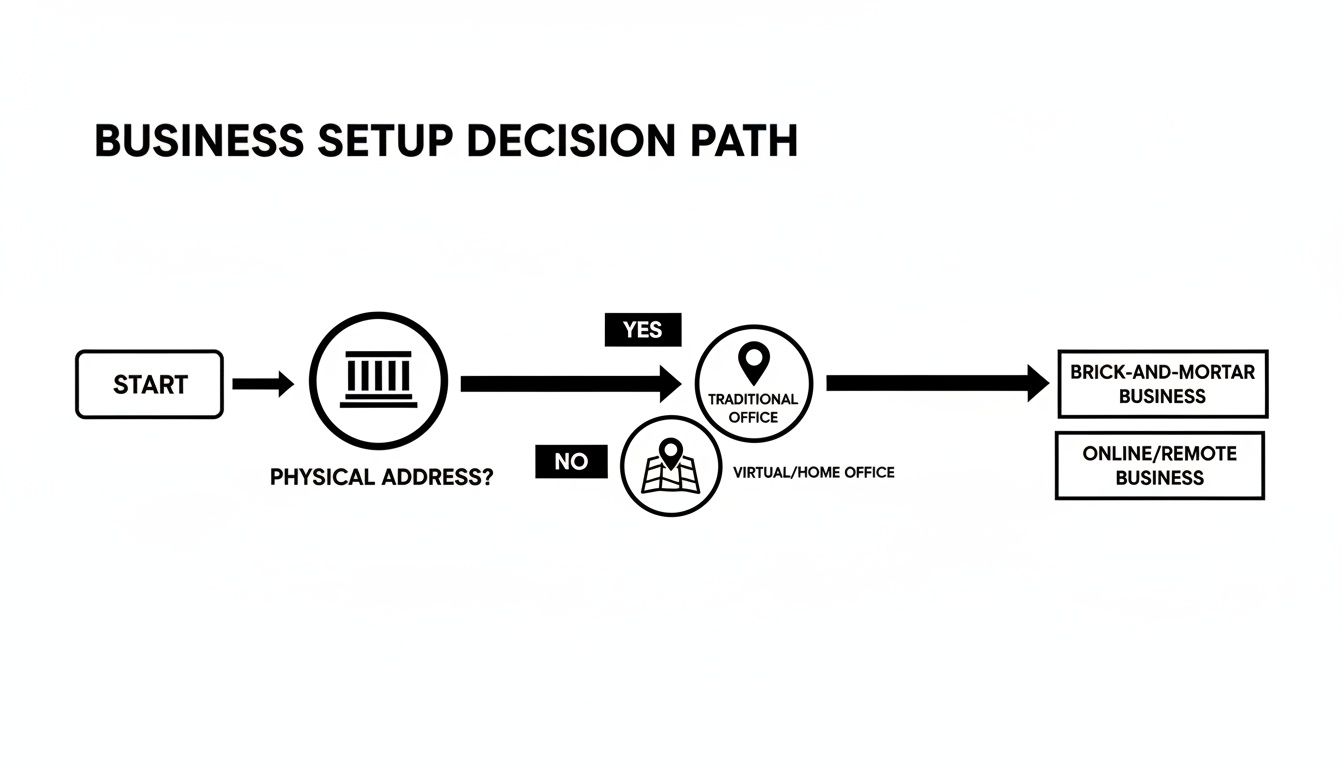
As you can see, both traditional showrooms and service-based businesses like delivery/installation services can get a listing—it's just about starting down the right path.
Navigating the Verification Methods
Google has a few ways to verify you, and the options you get depend on things like your business type and how much info Google can already find about you online.
The classic method, and still the most common, is postcard verification. Google will mail a physical postcard to your business's address. It usually shows up in five to seven business days and has a unique five-digit code inside.
When it arrives, you just log back into your profile and pop in the code. A pro tip from experience: tell your staff it’s coming. These postcards look a lot like junk mail and get tossed in the trash all the time, forcing you to start the waiting game all over again.
In some cases, Google offers quicker options:
- Phone or SMS Verification: You'll get an automated call or text to your business phone number with a verification code.
- Email Verification: A code gets sent to your business email, but it usually has to be on a domain that matches your website (like sales@yourequipmentsupply.com).
- Video Verification: This one is getting more popular. You might be asked to record a quick video showing things like your storefront signage, business license, and even warehouse inventory to prove you're a real, operating business.
Verification isn't just a box to check—it's everything. An unverified profile is practically invisible. Google trusts verified profiles more, which means they are far more likely to show up when a customer searches for a new piece of kitchen equipment.
Troubleshooting Common Verification Hurdles
Sometimes the process hits a snag. If your postcard hasn’t shown up after a couple of weeks, don't sweat it. Just log back into your profile and request another one. Before you do, make absolutely sure the address is perfect, down to the suite number.
If you keep running into problems—maybe a video verification fails or the postcard seems lost in the mail—your next step is to contact Google Business Profile support.
If you've done everything right and you're still stuck, the issue might be something deeper. For anyone wondering why your business isn't showing up on Google even after you think you're verified, our guide can help you diagnose the problem.
Getting through this phase is critical. Once that "Verified" checkmark appears, you have full control to polish every detail, talk directly with your buyers, and start turning those online searches into actual customers.
Optimizing Your Listing to Attract More Buyers
Getting your profile verified is like being handed the keys to your new showroom. But now, you have to actually stock the shelves, set up the displays, and make it somewhere people want to shop. Optimization is what turns that key into an engine that drives real business.
A bare-bones profile might get you on the map, but a fully fleshed-out one is what gets buyers in the door. This is where you stop just existing online and start actively pulling customers away from your competition.
Think of your verified profile as a blank canvas. It’s time to paint a picture so compelling that a buyer has no choice but to contact you. Every detail you add is another brushstroke that makes your supply business look more appealing than the place next door.
Crafting a Compelling Business Description
You get 750 characters for your business description—make every one count. This is your digital elevator pitch, a golden opportunity to tell your story and sprinkle in the keywords buyers are searching for. Don't just say you're a supplier; describe the value you provide.
Instead of something generic like, "We are a local restaurant equipment supplier," try painting a picture: "Your one-stop shop for new and used commercial kitchen equipment. From high-performance charbroilers to energy-efficient refrigerators, we carry the top brands and offer expert advice to help you build a more profitable kitchen."
See the difference? This version is packed with searchable terms like "used commercial kitchen equipment," "high-performance charbroilers," and "top brands," making it infinitely more effective at catching the right kind of attention. This is a core part of effective SEO and copywriting for your business.
Showcasing Your Business with High-Quality Photos
Let's be honest, buyers want to see the equipment, and your profile's photos are their first look. A profile with no images is like a catalog with no pictures—uninspiring and easy to scroll past. Your mission is to give a customer confidence in your inventory just from looking at their phone.
Your photo gallery should be a virtual tour of everything you offer. Don't just toss up a few random shots; be strategic about it. A good mix of photos tells a complete story and sets expectations.
Here’s a practical checklist to get you started:
- High-Quality Product Photos: Get clear, well-lit shots of your featured equipment. Show off that brand-new stainless steel charbroiler or a top-of-the-line commercial mixer.
- Showroom and Warehouse: Post wide shots of your showroom floor to display your inventory and a clean, organized warehouse to build trust.
- The Exterior: A clear shot of your storefront is a must so people can spot you from the street. Snap photos during the day and again at night.
- Your Team in Action: Photos of your sales staff helping customers or your technicians at work add a human touch that helps build a real connection with potential buyers.
A huge mistake I see all the time is suppliers using low-quality, dark, or blurry photos. Your smartphone can take incredible pictures, but you have to make sure the lighting is good and the lens is clean. A small investment in quality photography will absolutely pay for itself in new customers.
Highlighting Key Attributes and Services
Beyond your description and photos, Google lets you add specific attributes to your profile. Think of these as searchable tags that help you pop up when customers are looking for something specific. They are incredibly powerful for attracting your ideal crowd.
For a restaurant equipment supplier, these attributes are non-negotiable. You need to go through the list in your dashboard and check off every single one that applies to your business.
Popular Supplier Attributes:
- In-store shopping
- Delivery
- Online estimates
- Wheelchair Accessible Entrance
- Free Wi-Fi
- Identifies as veteran-led
Every attribute you select acts as a filter, helping you appear in hyper-specific searches like "restaurant suppliers that offer delivery." This is how you make it dead simple for the right buyers to choose you.
Adding Your Products and Enabling Direct Contact
One of the best features for any supplier profile is the Products tab. Instead of making people click away to your website, you can showcase your top-selling equipment right there on Google. This removes a step and gives motivated buyers the info they need, right now.
You can add your products manually—with photos, descriptions, and prices—which is great for SEO as the text is searchable.
Finally, turn on features like direct messaging and call tracking. Letting a customer go from discovering you to getting a quote in just a few taps is how you capture their interest when it's at its peak. Make it easy for people to connect, and they will.
For a deeper dive into all the ways you can enhance your profile and attract more buyers, check out this comprehensive Google Business Profile optimization guide. It's a fantastic resource for mastering these finer points.
Engaging Customers Through Posts, Reviews, and Q&A

Alright, you’ve created your business listing on Google and filled it out. But the work isn't over. Not even close. A common mistake is treating your profile like a static digital sign. It should be a dynamic hub of activity that builds a real community around your business.
Think of it as the digital version of greeting customers at the door. When you’re constantly active, it signals to both Google and potential buyers that your business is thriving, reliable, and genuinely cares. Three features are your best friends here: Posts, Reviews, and Q&A.
Using these tools actively transforms your listing from a simple directory entry into a powerful communication channel. This is where services like ongoing blog posting and content writing come into play, keeping your presence fresh and engaging.
Using Google Posts to Drive Action
Google Posts are basically mini-announcements that show up right on your profile. They’re perfect for sharing timely updates, running promotions, or giving folks a behind-the-scenes peek at new inventory.
They have a short shelf life—archiving after a week—which creates a natural sense of urgency. Use them for quick, punchy messages that grab attention. These posts are your direct line to people who are actively looking at your profile, and a well-crafted one can be the final nudge that turns a curious searcher into a paying customer.
Effective Post Ideas for Suppliers:
- Promote a Sale: "This weekend only! Get 15% off all commercial charbroilers. Call now for a quote or visit our showroom!"
- Announce New Inventory: "Just in! We've got the latest line of high-efficiency commercial freezers. Stop by and see how they can lower your energy bills."
- Share a Helpful Blog Post: Link to a recent article on your site, like "5 Things to Consider Before Buying a Used Commercial Oven." This positions you as an expert.
Your Google Business Profile should be updated regularly to reflect recent changes or activities. Think of it as a mini social media page. Google loves fresh activity, so post updates as if it's a platform, not a set-it-and-forget-it listing.
Mastering Your Online Reputation with Reviews
Reviews are the absolute lifeblood of your business's online reputation. It's a fact: over 80% of consumers check out online reviews before trying a local business. Responding to every single review—good and bad—is completely non-negotiable.
For glowing praise, a simple, "Thank you so much for your kind words! We're thrilled you had a great experience and look forward to working with you again," goes a long way.
But it’s your response to criticism where you can really shine. A negative review is a golden opportunity to show your professionalism. For instance, if someone complains about a delivery issue, try a thoughtful reply like: "We're so sorry to hear about the delay with your order. That is not the standard of service we aim for. Please contact our manager directly so we can make this right."
This response owns the problem, offers a solution, and shows you care. Managing your online reputation is critical; if it feels like too much, you might even consider engaging AI reputation management consultants for specialized help.
Proactively Answering Questions with the Q&A Feature
The Q&A section on your profile lets anyone ask questions directly. But you don't have to just sit back and wait. Be proactive. You can add your own common questions and answer them yourself, effectively turning this feature into a handy FAQ page.
This simple trick saves your staff time and makes it incredibly easy for potential customers to find the info they need to choose you. Just think about the questions your sales team answers all day long, and get them on your profile.
Common Questions to Pre-Populate:
- Do you offer financing options?
- Is there parking for trucks and trailers?
- Do you deliver and offer installation?
- What is your return policy on used equipment?
- Do you buy used equipment?
By seeding this section yourself, you remove any hesitation from the customer's decision-making process. You’re showing them you've already anticipated their needs, which builds trust and makes your business the easy, obvious choice.
Got Questions About Your Equipment Supply Business's Google Listing?
Even with a perfectly tuned profile, questions are bound to come up as you manage your business's presence on Google. I've heard them all over the years. Let's walk through some of the most common ones business owners run into, with clear answers to get you back to business.
How Long Does It Take for My Listing to Show Up?
So you've built your profile and hit "verify." What now?
Typically, once you create a business listing on Google and get it verified, your business will pop up on Google Search and Maps within a few hours, maybe a couple of days at most. The verification step is the key that unlocks everything.
But remember, just being live isn't the same as ranking well. Getting that top-spot visibility in local searches takes time and consistent effort. If you're actively adding fresh photos, getting new reviews, and publishing Google Posts, you'll start to see your ranking climb over the next few weeks.
What if My Business Has Multiple Locations?
If you're running a supply chain or have more than one branch, you absolutely need to create a separate Google Business Profile for each location. Trying to cram everything into one is a recipe for disaster.
Luckily, Google's "location groups" feature makes this manageable, letting you oversee all your profiles from a single dashboard.
Never list multiple addresses or phone numbers on a single profile. It's a direct violation of Google's guidelines and can get you suspended. More importantly, it creates a confusing and frustrating experience for customers trying to find the right spot.
Giving each location its own profile is the only way to provide the specific hours, inventory highlights, and phone number that customers need.
Can I List an Online-Only or Service-Based Business?
Yes, you can! Google calls these Service Area Businesses, and the setup is designed just for operations like yours that deliver equipment or provide repair services.
When you're creating the profile, you’ll pick a main category like 'Commercial Kitchen Repair' or an equipment-specific one. Then, instead of a single address, you'll define the specific areas you serve. You can do this by listing out cities and postal codes or just by drawing a radius around your home base.
Google even lets you hide your physical warehouse address, so your map will only show the service area you cover. It's the perfect setup for any business that goes to the customer.
What Are the Most Important Ranking Factors?
Google's local search algorithm boils down to three main things:
- Relevance: How well does your profile match what the user is searching for? This is why choosing super-specific categories like 'Commercial Oven Supplier' is so much better than just 'Restaurant Supplier.' This is where strong copywriting and SEO come in.
- Distance: This one’s simple—it's how close your business is to the person searching. Proximity is a huge piece of the local search puzzle.
- Prominence: This is all about how well-known your business is online. Google figures this out by looking at the number and quality of your reviews, links from other websites (like through blogger outreach to food industry sites), and your overall digital footprint from local citation services.
For equipment suppliers, the takeaway is clear: earning great reviews and staying active online are your best tools for boosting prominence and climbing those local rankings. Your efforts here directly impact how many new leads you get.
Managing your online presence is just as crucial as stocking the right inventory. For restaurant equipment suppliers who want to dominate local search, the right equipment is what your customers are looking for. Charbroilers.com provides top-tier commercial charbroilers that restaurant owners need to create the perfect sear and smoky flavor their customers crave. Explore our selection to find the ideal models to stock in your showroom at https://charbroilers.com.