
A Restaurant Equipment Supplier's Guide to Dominating Businesses on Google Maps
When a restaurant owner searches 'commercial charbroiler suppliers near me,' are you confident they'll find you? For any restaurant equipment supplier today, your business presence on Google Maps isn't just another online listing. It's the single most critical channel you have for pulling in immediate leads.
Think of it as your digital front door, always open to potential B2B customers who are making purchasing decisions on the spot.
Why Google Maps Is Your Digital Front Door
Picture a restaurant manager trying to source a new convection oven. What do they do? They pull out their phone, pop open Google Maps, and search for something like "restaurant supply store with commercial ovens." In seconds, a map full of options appears, showing off supplier locations, star ratings, and business hours. This isn't some rare scenario; it's exactly how procurement decisions are made now.
Your business's profile on Google Maps is a live, interactive billboard. It’s where a potential customer sees a photo of your showroom, checks if you’re open for pick-up, and scans recent reviews to see if your service is reliable. They can do all of this without ever even thinking about visiting your website.
The Modern Buyer's Journey
The path from an equipment need to a purchase order is shorter than ever. A well-built Google Business Profile gives B2B buyers everything they need to pick you over a competitor just down the street. It all comes down to a few key things:
- Visual Appeal: High-quality photos of your products, your warehouse, and your showroom can absolutely be the deciding factor.
- Social Proof: A high star rating and a stream of positive reviews from other businesses build instant trust and credibility.
- Convenience: Accurate hours, a precise location, and a clickable phone number make it easy for them to take the next step.
This whole ecosystem is incredibly powerful. A staggering 40% of all Google searches carry local intent, which means these listings are direct gateways to real, paying customers. Businesses that let this slide risk becoming practically invisible.
And the numbers don't lie. 86% of people look up a business's location on Google Maps before they visit. Taking the time to fully claim and optimize your profile can seriously boost your ranking power, directly influencing whether you show up in the coveted Google Local 3-pack—that little box of top results that appears in 93% of searches with local intent. You can dig into these Google Business Profile statistics yourself and see just how big the opportunity is.
A weak or incomplete Google Maps presence is like having a supply warehouse with no sign on the door. People will drive right by, completely unaware of the quality equipment waiting inside. It's your single greatest tool for turning local searchers into loyal customers.
Claiming Your Digital Real-Estate on Google Maps
Before a single customer walks through your door, they need to find you online. Think of your Google Business Profile as the front door to your digital location—you need the keys to open it. Claiming your profile is that critical first step.
Without it, your business is just a ghost listing floating on the map. You can't control the information, you can't engage with buyers, and you're letting competitors sell to your prospects.
The process is simple. Start by searching for your business on Google. If a profile already exists (maybe Google made one, or a customer added it), you’ll see an option that says, "Own this business?" That’s your way in. If nothing shows up, no problem—you'll just create a new profile from scratch.
Seriously, this step is non-negotiable. It's the only way you can update your hours, add those photos of your top-selling equipment, and actually talk back to customers who leave reviews.
Navigating the Verification Process
Google has to be sure you are who you say you are. It’s a security step to prevent someone else from hijacking your business's profile. They have a few ways of doing this, and the options you see might vary.
Here are the most common methods you’ll encounter:
- Postcard Verification: This is the old-school, tried-and-true method. Google mails a physical postcard with a secret code to your business address. It can take up to two weeks to arrive, so triple-check that your address is perfect. Pro tip: Don't change any of your business info while you're waiting for the postcard, or it can mess up the process.
- Phone or Text Verification: Some businesses get lucky with a faster option. Google will send a code via an automated call or text message directly to your business phone line.
-
Email Verification: Similar to the phone option, you might be able to get a code sent to a business email address tied to your website's domain (think
info@yourcompany.com, not a Gmail account). - Video Verification: This one is becoming more common. You might be asked to record a quick video showing things like your storefront, branded equipment (like your commercial charbroiler setup), and proof that you're in charge, like keys or business documents.
Once you’re verified, you get full access to the dashboard. If you want a more detailed breakdown, you can learn more about how to get a Google Business listing and sidestep the common hiccups that slow people down.
Still not convinced it matters? This flowchart spells out the choice every buyer makes when they search on Google Maps.
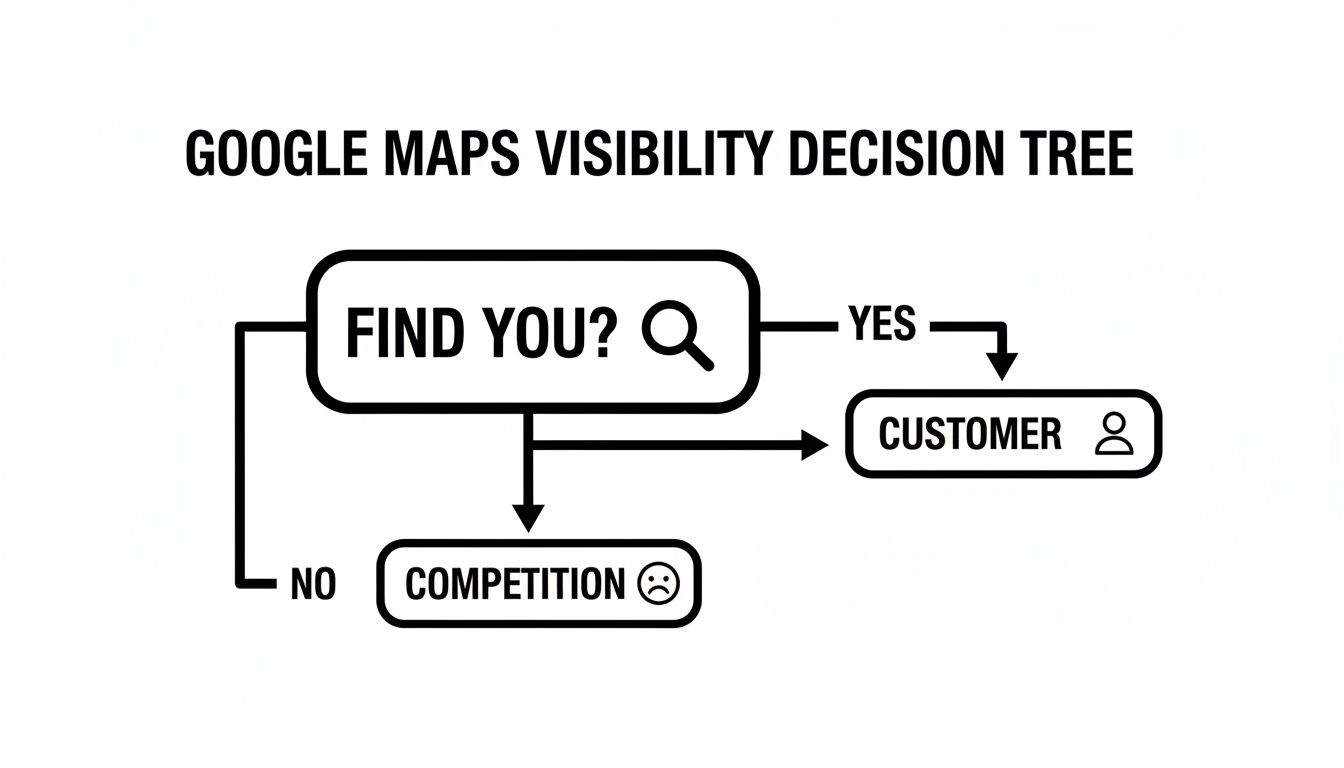
It’s a zero-sum game. If they can’t find you, they will find your competition down the street. It’s that simple.
Think of verification as signing the deed to your property. It’s the official act that gives you the power to build, renovate, and ultimately profit from your digital real estate. It’s a small administrative task with a huge return on investment.
Crafting a Profile That Attracts B2B Buyers
Getting your Google Business Profile verified is just the first step. Think of it as putting the key in the ignition—you still have to drive. An empty profile won't generate leads, so now it's time to turn that basic listing into a compelling preview of the products and services you offer.
This isn't just about being present; it's about being persuasive.
This level of detail is exactly why any local business, including suppliers, needs to be on Google Business Profile. While restaurants are known for high search volume, a well-optimized supplier profile attracts high-value B2B customers. Being verified signals you're a real business, but it's the rich content—the product photos, the posts, the detailed descriptions—that actually convinces someone to contact you for a quote. For a deeper dive, check out these Google Business Profile statistics to see how much of a difference a complete profile makes.
Choosing the Right Categories
Your first and most important move is picking the right primary category. This is the main signal you send to Google about who you are. Don't be vague. Instead of just "Supplier," get specific: "Restaurant Supply Store," "Commercial Refrigeration Supplier," or "Kitchen Supply Store."
This one choice tells Google exactly which searches you're most relevant for. It’s the main course of your profile.
But don't stop there. Secondary categories are your side dishes—they add crucial context that helps you show up in more niche searches. This is where you highlight the special features that buyers are actively looking for.
- Delivery Service: Perfect for attracting clients who need equipment shipped directly.
- In-store pickup: A magnet for local businesses that need an item immediately.
- Repair Services: Helps you stand out to restaurants looking for maintenance and support.
- Financing available: Catches the eye of buyers looking for flexible payment options.
By adding these, you cast a much wider net, ensuring you appear for searches like "commercial oven repair near me" or "restaurant equipment financing."
To make sure you've covered all your bases, here's a quick checklist of the most critical sections to complete.
| Essential Google Business Profile Sections for Suppliers |
| :--- | :--- | :--- |
| Profile Section | What to Include | Why It Matters for Suppliers |
| Primary Category | Your main business type (e.g., "Restaurant Supply Store," "Commercial Kitchen Supplier"). Be specific. | This is the #1 factor Google uses to match you with B2B searchers. Getting it right is non-negotiable. |
| Secondary Categories | Additional services like "Delivery," "Equipment Repair," "In-store pickup." | Helps you appear in more specific, high-intent searches, capturing buyers looking for exactly what you offer. |
| Business Description | A 750-character summary of your business's history, expertise, and unique selling points. | Your chance to sell your expertise and reliability, not just your products. It sets you apart from the competition. |
| Photos & Videos | High-quality images of your products, showroom, warehouse, and team. | B2B buyers want to see the quality and scale of your operation. Great visuals build trust and credibility. |
| Products | Showcase specific equipment like charbroilers, refrigerators, or ovens with photos, descriptions, and prices. | Removes a major hurdle for potential customers. They want to see what you offer before they contact you for a quote. |
Completing each of these sections gives Google—and your potential customers—a full, enticing picture of what makes your business special.
Writing a Description That Tells Your Story
Your business description is your elevator pitch. You have 750 characters to tell buyers what makes you special, so make every word count. Don't just list what you sell; describe the value you provide.
Are you a family-owned business known for outstanding customer service? Or are you a large-scale distributor with the best prices and widest selection? Use this space to paint a picture. Mention the top brands you carry, your years of experience in the industry, or what makes your service stand out from the crowd.
Your description should answer one simple question: "Why should I buy from you?" Use powerful language that highlights your unique selling points—whether it's your extensive inventory of charbroilers or your expert repair services.
Showcasing Your Business with Visuals
For equipment suppliers, photos are everything. A potential buyer is far more likely to be swayed by a high-quality photo of your well-stocked showroom than by any text you write. Your visuals are your single most powerful tool for turning a casual browser into a qualified lead.
Think of your photo gallery as a virtual tour of your operation. You'll want to prioritize a few key types of shots:
- Product Photos: This is the big one. Hire a professional or use a good camera with plenty of light. Show off the quality, features, and scale of your top-selling equipment.
- Facility Shots: Capture the overall scope of your business. Include pictures of the interior showroom, the warehouse, and any unique features that convey professionalism.
- Exterior Photos: A clear, well-lit shot of your storefront helps people recognize your location when they arrive. It’s a small detail that removes a lot of potential frustration.
- Products Tab: Don't make people hunt for your inventory. Use the "Products" tab to upload high-resolution images, descriptions, and even prices for specific items. This removes a major point of friction for potential customers and gets them one step closer to contacting you.
Turning Reviews and Posts into Your Biggest Asset
A static profile is an invisible one. To really stand out in the crowded list of businesses on Google Maps, your profile needs to be a living, breathing conversation with your customers. Don't think of it as a set-it-and-forget-it tool; it’s your business's daily billboard and customer service desk, all rolled into one.
Your profile isn't just a digital brochure. It’s your best channel for turning passive scrollers into qualified leads by keeping your presence fresh, relevant, and interactive.
Using Google Posts as Your Free Billboard
Google Posts are one of the most powerful—and most overlooked—features of your profile. These are short, timely updates that pop up right on your listing, acting like a free ad exactly when people are deciding where to buy. It's shocking, but around 60% of businesses don't use them at all, which is a huge missed opportunity when 46% of all Google searches are local.
Here’s how you can put them to work immediately:
- Announce New Inventory: "Just in: The latest line of high-efficiency commercial refrigerators. Stop by the showroom to see them!"
- Promote Special Offers: "This month only: Get 10% off all charbroiler models. Mention this post to claim your discount."
- Showcase a Product: "Did you know our top-selling convection oven cuts cooking time by 25%? Here's a look inside."
- Highlight a Service: "Offering emergency repair services 24/7. If your equipment goes down, we're here to help."
Every post you make keeps your profile active, which sends a strong signal to Google that your business is current and engaged with its community. Our blog posting and article writing services can help you create a steady stream of engaging content for your profile and website.
Mastering the Art of Review Management
Reviews are the lifeblood of your online reputation. They’re not just social proof; they directly influence roughly 10% of your local SEO ranking. From my experience, suppliers that actively manage their reviews see higher traffic and more leads. It shows both Google and potential customers that you genuinely care about the quality of your products and service.
Getting more positive feedback is your first move. Try adding a line to your invoices or sending a follow-up email after a purchase that links directly to your review page. A simple message like, "Happy with your purchase? Let us know on Google!" can make a huge difference.
But responding to criticism is just as critical. Knowing how to respond to negative Google reviews effectively can turn a bad experience into a chance to build loyalty. A thoughtful, public response shows everyone you’re listening and can actually win back an unhappy customer.
A prompt and professional response to a bad review can build more trust than a dozen five-star ratings. It shows you're listening, you're accountable, and you are committed to excellent service, even when things go wrong.
In a world where first impressions are everything, actively managed businesses on Google Maps are 2.7 times more likely to be considered trustworthy by customers. With 81% of consumers using Google to vet local businesses, your posts and review responses aren't just content—they are powerful signals of trust that directly impact your bottom line.
Advanced Tactics to Outrank the Competition
Getting beyond the basics of photos and posts is how you really start to dominate the local map pack. Once you have that solid foundation, these advanced strategies can give you a serious competitive edge, turning your profile from just another listing into a machine that brings customers through the door.
It’s time to sharpen your approach and get ahead of what other businesses on Google Maps are doing.
Proactively Manage Your Q&A Section
Think of the Questions & Answers section on your profile as a goldmine that most of your competitors are completely ignoring. Customers jump in here to ask about everything—financing options, delivery times, return policies, you name it. Instead of just waiting for those questions to trickle in, you should be seeding this section yourself.
What are the top five questions your sales team answers every single day? Go ahead and log into your Google account, pull up your own business profile, and ask those very questions. Then, immediately hop back in and answer them yourself, clearly and helpfully.
Doing this accomplishes two critical things:
- It gives potential customers instant answers to their most common questions, making it easier for them to choose you.
- It puts you in control of the narrative, ensuring the information out there is 100% accurate.
The Power of Local Citations
A huge piece of the puzzle for ranking on Google Maps is consistency. This means your business's Name, Address, and Phone number (NAP) needs to be absolutely identical everywhere it appears online. Every single mention of your business on a directory like Yelp, a review site like Capterra, or even a local industry blog is what we call a local citation.
If one site lists you as "Joe's Supply" but another has you down as "Joe's Restaurant Supply," Google's algorithm sees that as a red flag. These little inconsistencies create confusion and chip away at your local search authority. To get everything lined up, you have to build local citations with precision. Our local citation services handle this tedious but essential task, ensuring your online footprint is clean and powerful.
A consistent NAP across the web is like a chorus of voices all telling Google the same thing: "This business is legitimate, its information is reliable, and you can trust it." This trust is a direct ranking signal.
Optimize Your Products and Ordering Systems
For any supplier, the Products feature is so much more than a catalog—it's a conversion tool. Please don't just leave this section blank. Take the time to add your key products, complete with high-quality photos, detailed descriptions, and even pricing or a link to the product page on your website.
Even better, if you use e-commerce or quote request platforms, make it obvious. Use Google Posts or your business description to guide users. When a potential buyer sees exactly what they need right there on your listing, you remove all the friction. You capture their business at the exact moment they're ready to buy, which is a massive advantage over other places that make people click away to a clunky website.
Dig into Your Performance Insights
Finally, stop guessing what’s working and start using the data. Your Google Business Profile has a "Performance" tab that is packed with valuable information. This dashboard shows you exactly how customers are finding you.
You can see things like:
- The actual search terms people used to find you (e.g., "commercial refrigerators near me" or "restaurant supply downtown").
- How many people found you through a standard Google Search versus directly on Google Maps.
- The total number of phone calls, website clicks, and requests for directions your profile generated over a specific period.
Making it a habit to review this data every month helps you understand what your customers are looking for and how you can refine your SEO and content strategy. For an even deeper dive into how to rank higher on Google Maps, this guide covers even more advanced tactics. By turning these insights into action, you can make smarter decisions that lead directly to more sales.
Common Questions from Equipment Suppliers
Navigating your business's presence among the millions of businesses on Google Maps can definitely bring up a few common hurdles. Getting straight answers helps you focus on what really matters—generating leads and selling equipment.
So, let's dive into some of the most frequent questions we hear from business owners just like you.
How Long Does It Take for My Business to Show Up on Google Maps
I get this one all the time. You’ve done the work, and now you want to see the results.
Patience is a virtue, but thankfully, you won't need much of it here. After you complete the verification process, your business will typically pop up on Google Maps within 24-48 hours.
Keep in mind, though, it can sometimes take up to a week for all the features to become fully accessible and for Google to completely index your information. The best way to speed things up? Double-check that every single piece of information in your profile is complete and accurate right from the get-go.
What Are the Most Important Photos for a Supplier Profile
For a supplier, visuals build trust and credibility. A potential buyer often decides whether to contact you based on your photos alone before they even read a single review.
To make the best first impression, focus on uploading high-quality images in these key areas:
- Product Photos: This is non-negotiable. Get professional shots of your most popular, high-margin equipment.
- Showroom/Warehouse: Capture the scale of your operation. Show off your organized warehouse, your clean showroom, and the breadth of your inventory.
- Exterior: A clean, clear shot of your building helps people find you and builds brand recognition.
- Team Photos: Showing your expert staff can add a human touch and build trust in your service and expertise.
To start, aim for at least 15 compelling photos. This gives customers a full picture of the business they'll be working with. Our copywriting and blogger outreach services can help promote your business's visual story across the web.
How Should I Handle a Bad Review About My Business
First, take a deep breath. A negative review is not the end of the world. In fact, how you handle it can be a huge opportunity. Never, ever ignore it.
The best approach is to respond publicly, promptly, and professionally. It shows everyone watching that you care and take feedback seriously.
Acknowledge the customer's experience without getting defensive. Offer to resolve the issue offline—ask them to email a manager or call the business. Believe it or not, a thoughtful, human response to a bad review can build more trust with potential customers than a page full of nothing but five-star raves.
And if your profile isn't showing up at all? That's a different beast entirely. Our guide on why your business isn't showing up on Google can help you diagnose and fix the problem.
At Charbroilers.com, we know that a perfectly grilled dish starts with the right equipment. Our commercial charbroilers are designed to deliver that delicious, smoky flavor and signature char that keeps customers coming back. Find the perfect model for your kitchen and elevate your menu at https://charbroilers.com.