
Mastering Your Business Listing Google Maps
Think of your business listing on Google Maps as far more than just a digital pin on a map. It's a direct line to local customers right when they’re looking for what you offer. This profile is your virtual storefront, giving them quick answers and building trust before they even think about clicking to your website.
Why Google Maps Is Your Best Local Marketing Tool
Let’s get straight to the point. For any B2B foodservice business, your Google Maps listing is your most powerful local sales funnel. It's the modern-day Yellow Pages, but it's interactive, trusted, and something your potential customers use every single day.
Picture this: a local restaurant manager is in the middle of a chaotic dinner service when their commercial charbroiler dies. What do they do? They don't have time to browse websites. They grab their phone and search "commercial oven repair near me." This is the exact moment your Google Maps listing becomes your #1 salesperson.
Winning Business in Moments of Need
A fully built-out profile for a restaurant equipment supplier doesn't just show up in these high-stakes searches—it immediately inspires confidence. A competitor's bare-bones listing might just have a name and a number. Yours, on the other hand, can instantly show:
- High-quality photos of your service vans, your shop, and your technicians on the job.
- Dozens of glowing reviews from other local restaurants you've helped.
- Clear service details confirming you handle emergency repairs.
- Up-to-date business hours and a phone number they can tap to call you directly.
This rich, detailed presence wins you the job before the competition even gets a second look. You’re not just visible; you’re the obvious, reliable local expert. To really dig into the strategic power here, it's worth understanding why use Google My Business (the platform behind your Maps listing) as the essential tool it is.
The Staggering Impact of a Local Listing
The sheer scale of this platform is hard to overstate. With over 200 million businesses listed worldwide, Google Maps is the foundation of local discovery for billions of people.
The numbers are staggering: research shows around 80% of local searches on Maps lead to a physical visit within 24 hours. And globally, a massive 86% of customers depend on Google Maps to find local businesses. A top-notch listing isn't just nice to have; it's essential for survival.
Your Google Business Profile is the new homepage for your local business. For many customers, it provides all the information they need to make a decision without ever needing to click through to your website.
Getting the Foundation of Your Listing Right
Getting your business listing on Google Maps set up correctly right out of the gate is the single most important part of this whole game. Think of it like pouring the concrete for a new building. If the foundation is weak or crooked, everything you build on top of it will be unstable. The same goes for your Google Business Profile (GBP)—get the basics wrong, and all your future efforts will be for nothing.
Let's walk through the non-negotiable setup steps, using a real-world example of a restaurant equipment supplier to make it crystal clear.
Choosing Your Categories with Precision
Your first big decision is picking your business category. This is arguably the most powerful ranking factor for local searches because it tells Google exactly what you do. So many businesses make the costly mistake of being too generic here.
For instance, if you sell and service commercial ovens and refrigerators, you absolutely cannot use a broad category like "Appliance Store" or "Store." That’s far too general and throws you into the ring with residential giants like Best Buy or Home Depot. That's a fight you just won't win.
You have to be hyper-specific. Here’s the right way a restaurant equipment supplier should tackle it:
- Primary Category: Pick the one category that best describes your main business. "Commercial Refrigeration Supplier" or "Restaurant Supply Store" are perfect, specific choices.
- Secondary Categories: Now, layer in other relevant services you offer. You could add things like "Commercial Kitchen Equipment Supplier," "Oven Repair Service," or "Ice Machine Repair Service."
This kind of precision is what helps Google connect your business with a customer who has their wallet out, ready to buy. When a local restaurant owner searches for "walk-in cooler repair," having the right categories makes it a thousand times more likely your profile pops up.
Establishing Unbreakable NAP Consistency
Your Name, Address, and Phone number (what we in SEO call NAP) is the digital DNA of your local business. Google’s algorithm is built on trust, and it confirms that trust by cross-referencing your NAP across the entire internet.
If your GBP says you are "Joe's Restaurant Supply LLC" at "123 Main St," but Yelp has you as "Joe's Supply" at "123 Main Street," that's a red flag for Google. These tiny differences create confusion, which erodes Google's trust and can seriously tank your local rankings.
Your NAP needs to be identical everywhere online—down to the period and the abbreviation. This means your website's footer, your Facebook page, and every last online directory. Consistency is not optional; it’s the price of entry for building local authority.
Making sure your business info is correct across all these different online platforms is a fundamental part of local SEO. If you want to really get into the weeds on this, our guide on local citation building lays out a complete roadmap for getting this done right.
Demystifying the Verification Process
Before your listing can even go live, you have to get it verified. This is just Google's way of making sure you're the real owner of the business at that physical location. Without verification, you’re locked out—you can’t manage your listing, respond to reviews, or do much of anything.
The process has changed over the years, and for most businesses now, Google requires a video verification. You’ll need to pull out your smartphone and record a quick video that proves you're legit. To nail it on the first try, make sure your video clearly shows:
- Your Location: Start outside. Get the street sign and your building number in the shot.
- Business Signage: Pan over to your permanent sign that clearly displays your business name.
- Proof of Business: Walk inside and show your workspace. This could be your inventory, like crated commercial charbroilers and refrigerators. If you're a service-area business, a branded work truck and your tools of the trade are perfect.
Sometimes, the automated system might reject your video. Don't sweat it. Just carefully re-read the requirements and shoot it again, making sure the video is steady, clear, and leaves no doubt that you are who you say you are. Getting verified is the final step to unlocking the full power of your Google business listing.
Optimizing Every Detail to Win Local Customers
Getting your profile verified is like getting the keys to your new virtual storefront. Now the real work begins. It’s time to transform that basic space into a powerful magnet for new customers. A verified but empty business listing on Google Maps is a massive missed opportunity. The details you fill in next are what separate the businesses that thrive from those that just exist.
This is where you turn a simple listing into an active sales tool. Let’s break down every field you can optimize, with real, actionable examples specifically for the restaurant equipment supply industry.
Crafting a Compelling Business Description
Think of your business description as your 750-character elevator pitch. It’s a prime spot to tell potential customers who you are and why you're their best choice, all while naturally weaving in important keywords. You need to ditch the generic fluff and focus on what your target customer—a busy restaurant owner or chef—actually needs to know.
For instance, a weak description might just say: "We are a supply company that sells equipment." That tells them nothing.
A much better, fully optimized version would be: "Your trusted partner for commercial kitchen solutions in [Your City]. We are a premier restaurant kitchen outfitter, specializing in high-performance charbroilers, walk-in coolers, and commercial dishwasher installation. From initial design to emergency repairs, our expert team is here to keep your foodservice operation running smoothly."
See the difference? This version clearly states what you do and who you serve. More importantly, it’s packed with relevant keywords that help you show up for very specific searches.
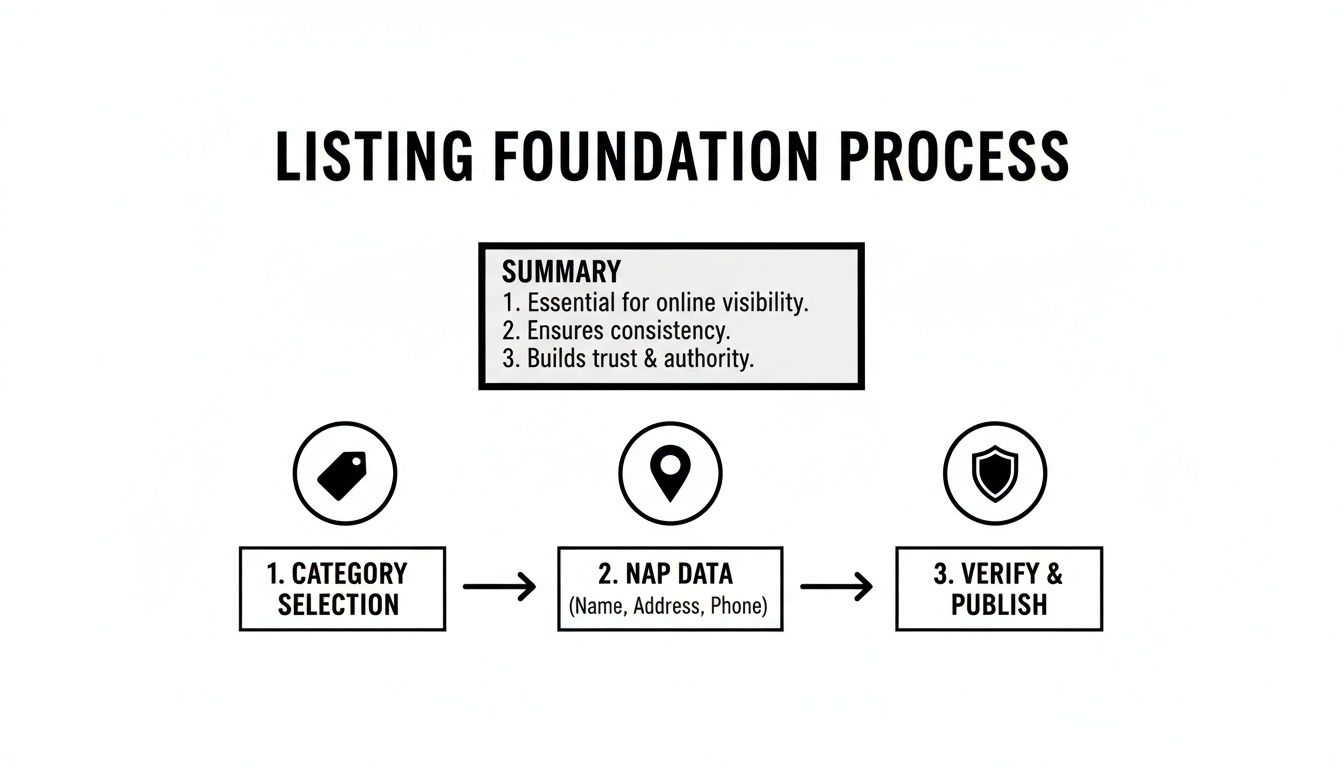
The flowchart below shows how getting these basics right—like your categories and business info—is the essential first step before you can dive into the detailed optimization that truly brings in customers.
Leveraging Attributes to Stand Out
Attributes are those little clickable tags that highlight specific features of your business. They might seem small, but they answer crucial customer questions at a glance and help Google match your business with highly specific searches.
For a restaurant equipment supplier, these can be incredibly powerful. Selecting the right ones can be the deciding factor for a potential client who is quickly scanning their options.
- Service Attributes: Ticking boxes like 'Online Estimates' or 'Onsite Services' is perfect for showing convenience to busy managers who need a quick quote for a new ventilation hood without leaving their kitchen.
- Identity Attributes: Tags like 'Veteran-Led' or 'Woman-Owned' can resonate with certain customers and help your business connect on a more personal level.
- Accessibility Attributes: Details like a 'Wheelchair accessible parking lot' are crucial for customers planning to visit your showroom in person.
Think of these attributes as quick filters. They instantly confirm to a user that you meet their specific needs, making your profile far more relevant and appealing.
Build a Rich Visual Portfolio
Photos and videos are no longer just nice-to-haves; they are absolutely essential for building trust and driving sales. A business listing with a robust gallery of high-quality visuals just feels more legitimate. It gives customers a clear, tangible idea of your work and what you offer.
Research consistently shows that businesses with complete profiles and rich media significantly outperform their competitors. In fact, top-ranked businesses often feature over 250 images on their profiles, and verified profiles are 80% more likely to appear in local searches.
This is especially true when you consider that 87% of consumers use Google to discover local businesses. Don't underestimate the power of a complete profile. You can read the full research about local business discovery on Starfish.reviews to dig into the data behind these trends.
To build a compelling visual portfolio, you need a good mix of shots:
- Product Shots: Get high-resolution images of the equipment you sell, like a gleaming new commercial charbroiler or an industrial mixer. Show them from multiple angles.
- Your Team in Action: Photos or short videos of your technicians performing an installation or a repair are fantastic. They showcase your expertise and professionalism.
- Your Showroom/Warehouse: Give potential clients a virtual tour of your facility. Let them see your inventory and the scale of your operation.
- Completed Projects: Before-and-after photos of a kitchen you've fully outfitted can serve as powerful case studies and social proof.
Adding new photos regularly also signals to Google that your profile is active and well-maintained, which can positively influence your ranking over time.
Activate Your Listing with Google Posts
Google Posts are like mini-blog posts or social media updates that appear right on your business listing. They are a fantastic way to share timely information, announce promotions, or highlight new products. They expire after seven days (unless they are for a specific event), so you have to be consistent.
For a foodservice supplier, you could create posts about:
- Special Offers: "Get 15% off all commercial dishwasher servicing this month!"
- New Arrivals: "Just in: The latest line of energy-efficient commercial charbroilers. Stop by our showroom for a demo."
- Helpful Tips: "Is your walk-in cooler running efficiently? Here are 3 signs it might need a check-up."
Every post should have a clear photo or video, a compelling headline, and a call to action (like "Call Now" or "Learn More"). This keeps your profile fresh and gives customers a reason to keep checking back.
Create a Full Product Catalog
The Products feature on your Google Business Profile lets you build out a detailed catalog of your inventory, complete with images, descriptions, and even prices. This simple step transforms your listing from a basic directory entry into a virtual showroom.
For each piece of equipment, like a "Heavy-Duty Gas Charbroiler," you can add:
- A clear, high-quality product photo.
- A detailed description, including key specs and benefits.
- The price or a price range.
- A link that takes them directly to that product page on your website.
A fully populated product catalog doesn't just give customers detailed information upfront. It also provides Google with a ton of keywords about what you sell. This makes your business listing on Google Maps a much richer, more useful resource for potential buyers, rewarding you with better visibility and more qualified leads.
To put it all together, here's a quick look at how these optimizations stack up. You can use this as a checklist to see where your profile stands and identify areas for immediate improvement.
Google Business Profile Optimization Checklist
| Feature | Poorly Optimized Example | Fully Optimized Example | Impact on Ranking |
|---|---|---|---|
| Business Name | "The Restaurant Supply Co." | "The Restaurant Supply Co. of Chicago" | High |
| Categories | Primary: "Store" | Primary: "Restaurant Supply Store"; Secondary: "Commercial Refrigeration Supplier," "Kitchen Supply Store" | Very High |
| Business Description | "We sell restaurant equipment." | A 750-character description with keywords like "commercial kitchen outfitter" and "foodservice equipment repair." | Medium |
| Photos | 5-10 low-quality photos. | 100+ high-res photos of products, team, showroom, and completed projects. | High |
| Attributes | None selected. | All relevant attributes like "Onsite Services," "Veteran-Led," and "Online Estimates" are checked. | Medium |
| Google Posts | No posts in the last 6 months. | Weekly posts with offers, new products, and tips, including a CTA. | Medium |
| Products Catalog | Empty. | 50+ products listed with photos, descriptions, prices, and links to the website. | High |
| Reviews | 3 reviews, no owner replies. | 50+ reviews with thoughtful, keyword-rich owner replies to all of them. | Very High |
As you can see, the difference is stark. A fully optimized profile doesn't just look better—it actively works to attract, inform, and convert customers by giving both users and Google exactly what they're looking for.
Mastering Reputation Through Reviews and Engagement
Think of your business listing on Google Maps as more than just a digital signpost. It's a living, breathing conversation with your customers. The reviews, questions, and other interactions happening on your profile are powerful social proof. They signal to potential customers whether you're a trusted local authority or just another name on a long list.

This direct feedback loop has a massive impact on buying decisions. We know over 90% of users check out reviews before pulling the trigger, so your reputation management game has to be sharp. In fact, businesses that actively reply to customer feedback see 30% higher engagement. That's a huge leg up, especially when you consider that most Maps users pick from the top five results.
Encouraging and Managing Customer Reviews
Reviews are the lifeblood of a healthy listing. To both Google and potential customers, they’re one of the strongest signals that your business is active, credible, and valued by the community. You just have to be smart and ethical about how you encourage them.
A simple but killer strategy is to ask for a review right at the peak of a positive customer experience. For a restaurant equipment supplier, this might be immediately after a successful emergency repair on a walk-in cooler, or right when a full kitchen installation is complete. A quick, polite follow-up text or email with a direct link to your review page makes it dead simple for them.
Pro Tip: Don't just respond to reviews—use your replies as a marketing tool. Mention the specific service, like, "We're thrilled we could get your new commercial charbroiler installed so quickly." This drops relevant keywords and context right into your profile.
Responding to every single review—good, bad, or in-between—is absolutely critical. It shows everyone that you care about feedback and are committed to great service.
Crafting the Perfect Response
How you respond is just as important as if you respond. Having a few templates ready can save you time and keep things professional, especially when a negative comment has you seeing red.
- For Positive Reviews (5 Stars): Thank the customer by name. Reference a specific detail from their review to show you actually read it, and then invite them back. That personal touch goes a long way.
- For Negative Reviews (1-2 Stars): Acknowledge their frustration without getting defensive. Apologize for their bad experience, offer a direct contact to take the conversation offline, and promise to make things right. This shows real accountability.
- For Neutral Reviews (3-4 Stars): Thank them for the feedback and touch on any specific points they made. It's also a great opportunity to ask what you could have done to earn that 5th star, showing your dedication to improving.
Proactively Using the Q&A Feature
The Questions & Answers section on your profile is a goldmine that most businesses completely ignore. While anyone can ask a question, there's nothing stopping you from populating this section yourself. This turns your listing into a user-generated FAQ that pre-qualifies potential customers.
Just think about the most common questions your sales team gets on the phone. For an equipment supplier, that might be:
- "Do you offer installation services for walk-in coolers?"
- "What kind of warranty comes with your commercial ovens?"
- "Do you provide emergency repair services on weekends?"
By seeding your Q&A with these common queries and giving clear, detailed answers, you handle customer concerns before they even have to ask. It saves your team time and helps potential clients make decisions faster, pushing them down the funnel before they even pick up the phone. For more ideas on managing customer feedback, check out resources on Maps Reviews.
Tracking Performance and Advanced Strategies
Getting your business listing on Google Maps fully optimized and actively managed is a huge step, but the job isn't quite done. The final piece of the puzzle is tracking what’s actually working, understanding how customers behave, and using that data to make smarter decisions down the road. This is where you graduate from basic setup to real strategy, turning your profile into a reliable source of leads.
Thankfully, your Google Business Profile comes with a powerful analytics dashboard called "Insights." Don't just glance at it—this tool is a goldmine of actionable data. It pulls back the curtain on how customers are finding and interacting with your listing, showing you the real return on all your optimization efforts.
Decoding Your Google Business Profile Insights
Think of Insights as the control panel for your local marketing. It gives you a clear snapshot of your performance, helping you connect the dots between your actions and customer responses. Paying close attention to these metrics is absolutely essential for sharpening your strategy over time.
Here are the key metrics you need to keep an eye on and what they really mean for your restaurant equipment business:
- Search Queries: This report shows you the exact keywords people typed into Google to find you. You might see phrases like "commercial charbroiler repair near me" or "restaurant supply showroom." This is pure gold for understanding what your customers are looking for, and it can directly influence your website's SEO and your next Google Post.
- How Customers Find You: This metric breaks down whether people found you through a "Direct" search (they knew your name) or a "Discovery" search (they were looking for a category, product, or service you offer). A high number of Discovery searches is a fantastic sign that your optimization is attracting brand-new customers.
- Actions Taken: This is where the rubber meets the road. Insights tracks how many users clicked to your website, requested driving directions to your showroom, or called your business straight from the listing. These are tangible metrics that directly tie back to potential sales.
By regularly monitoring your Insights, you can spot trends. For example, if you notice a spike in phone calls after publishing a Google Post about a promotion on commercial refrigeration units, you've just found a repeatable tactic for driving leads.
Diving into this data is a core part of any real SEO campaign. For a wider view, you can explore the fundamentals in our complete guide on how to measure SEO performance, which gives you a solid framework for tracking your progress.
Advanced Tactics for Scaling Your Success
Once you have a good handle on your performance data, you can start layering in more advanced strategies to really amplify your authority and reach. These tactics are especially important for businesses with multiple locations or those trying to dominate a competitive local market.
One of the most powerful moves you can make is building out a strong network of local citations. A citation is simply any online mention of your business's Name, Address, and Phone number (often called NAP). Getting consistent citations on reputable directories like Yelp, industry-specific sites, and local chamber of commerce pages acts as a vote of confidence for Google, reinforcing your legitimacy and boosting your authority on Maps.
Integrating Your Listing with Broader Content Marketing
Your Google Business Profile shouldn't be an island. It works best when it's integrated with your overall content marketing strategy, creating a synergy that drives serious local traffic. This is especially effective for a specialized business like a restaurant equipment supplier.
Try creating blog posts on your website that target specific, long-tail local keywords. For instance, you could write an article titled "5 Things Every Chicago Restaurant Should Look for in a Commercial Charbroiler."
This approach accomplishes two things at once:
- It helps your website rank for valuable local search terms that bring in qualified traffic.
- You can then promote this blog post using Google Posts on your listing, driving traffic and establishing your expertise right there on your profile.
This creates a powerful feedback loop: your website content strengthens your Maps listing, and your listing drives qualified local traffic back to your site. A cohesive strategy that includes SEO, copywriting, and blog posting ensures your business listing on Google Maps becomes the central hub of a powerful local marketing engine.
Answering Your Toughest Google Maps Listing Questions
Even when your profile is dialed in, managing a business listing on Google Maps can throw you a few curveballs. Let’s tackle some of the most common—and stressful—questions we hear from business owners, especially those in the restaurant equipment game.
What Should I Do If My Google Business Listing Gets Suspended?
Getting that suspension notice is enough to make anyone’s heart sink, but it’s usually a fixable problem. The first rule: stay calm and never, ever create a new listing. That just makes a bigger mess for Google to untangle.
Instead, take a breath and carefully read through Google's official guidelines. Something in your profile likely tripped their quality filters.
Common culprits we see all the time include:
- Keyword Stuffing: Jamming descriptive terms or city names into your business name is a classic mistake. If your sign says "Joe's Restaurant Supply," your profile name can't be "Joe's Restaurant Supply - Best Charbroilers in Chicago." It has to match your real-world branding.
- Address Problems: Using a P.O. Box or a virtual office that you don't physically staff is a major red flag for Google. Your listing needs a legitimate, physical location where customers can actually find you.
- Bad Info: If there are big differences between what your listing says and what your business actually does, that can trigger a suspension.
Once you’ve found the likely issue and fixed it in your profile, you can submit a reinstatement request right from your dashboard. Be ready to prove you're a real business. Have photos of your storefront with its sign, a recent utility bill with the business name and address, or your business license ready to go. Patience is your best friend here; the review process can take a few days or sometimes a couple of weeks.
To avoid these headaches from the start, check out our foundational guide on how to get a Google Business listing. It walks you through setting things up the right way.
How Often Should I Update My Listing?
Think of your Google Maps listing as an active marketing tool, not a one-and-done entry in a dusty phone book. Consistent activity tells Google your business is open, active, and relevant—all good things for your local ranking.
The easiest way to stay on top of it is to create a simple schedule.
We tell our clients to aim for at least one Google Post per week. It's the simplest way to keep your profile looking fresh. You can highlight new equipment arrivals, announce a promotion, or share a quick industry tip. It shows Google (and customers) that you're actively managing your presence.
At a bare minimum, you need to log in weekly to respond to new reviews and answer questions. It's also non-negotiable to update your hours for holidays or special events. Nothing frustrates a potential customer faster than driving to a closed store.
Beyond that, do a full audit of your profile once a quarter. Look through your photos, update your product catalog, and read over your business description to make sure everything is still accurate.
Can I Rank in a City Where I Don't Have a Physical Address?
This is the million-dollar question for many businesses, and the short answer is: it's incredibly difficult. Ranking well in a city where you don't have a physical, verified address goes against how Google's local search is designed to work. Your address is the anchor for your local SEO.
Now, if you're a service-area business (SAB)—like an equipment repair tech who travels to restaurants—you have an option. You can hide your physical address and define a service area on your profile. This will help you show up in searches across that zone, but your ranking power will always be strongest near your actual, verified location.
To boost your visibility in those other cities, you have to look beyond your Google profile. The real work involves building out location-specific pages on your website and earning local citations and backlinks from business directories and organizations in those target areas.
Optimizing your business listing on Google Maps is a huge step, but it’s only one part of a powerful local SEO strategy. To really own your local market, you need a complete plan that brings together expert content, strategic link building, and solid citation management. At Charbroilers.com, we provide specialized SEO, local citation services, blog posting, blogger outreach, copyrighting, and article writing specifically for the restaurant equipment industry, helping you turn searches into customers. Visit us at https://charbroilers.com to see how we can boost your online presence.